

More than 61% of organizations moved workloads to the cloud in 2020 alone to support remote work and continuity, according to Centerpoint IT's cloud migration overview. That number matters because it changed the cloud from a modernization project into standard operating infrastructure.
In Atlanta, that shift is easy to see on the ground. Healthcare groups need tighter control over sensitive data. Financial and payment-heavy businesses need resilient systems and cleaner audit trails. Multi-location companies want staff in Buckhead, Alpharetta, Midtown, and remote home offices working from the same platforms without carrying the cost and friction of aging server rooms.
A lot of cloud content stops at cutover. Real projects don't. Atlanta's cloud migration trends are about more than choosing AWS, Azure, Google Cloud, or a SaaS stack. They also involve migration sequencing, governance, rollback planning, compliance review, and one final task many teams delay too long: deciding what to do with the physical servers, storage arrays, switches, backup appliances, and old drives left behind after workloads move.
The New Normal for Atlanta Businesses
Atlanta businesses aren't asking whether the cloud matters anymore. They're asking how to migrate without disrupting operations, how much of the environment should stay hybrid, and how to retire old infrastructure without creating a security problem.
That's a meaningful change in mindset. A few years ago, many firms treated cloud adoption as an optional IT initiative. Now it sits much closer to revenue continuity, hiring flexibility, security operations, and office footprint decisions.
Cloud is now part of day-to-day operations
The practical impact is simple. Cloud platforms now support email, collaboration, backups, line-of-business applications, file access, identity management, and disaster recovery. Even companies that still keep some systems on-prem are usually running core business functions across connected environments rather than inside a single server closet.
Atlanta's business climate adds pressure to move carefully but decisively. Companies are scaling, opening new locations, consolidating systems after acquisitions, and supporting distributed teams. Local firms also operate in a region with growing cybersecurity and compliance expectations, which is one reason Atlanta keeps showing up in conversations about digital infrastructure and security maturity, as seen in Atlanta's rise as a cybersecurity hub.
Practical rule: A migration isn't finished at go-live. It's finished when the new environment is validated, users are stable, and the legacy environment is retired without leaving data exposure behind.
Migration now includes physical cleanup
Many projects drift. Teams spend months planning architecture and weekends handling cutovers, then leave racks of retired hardware powered down but still sitting in place. That creates confusion about ownership, lingering support contracts, backup dependencies, and whether sensitive data still lives on old disks.
A cloud move should end with a decommissioning plan. That means identifying what can be reused, what should be sold, what must be destroyed, and what needs compliant recycling. If you skip that step, you haven't completed the migration lifecycle. You've only changed where workloads run.
Why Atlanta Is Moving to the Cloud Now
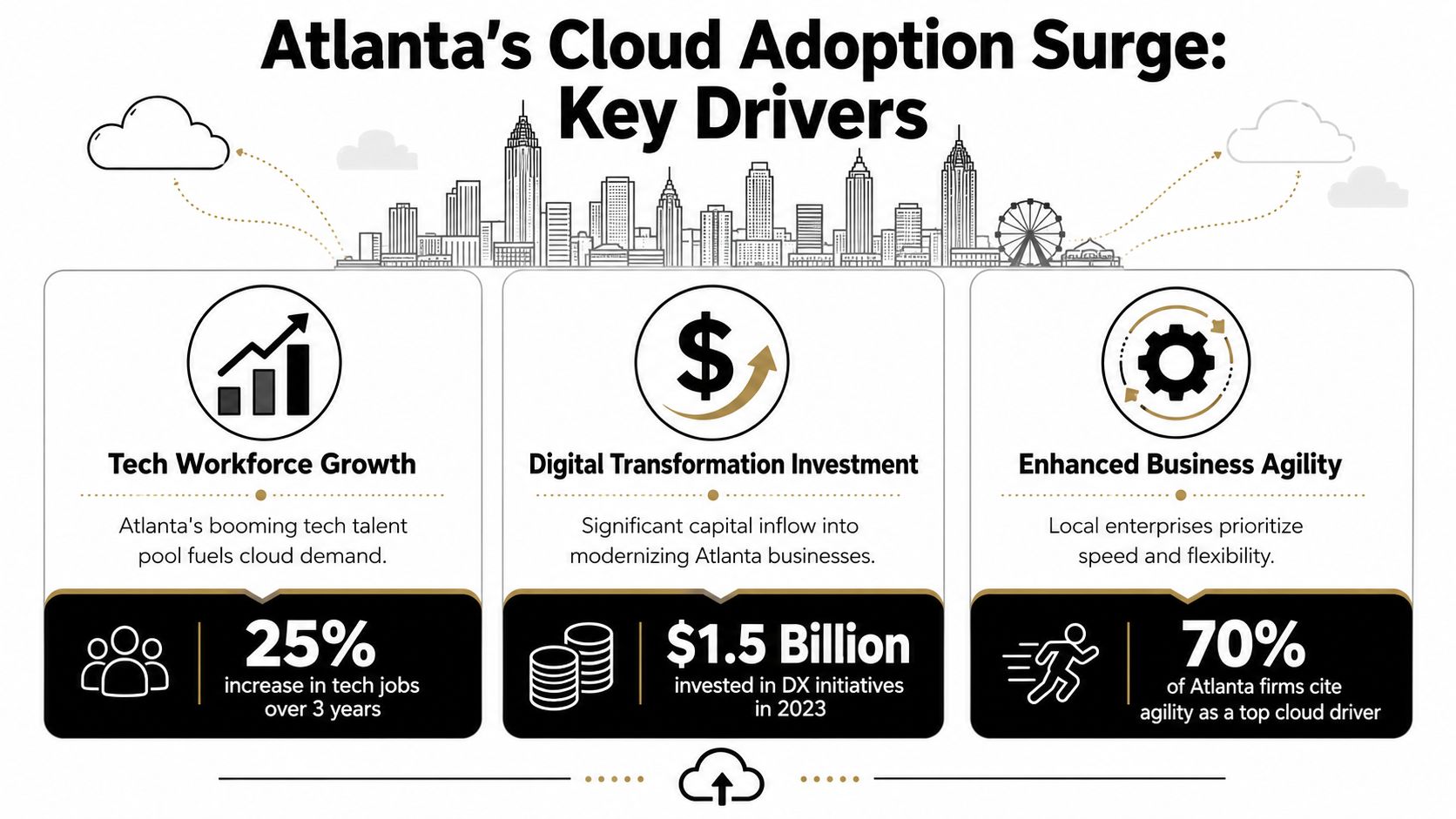
Atlanta isn't moving to the cloud for one reason. It's happening because local businesses need scale, resilience, compliance control, and faster change management at the same time.
Industry trend data shows how much cloud strategy has evolved. 55% of organizations use two or more cloud providers, public cloud holds 54.82% of the market, and hybrid cloud is expanding at 18.35% annually, according to Auvik's cloud migration statistics summary. That pattern fits what many Atlanta businesses need. They aren't replacing one server room with one cloud login. They're building mixed environments that match workload requirements.
The local business mix pushes cloud complexity
Atlanta has a concentration of companies that can't afford simplistic infrastructure decisions.
Healthcare teams need to think about protected health information, retention, access control, and recovery procedures. Financial and payment-driven organizations care about auditability, uptime, segmentation, and vendor risk. Logistics and distributed operations teams need systems that work reliably across offices, warehouses, and mobile staff. Those requirements often lead to hybrid decisions, not all-or-nothing migrations.
That's why many Atlanta firms keep some workloads on-prem or place them in a secondary environment. Latency-sensitive applications, legacy databases, compliance-bound systems, and appliances tied to physical operations don't always move cleanly in the first phase.
Cloud adoption now reflects governance, not just speed
The old sales pitch was straightforward: move to the cloud and reduce hardware headaches. The current decision is more nuanced. Where does data live? Which provider handles which workload? What stays local for performance or compliance reasons? Who owns cost controls after migration?
Businesses in Atlanta also have to keep pace with changing oversight and operational expectations. That's part of why it helps to understand Atlanta tech regulations businesses should know before choosing an architecture that looks elegant on paper but becomes hard to govern in practice.
A good cloud strategy reflects business operations. It doesn't force every application into the same destination just because a vendor bundle makes that tempting.
Why timing matters now
Several Atlanta companies put off migration while existing hardware still “worked.” Then support contracts grew expensive, remote access became awkward, backup windows became harder to manage, and application dependencies piled up. By that point, the issue wasn't just modernization. It was operational drag.
The businesses getting the most out of cloud adoption tend to treat it as a portfolio decision. Some workloads move quickly. Some get rebuilt or replaced. Some remain in place until there's a stronger business case. That discipline usually produces better outcomes than broad, rushed migration mandates.
Choosing Your Cloud Migration Path
The right migration model depends on what you're moving, how dependent the workload is on existing infrastructure, and how much change your team can absorb at once. Most Atlanta companies don't fail because they chose the wrong cloud. They struggle because they chose the wrong migration path for the application.
A useful way to think about the options is this:
- Lift-and-shift is like moving your furniture to a new house without changing the layout.
- Replatforming is like moving house but upgrading the kitchen and electrical panel first.
- Refactoring or replacement is like rebuilding the home for a different way of living.
- SaaS adoption is like deciding not to own the house at all for that function, because renting a finished space makes more sense.
Why phased replatforming fits many Atlanta firms
For many local businesses, especially those handling regulated data, phased replatforming is the safest middle path. Atlanta-focused guidance recommends running a pilot and validating each cutover so backup, rollback, and security procedures are tested before core systems move, as noted in True IT Pros' migration guidance for Atlanta SMBs.
That approach works because it reduces blast radius. You move a lower-risk workload first, test identity, backup, restore, user access, and performance, then decide whether the next workload is ready. If something breaks, rollback is still realistic.
For firms with aging circuits, branch offices, or mixed infrastructure, it also helps to review connectivity before migration. Weak upstream network planning can make a clean cloud design feel slow and unreliable in production. That's why network groundwork matters, whether you're evaluating SD-WAN, fiber, or business internet providers near me.
Cloud Migration Models Compared
| Migration Model | Description | Best For | Risk/Effort |
|---|---|---|---|
| Lift-and-shift | Move existing servers or apps with minimal redesign | Older workloads that need to exit hardware quickly | Lower redesign effort, but may carry old inefficiencies into the cloud |
| Replatforming | Make targeted improvements during migration without fully rewriting the app | Businesses that want operational gains without a long rebuild cycle | Moderate effort with better long-term fit than pure lift-and-shift |
| Refactoring or replacement | Redesign the application or replace it with a cloud-native alternative | Systems with performance, scalability, or maintenance problems | Higher effort and change management, but often cleaner over time |
| SaaS adoption | Replace self-hosted software with a managed cloud application | Email, collaboration, CRM, HR, ticketing, and other standard business functions | Lower infrastructure burden, but requires vendor review and process change |
What tends to work and what doesn't
What works:
- Move by dependency group. Start with systems that have clear boundaries and manageable integrations.
- Test restores, not just backups. Backup success doesn't matter if recovery fails under pressure.
- Keep rollback realistic. A rollback plan that depends on manual heroics at midnight isn't a plan.
What doesn't:
- Migrating by enthusiasm. Teams often pick the easiest app politically, not technically.
- Moving a bad architecture unchanged. The cloud won't fix brittle workflows or undocumented dependencies.
- Declaring success too early. If users still rely on the old environment for reports, archives, or print services, the migration isn't done.
Navigating Local Challenges and Hidden Costs
The cleanest migration plans still run into trouble in three places: compliance, operational ownership, and cost control. Those problems get sharper in hybrid and multi-cloud environments because complexity spreads faster than anticipated.
Research on cloud migration trends points to a simple warning. Hybrid and multi-cloud strategies can support flexibility and resilience, but without strong governance, organizations can end up with architecture sprawl and duplicated costs that weaken the financial upside, as outlined in Pump's cloud migration statistics analysis.
Where costs drift off course
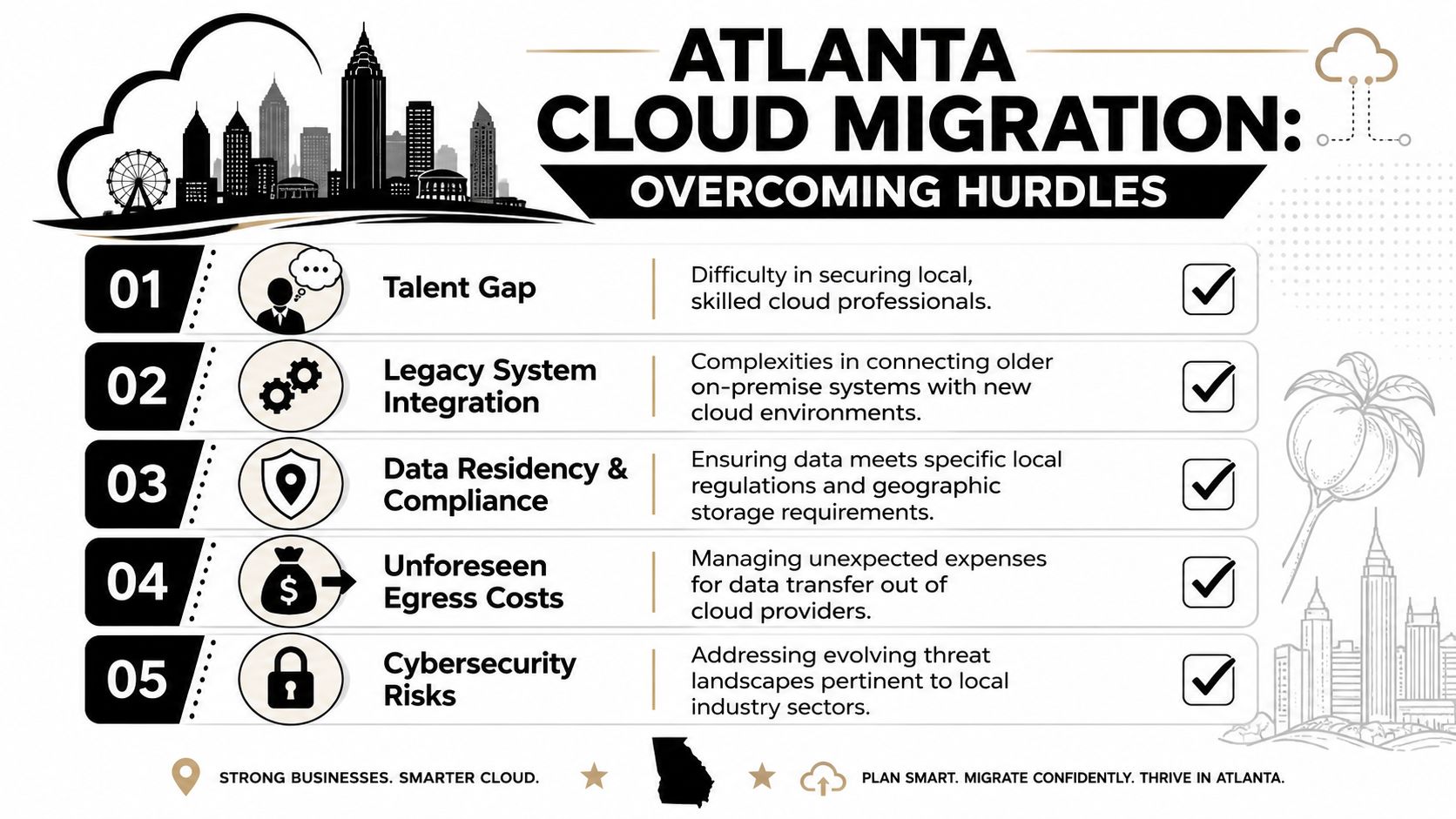
A cloud bill usually grows for understandable reasons. Teams keep legacy systems online longer than expected. New environments get built before old ones are shut down. Storage is replicated “temporarily” and then left alone. Different departments buy overlapping SaaS tools because nobody owns application rationalization.
That last point matters more than many infrastructure teams admit. For companies trying to control the software layer as well as the hosting layer, it helps to review ways to reduce SaaS spend with LicenseTrim while cleaning up redundant subscriptions during migration.
The practical controls that keep projects healthy
Use these controls early, not after spend gets messy:
- Assign one owner for cloud cost governance. Finance can review invoices, but someone in IT or operations has to own tagging, cleanup, and lifecycle enforcement.
- Define exit criteria for old systems. If nobody documents when a server, appliance, or license can be retired, it stays on the books.
- Separate compliance requirements by workload. Don't apply the same migration assumptions to a file share, a payment system, and a healthcare database.
- Review support boundaries. Managed service providers, cloud vendors, and internal teams often assume someone else handles identity cleanup, firewall policy review, or decommissioning.
Local execution issues are usually operational, not theoretical
In Atlanta, growing businesses often hit a practical wall. They've expanded locations, added vendors, inherited systems, or outgrown the internal team's original scope. That makes cloud migration less of a technical event and more of an operating model change.
A business dealing with expansion, office change, or mixed legacy systems should also think through the broader Atlanta IT infrastructure challenges in rapid growth. Migration can simplify a lot. It can also expose process gaps that were hidden when everything lived in one building.
The hidden cloud cost isn't just the invoice. It's the staff time spent maintaining duplicate environments because nobody set a hard retirement date.
The Final Step Most Migration Guides Forget
A migration project isn't complete when workloads leave the data center. It's complete when the infrastructure that supported those workloads is securely and deliberately retired.
Many Atlanta businesses pause at this point. The cloud cutover succeeded. Users are working. The vendor signed off. Then facilities or IT walks into a server room and sees racks of old gear that nobody wants to touch.
What gets left behind
After migration, most organizations still have some mix of:
- Rack servers and blades that were powering legacy applications
- Storage arrays and backup devices holding old snapshots, archives, or replicated data
- Network equipment that supported the retired environment
- Loose hard drives and spare parts pulled during troubleshooting over the years
- KVMs, rails, cables, and UPS hardware sitting in cabinets long after business use has ended
Leaving that equipment in place creates three problems. First, sensitive data may still reside on drives. Second, the business keeps carrying confusion about what was decommissioned. Third, old equipment continues to occupy expensive space in offices, server rooms, and colocation footprints.
A realistic end-of-life sequence
A solid decommissioning process usually follows this order:
- Confirm the workload is retired. Check cutover validation, user acceptance, backup retention, and reporting dependencies.
- Create an asset inventory. Match physical equipment to the systems that were migrated.
- Decide what has reuse or resale value. Some datacenter hardware may still have secondary market value.
- Sanitize data-bearing devices. Drives, SSDs, backup media, and embedded storage all need attention.
- Document chain of custody and final disposition. This matters for audits, internal accountability, and risk management.
- Recycle or remarket responsibly. Don't let retired hardware become a closet problem.
For teams mapping this work in detail, a server decommissioning checklist helps prevent the usual misses, especially around storage media and dependencies that survive after the application itself is gone.
Retired hardware is still part of your security perimeter until the data is destroyed and the asset is documented out of service.
Why IT asset disposition belongs in the migration plan
Consider a typical Atlanta scenario. A company migrates file services, virtual machines, and collaboration tools to the cloud over several phases. The business does the hard part well. It tests cutovers, trains users, and stabilizes the new environment. Then the project stalls because nobody budgeted time for removing old hardware, wiping drives, or arranging compliant recycling.
That's the point where IT asset disposition stops being an afterthought and becomes part of security policy. If equipment still holds data, your migration left risk behind. If hardware has resale value, you may be leaving recoverable value untouched. If e-waste leaves the building without documentation, you've created an avoidable governance problem.
In practical terms, businesses often need a partner that can handle on-site removal, asset tracking, data destruction, and compliant disposition. One local option is Montclair Crew Recycling, which works with Atlanta-area organizations on IT equipment disposal and related decommissioning logistics. The important thing isn't brand preference. It's using a documented process with clear custody and destruction records.
Actionable Recommendations for Your Atlanta Business
Most cloud migrations improve when leadership treats them as a business operations project with an infrastructure retirement phase, not just an application move. If you're planning one now, keep the roadmap disciplined.

A workable roadmap
- Start with business priorities. Identify which systems are causing support friction, renewal pressure, security concern, or location constraints. Don't begin with a provider comparison. Begin with what the business needs to change.
- Choose the migration model workload by workload. Some systems should be lifted and shifted. Others need phased replatforming. Some should be replaced with SaaS instead of migrated at all.
- Build security and compliance into the cutover plan. For regulated environments, document backup validation, rollback, access control, and data handling before you move production workloads.
- Set retirement dates for legacy infrastructure. Every migrated workload should have a matching plan for old servers, storage, licenses, and network gear. If there's no retirement date, the cost and risk remain.
- Document who owns optimization after migration. Someone has to manage cloud spend, resource cleanup, and tool overlap after the excitement of go-live fades.
What to schedule before migration ends
Use this short closeout list to keep the final phase from drifting:
| Final-stage task | Why it matters |
|---|---|
| Validate backups and restores in the new environment | Proves recovery works after cutover |
| Confirm legacy dependencies are removed | Prevents “temporary” old systems from becoming permanent |
| Inventory retired hardware | Tells you what still needs sanitization or removal |
| Arrange secure data destruction and recycling | Reduces data exposure and clears physical space |
| Archive disposition records | Supports audits and internal accountability |
Keep the physical side on the project board
The fastest way to lose discipline is to declare the migration done while old hardware is still sitting in place. Put the removal date, data destruction step, and recycling workflow on the same project plan as the cloud tasks. That's what closes the loop.
Frequently Asked Questions About Cloud Migration
Can we keep some servers on-prem after migrating?
Yes. Many businesses keep selected systems on-prem when performance, compliance, equipment dependencies, or application design make full migration impractical. The key is being intentional about which systems stay and why.
What's the biggest risk during migration?
Unclear dependencies. Teams often migrate the main workload but miss reporting jobs, backup links, archive stores, authentication ties, or shared services connected to the old environment.
How do we prove data on retired drives was destroyed?
Use a documented disposition process that includes chain of custody and destruction records. For some organizations, that means drive wiping. For others, it means physical destruction, depending on policy and risk tolerance.
Should we keep old equipment in storage just in case?
Usually not for long. Short-term retention can support rollback or validation, but indefinite storage creates data risk, space waste, and confusion about what's still active.
If your organization is migrating workloads and needs a clean plan for the hardware left behind, Montclair Crew Recycling can help with business IT equipment pickup, decommissioning support, data destruction, and compliant electronics recycling across Metro Atlanta.
