
You're probably dealing with this already. A shelf of retired laptops. A few old servers from the first office buildout. Phones from employees who left. Maybe a network closet that nobody wants to touch because it likely contains both expensive gear and a compliance problem.
That's where a lot of Atlanta businesses first realize that tech regulation isn't theoretical. It shows up in ordinary operating decisions. How long you keep records. Who can access customer data. Whether remote access is locked down. What you do with storage devices before anything leaves your office. If you get those decisions wrong, the cost isn't limited to a cleanup project. It can turn into a security incident, a customer dispute, a failed diligence review, or a painful audit.
For a new owner, the challenge is that most compliance content is written like a legal inventory. It tells you what laws exist, but not what to do on Monday morning. The practical version looks different. You need to know which rules affect your business model, which controls are mandatory, what evidence you should keep, and where local Atlanta requirements change the math.
Why Tech Regulations Matter for Your Atlanta Business
A founder can ignore regulation for a while if the company is still tiny and informal. That stops working fast in Atlanta.
Georgia's technology market has real depth. One Atlanta tech guide says the state has more than 75 cybersecurity companies generating an estimated $2.6 billion annually, plus 12+ accelerators and 13 incubators supporting the local ecosystem, according to Information Age's guide to working in Atlanta's tech scene. In a market like that, buyers, partners, lenders, and procurement teams expect process discipline. They assume you have a plan for access control, disposal, vendor oversight, and documentation.
That expectation affects even simple office decisions. If you replace employee laptops, you're not just swapping hardware. You're handling stored credentials, browser tokens, customer files, payroll exports, and internal messages. If you shut down an old line of business, you're not just clearing space. You're deciding what records stay, what gets destroyed, and how you prove the disposal was handled correctly.
Practical rule: If a device ever stored business data, treat it like a regulated asset until you can prove otherwise.
That's why the most useful frame for Atlanta tech regulations businesses should know is operational, not academic. The issue isn't whether a rule exists in a statute book. The issue is whether your current workflows would hold up if a client, insurer, auditor, or regulator asked for proof.
A lot of owners start with privacy notices and cybersecurity tools, which makes sense. But physical device handling matters too. If you're sorting through old equipment, this business guide to recycle in Atlanta is a practical companion because it ties disposal decisions back to business risk instead of treating recycling as a separate environmental task.
The Three Layers of Tech Regulation
Most businesses get compliance wrong because they treat it as one blob. It's easier to manage if you separate it into three layers. Federal rules create the broad baseline. Georgia rules and obligations affect how you operate in the state. Local Atlanta requirements and industry expectations shape what buyers and agencies expect from you day to day.
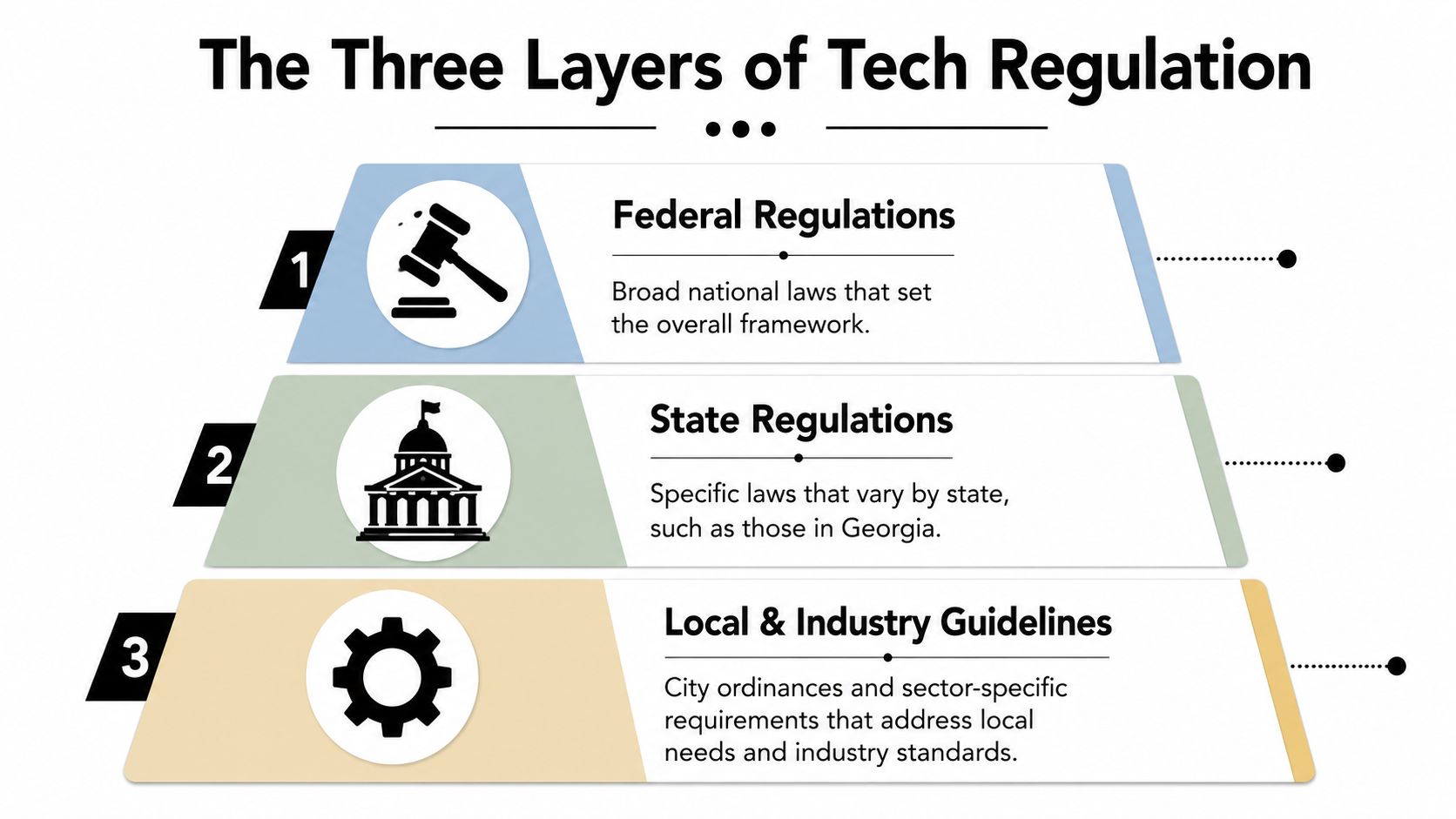
Federal rules set the floor
At the federal level, think in terms of category. Healthcare businesses face HIPAA obligations around protected information. Financial and consumer-facing businesses may face federal consumer protection and records duties. Employers also carry responsibilities for payroll, employee records, and identity-related information.
The key point is that federal rules usually establish the minimum standard. They tell you that certain data, transactions, and retention practices require controls. They rarely solve the operational details for you.
Georgia rules affect how you apply controls
Georgia adds another layer through state business law, breach response expectations, sector-specific obligations, and practical risk standards. Even when a federal rule applies, your state location still matters because contracts, state enforcement, and local business practices influence what “reasonable” compliance looks like.
That's where owners often make a costly mistake. They assume a software subscription or a template policy solves the problem. It doesn't. A policy only matters if your team follows it and your records prove that they did.
Local and industry requirements shape real-world expectations
Atlanta adds local business compliance issues and strong industry expectations, especially in sectors that sell to healthcare systems, banks, schools, enterprise buyers, and public agencies. Those customers usually care less about your intentions than your evidence.
Here's a simple reference point:
| Level | Key Regulations | What It Governs |
|---|---|---|
| Federal | HIPAA, federal consumer protection and records rules, sector-specific federal obligations | Health data, financial activity, consumer communications, recordkeeping |
| State | Georgia business and data-handling obligations, breach response expectations, contract and employment-related duties | Business operations inside Georgia, handling of sensitive business and personal information |
| Local | Atlanta business tax requirements, city-level incentives, procurement expectations, local industry standards | Licensing, local filings, startup incentives, practical operating expectations in the Atlanta market |
The safest approach is to map each business activity to a control. Hiring creates HR data obligations. Selling creates consumer communication obligations. Retiring hardware creates disposal and data-destruction obligations.
Managing Data Privacy and Consumer Protection Rules
Privacy compliance starts with one blunt question. What personal information do you hold right now that you don't need?
A lot of small and midsize businesses collect far more than they can defend. Customer lists with stale notes. Spreadsheets exported from a CRM and saved on desktops. HR files emailed around as attachments. Marketing contact data copied between platforms without a retention rule. The legal issue isn't just collection. It's uncontrolled duplication.
What counts as personal information in practice
For an Atlanta business owner, personal information usually includes customer contact details, employee records, payment-related information, support tickets, text message opt-ins, account credentials, and internal records that can be tied back to a person. It also includes data you may not think of as sensitive at first, such as usage logs, exported analytics tied to named users, and old forms saved in shared folders.
That means privacy work is less about writing a polished website statement and more about reducing sprawl. If your team can't identify where data lives, you can't control access, retention, or deletion.
A common weak point is SMS and direct outreach. Marketing teams often move faster than compliance review, especially when they're testing promotions, reminders, or lead follow-up. If text messaging is part of your outreach, Miles Hansford Law Firm on SMS compliance is a useful read because it grounds privacy obligations in a channel many businesses treat too casually.
What works and what doesn't
What works is boring and repeatable:
- Limit collection: Don't ask for data you can't justify operationally.
- Restrict access: Customer data shouldn't sit in broad shared drives.
- Set retention rules: Information needs a defined business life.
- Control exports: Spreadsheet copies create shadow systems fast.
What doesn't work is relying on intent. Owners often say, “We're careful,” but that isn't a control. If employees can download unrestricted reports, text customers from unmanaged devices, or keep old personnel files indefinitely, the business has a privacy problem even if nobody meant harm.
Keep one authoritative record where possible. Every duplicate copy increases the odds of inconsistent deletion, unauthorized access, and missed legal holds.
A written retention schedule helps here because privacy and recordkeeping are tightly linked. This record retention guidelines for businesses resource is useful for turning broad policy language into a practical inventory of what should be kept, what should be archived, and what should be destroyed.
Meeting Cybersecurity Mandates as an Operational Cost
Cybersecurity isn't a side project for the IT person. It's part of the cost of staying in business.
Atlanta-focused guidance increasingly treats cybersecurity as an operational regulation, with emphasis on MFA, patching, segmentation, secure remote access, backups, and phishing defenses. That same guidance says small businesses with fewer than 50 employees should budget roughly $10,000 to $50,000 annually for cybersecurity essentials, according to Integricom's Atlanta cybersecurity checklist. Whether your spend lands at the low end or high end, the point is the same. Security controls now sit in the operating budget, not the wish list.

The cost of underbuilding
Many owners still think of security as software plus antivirus. That's too narrow. Real compliance pressure usually comes from process failures. Shared admin accounts. Unpatched remote access tools. Weak offboarding. No tested backup process. No incident response playbook. Those gaps create the kind of event that pulls in legal, operations, HR, clients, and insurance all at once.
A strong security posture doesn't mean buying every tool in the market. It means funding the controls that reduce likely risk in your environment. For one business, that may be endpoint management and tighter access reviews. For another, it may be segmented networks, vendor oversight, and stricter remote access policy.
What to fund first
If your budget is limited, fund controls that reduce business interruption and unauthorized access first.
- Identity security: MFA, role-based access, and fast offboarding usually produce immediate risk reduction.
- Patch discipline: Delayed updates often leave known holes open longer than necessary.
- Backups and recovery: A backup that hasn't been tested is just a comforting assumption.
- User training: Staff need to recognize phishing, account takeover attempts, and suspicious requests.
- Response planning: Someone must know who decides what when an incident occurs.
Spend first where failure would stop revenue, expose sensitive data, or block client delivery.
If you need a practical baseline for smaller organizations, these cybersecurity tips for small businesses can help translate broad security principles into a short implementation list.
Navigating Local Atlanta and Industry-Specific Rules
Some of the most useful Atlanta-specific compliance issues aren't penalties. They're deadlines, eligibility rules, and sector obligations that affect margins and sales readiness.
Atlanta's startup tax waiver is valuable if you track it correctly
The City of Atlanta has offered a meaningful incentive for qualifying new and emerging technology businesses since March 2015. Eligible firms can receive a waiver of occupation taxes for up to 3 years, but only if they were registered within the past 3 years and report less than $1 million in annual revenue. They still have to file an Annual Business Tax Return by February 15, and the waiver ends once revenue exceeds the $1,000,000 threshold, as outlined by Invest Atlanta's new and emerging technology business tax waiver page.
That's the kind of rule owners miss because it sits between finance and compliance. The financial upside is real, but only if somebody tracks eligibility, filing dates, and revenue status. If nobody owns that calendar, businesses leave money on the table or assume a waiver applies when it no longer does.
Industry rules hit harder than general advice
In Atlanta, healthcare, finance, education, and public-sector work often drive stricter controls than a generic small business checklist. A software firm selling into a healthcare network may need stronger access controls and records discipline because the customer requires it. A startup processing card payments needs to understand payment security obligations early, especially if it stores, transmits, or touches payment data through its platform or vendors.
For founders dealing with payment environments, this guide to PCI DSS compliance for startups is a practical reference because it frames compliance as an architectural and vendor decision, not just a paperwork task.
The local lesson is simple. Don't ask only, “What laws apply to us?” Ask, “What does our customer base require us to prove?” For many Atlanta businesses, that second question becomes the more demanding one.
Ensuring Compliant E-Waste Disposal and Data Destruction
When businesses talk about compliance, they usually focus on software, access, and legal notices. Then the old equipment leaves the building, and significant exposure starts.
Retired laptops, servers, phones, network gear, backup drives, and multifunction devices often contain exactly the data categories your policies are supposed to protect. If those assets move through your office with no inventory, no custody trail, and no documented sanitization method, the gap isn't environmental. It's regulatory.
Recycling isn't the same as compliant disposal
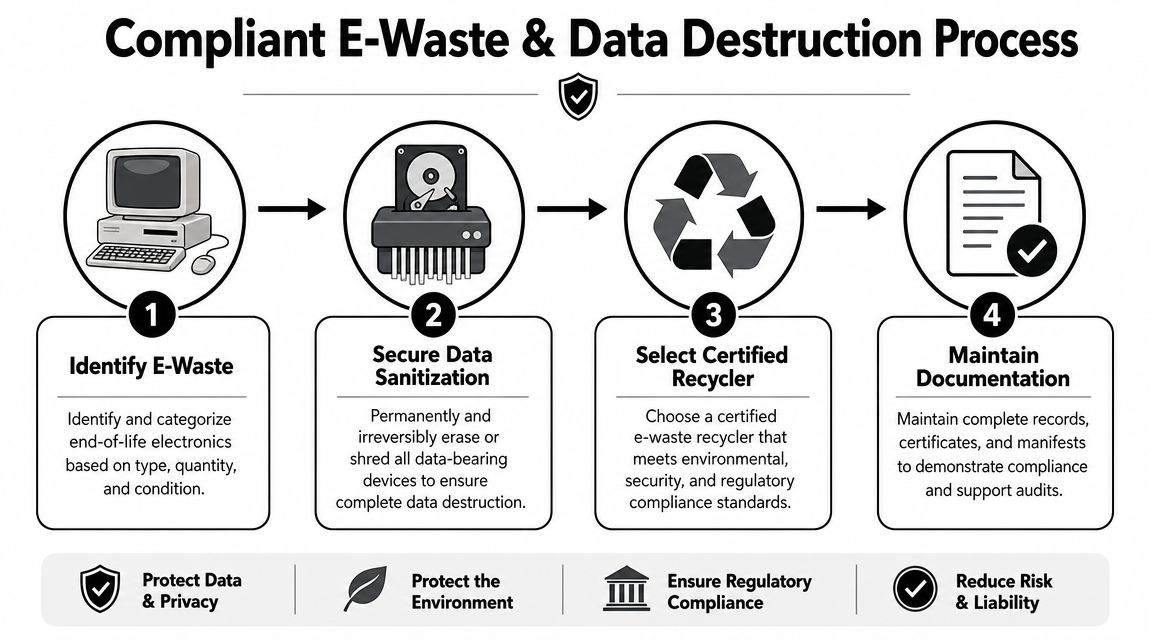
Many businesses often become careless. They assume that if hardware is recycled responsibly, the compliance risk is solved. It isn't. For businesses, the most critical issue in IT asset disposal is often data-destruction compliance. Guidance calls for documented sanitization methods and a chain-of-custody record for each storage device so the business can prevent breach exposure or audit failure, as noted in this guidance on documented sanitization and chain of custody.
In practice, that means every storage-bearing device should be tracked at the device level. You need to know what it was, where it came from, who handled it, which sanitization method was applied, and what proof was retained.
What a defensible disposal workflow looks like
A compliant workflow usually includes several pieces working together:
- Asset identification: Build a serial-level inventory before anything moves.
- Controlled pickup or transfer: Limit who can touch equipment and document handoff points.
- Sanitization decision: Decide whether a device will be cleared, purged, or physically destroyed based on risk and reuse goals.
- Proof package: Keep records that tie the method used to the specific device.
- Final disposition records: Retain documentation showing where the hardware ended up.
What doesn't work is a one-line invoice that says “recycled electronics.” That may confirm removal, but it usually doesn't prove compliant data destruction.
If you can't match the serial number to the sanitization record, you don't have audit-ready evidence.
For businesses that need operational help, one option is to use an IT asset disposition provider that handles pickup, asset audit, data destruction, and downstream recycling with documentation. Montclair Crew Recycling is one Atlanta-area example that works with business IT equipment and related disposal workflows. If you're evaluating vendors generally, this Georgia guide to responsible e-waste recycling is a useful checklist for comparing process quality rather than choosing based on convenience alone.
Your Actionable Business Compliance Checklist
A workable compliance program doesn't start with a legal memo. It starts with assignments, dates, and records.

Internal policies and procedures
Start by tightening the controls you own directly.
- Map your data: List the customer, employee, operational, and device data your business collects.
- Assign ownership: One person should own privacy administration, one should own security operations, and one should own records and disposal workflow. In a small company, those roles may overlap.
- Write retention rules: Decide what gets kept, where it lives, who can access it, and when it should be destroyed.
- Create an offboarding process: Remove access, recover devices, and preserve necessary records every time someone leaves.
- Document device retirement: No laptop, phone, or server should leave service without an inventory and disposition step.
Vendor management
Most compliance failures now involve third parties somewhere in the chain.
- Review service providers: Ask how they handle data, access, subcontractors, and retention.
- Check disposal vendors carefully: They should support chain of custody, device-level tracking, and proof of sanitization.
- Confirm security expectations: Your contracts should reflect actual handling standards, not vague promises.
- Match the vendor to the risk: A janitorial-style removal service isn't the same as a provider handling storage devices.
Documentation and review
Many otherwise careful businesses fall short; they do the work, but they don't preserve evidence.
Keep a practical compliance file that includes policies, training records, access review notes, disposal records, tax or licensing filings, and incident-response contacts. Review it on a schedule. If your business has growing volumes of retired tech, these IT asset management best practices can help turn one-off cleanup events into a repeatable asset lifecycle process.
The right standard isn't perfection. It's whether your business can show that it identified risk, applied controls, and kept proof.
Frequently Asked Questions About Atlanta Tech Compliance
A few questions come up repeatedly when owners start putting this into practice.
| Question | Answer |
|---|---|
| Do I need a formal compliance program if my company is still small? | Yes, but it doesn't need to be elaborate. Small businesses still collect personal information, use cloud systems, issue devices, and rely on vendors. Start with basic policies, assigned ownership, and recordkeeping. |
| Is deleting files enough before donating or recycling old computers? | No. Deleting files doesn't create a defensible data-destruction record. You need a controlled sanitization or destruction process with documentation tied to the device. |
| If we outsource IT, does the provider handle our compliance? | Not fully. Vendors can support controls, but your business still owns the obligation to choose them carefully, define expectations, and keep records. |
| Are local Atlanta rules only relevant for startups? | No. Startups may care about city tax incentives, but established businesses still deal with local filings, procurement standards, and market expectations from Atlanta-area buyers. |
| What's the biggest mistake new owners make? | Treating compliance as paperwork instead of operations. The highest-risk failures usually come from weak execution, such as poor offboarding, bad device disposal, unmanaged access, or missing records. |
| How often should we review our compliance setup? | Review it whenever your business changes materially, such as adding remote staff, changing systems, entering a regulated industry, or replacing a large batch of equipment. A regular scheduled review also helps keep controls current. |
A good test is simple. If a customer, insurer, lender, or auditor asked for evidence next week, could you produce it without scrambling? If the answer is no, your first job isn't to buy more tools. It's to tighten the process.
If your business needs help with compliant IT equipment disposal, Montclair Crew Recycling provides Atlanta-area services for business electronics recycling, asset removal, data destruction, and IT asset disposition workflows. For companies dealing with retired laptops, servers, network gear, and storage devices, that kind of operational support can make compliance easier to document and easier to sustain.
