
In Georgia, AI still looked early in late 2024. A September 2024 report found that 4.5% of Georgia businesses were already using AI, while 6.2% planned to adopt it within the next six months, with marketing automation identified as a leading use case (Georgia AI adoption report). That number matters because it catches a market right before acceleration.
For Atlanta business leaders, the story isn't just who bought an AI subscription. It's who figured out how to make AI work inside daily operations without creating security gaps, compliance headaches, or a pile of retired hardware with sensitive data still sitting on it.
That last part gets missed all the time. Businesses talk about prompts, copilots, and automation. Then they discover that serious AI use touches laptops, storage, servers, telecom gear, data retention rules, and refresh cycles. If your company is growing quickly, that pressure tends to show up first in infrastructure, not in strategy decks. That's why local firms dealing with expansion often run into the same operational strain described in these Atlanta IT infrastructure challenges in rapid growth.
The AI Tipping Point in Atlanta
Atlanta has reached the point where AI is no longer a novelty purchase. It's becoming a business operating decision.
The local pattern is familiar. A firm starts with one narrow use case, usually something visible and low risk. Marketing drafts. Meeting summaries. Customer service replies. Internal search. Then one department asks for access, another team wants workflow automation, and IT suddenly has to answer harder questions about data access, software approvals, device management, and records retention.
What changed in practice
The early Georgia benchmark matters because it shows how adoption often begins. Businesses don't start by building custom models. They start with practical tools that fit existing work, especially in service-heavy environments like Atlanta's finance, healthcare, logistics, consulting, and IT support markets.
That creates a different kind of tipping point than most leaders expect. The shift isn't from "no AI" to "advanced AI." It's from scattered experimentation to governed use.
Practical rule: The moment employees use AI in live customer, financial, legal, or HR workflows, you're no longer experimenting. You're operating.
In Atlanta, that distinction matters because many companies sit in regulated or process-intensive sectors. A scheduling bot for a clinic, a document summarizer for a law-adjacent service team, or a proposal assistant for a consulting firm can save time quickly. But once those tools touch real business data, the conversation moves beyond convenience.
Why local businesses need a fuller view
A software-only view of AI is too narrow. Every deployment has a physical side:
- Devices change: Older laptops and desktops may struggle with newer AI-heavy workflows.
- Storage expands: Teams generate more drafts, recordings, transcripts, and data exports.
- Security stakes rise: More data passes through more systems, often faster than policy catches up.
- Refresh cycles tighten: Servers, network gear, and endpoint fleets may need replacement sooner.
That's the practical lens behind how Atlanta businesses are adopting AI tools. The winners usually aren't the firms with the flashiest demos. They're the ones that connect adoption to governance, infrastructure, and end-of-life asset handling before those issues become expensive.
What AI Adoption Really Means for Your Business
For most companies, adopting AI doesn't mean hiring a research team or building models from scratch. It means plugging smarter tools into work your staff already does.
A simple analogy helps. AI is becoming like electricity in business systems. You don't need to build a power plant to use it. You need the right appliances, the right wiring, and rules for safe use.
The most common starting points
The Federal Reserve Bank of Atlanta reports that business AI use is concentrated in LLM text generation (41% of firms), machine-learning-based data processing (30%), and visual content creation (30%), with an estimated 0.8% output boost over three years tied to this adoption pattern (Atlanta Fed working paper on firm AI use).
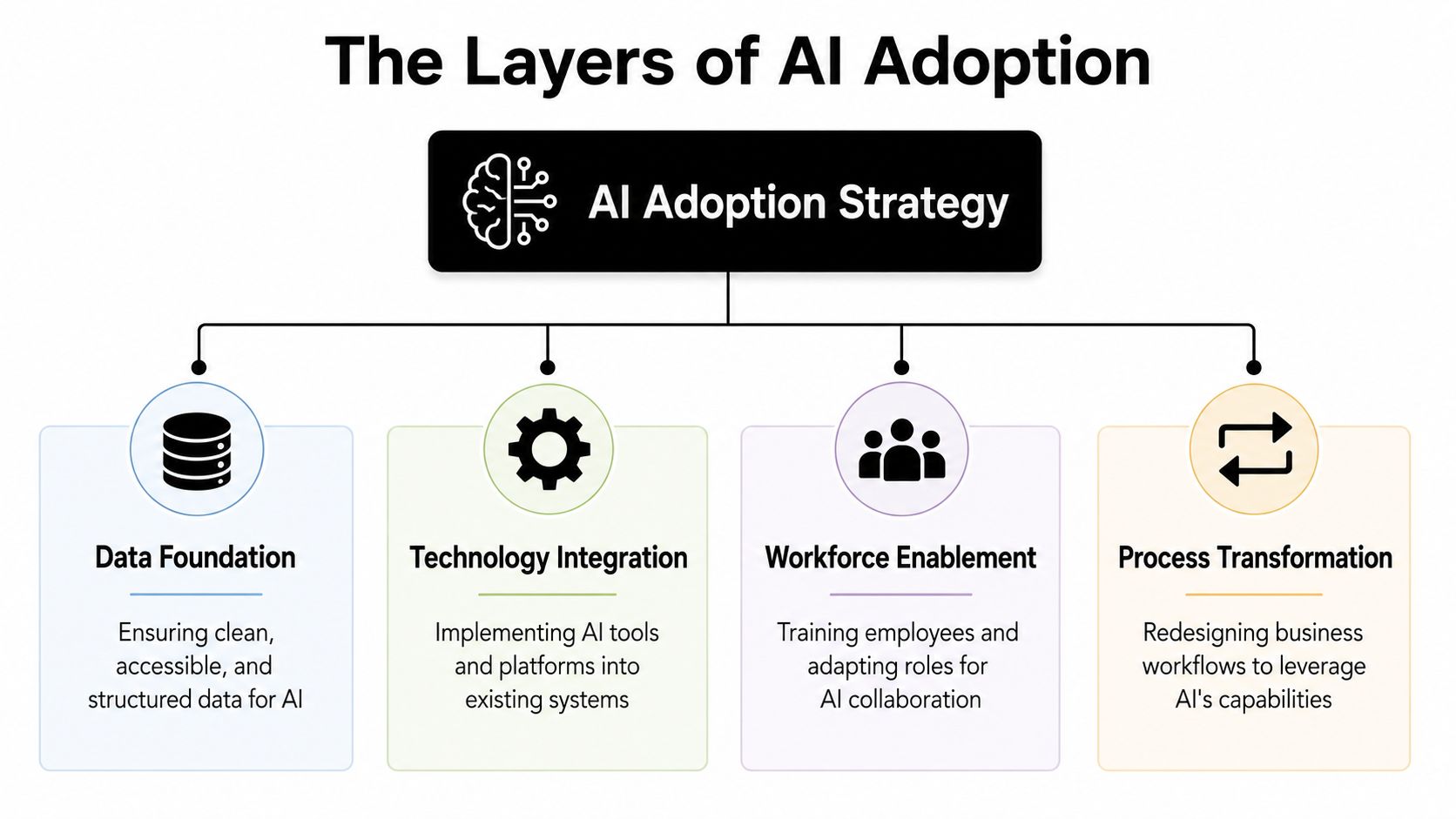
In plain terms, that usually looks like this:
- Text generation: Drafting emails, proposals, knowledge base articles, marketing copy, call summaries, and first-pass reports.
- Data processing: Sorting customer records, spotting patterns in sales data, cleaning spreadsheets, classifying tickets, and summarizing operational logs.
- Visual content: Creating social media graphics, internal training visuals, presentation assets, and campaign variations.
Those are attractive entry points because they don't require a full platform rebuild. They fit inside systems companies already use, such as Microsoft 365, Google Workspace, CRM tools, help desk software, and design platforms.
What adoption looks like inside a real company
Most Atlanta firms don't need "more AI." They need clearer decisions about where AI belongs.
A healthy rollout usually includes these moves:
- Pick one workflow with friction. Proposal writing, appointment scheduling, invoice follow-up, or FAQ response are common examples.
- Define the human checkpoint. Someone still reviews, approves, or audits outputs before they go live.
- Limit the data scope. Start with public, low-sensitivity, or well-governed internal data.
- Measure operational usefulness. Not hype. Time saved, fewer handoffs, faster response, cleaner records.
The fastest AI wins usually come from repetitive language and repetitive data, not from high-stakes judgment calls.
Tool selection matters here. Businesses often underestimate the operational side of AI, especially monitoring, endpoint management, patching, and workflow support across distributed teams. If you're comparing IT management platforms while planning broader automation, this Atera review gives a practical look at one option teams consider when they need tighter control over day-to-day IT operations.
What doesn't work
A few patterns fail repeatedly:
- Buying tools before setting rules: Employees start pasting sensitive data into unapproved apps.
- Forcing AI into every department: Teams resist when the tool doesn't solve a real bottleneck.
- Skipping staff training: Even strong tools produce weak results when users don't know how to prompt, verify, or escalate.
- Treating output as truth: AI is useful for drafts and pattern recognition. It still needs review in legal, financial, medical, and HR contexts.
The businesses getting real value from AI usually treat it like an operational capability, not a novelty app.
AI Use Cases Across Atlanta's Key Sectors
Atlanta's economy gives AI adoption a particular shape. This isn't a one-industry city. It has corporate services, finance, logistics, healthcare, legal-adjacent work, marketing agencies, and technical operations all clustered in the same metro. That means adoption spreads through workflows faster than many leaders expect.
By the end of 2025, AI adoption had reached about 33% in professional, scientific, and technical services and 30% in financial services nationwide, sectors that align closely with major parts of Atlanta's business base (Federal Reserve analysis of U.S. AI adoption).
AI use cases in key Atlanta industries
| Industry Sector | Primary Use Case | Business Benefit |
|---|---|---|
| Financial services | Document review, fraud screening support, client communications | Faster internal review and more consistent customer response |
| Logistics and transportation | Route planning support, dispatch summaries, shipment exception handling | Better coordination and less manual scheduling friction |
| Healthcare and medical offices | Patient scheduling, intake documentation, billing admin support | Lower administrative burden and quicker front-office processing |
| Professional services | Proposal drafting, research summaries, meeting notes, knowledge retrieval | Faster client delivery and less time spent on repetitive writing |
| Marketing and creative teams | Campaign copy, content variations, visual asset generation | Higher throughput for routine content production |
| IT and support operations | Ticket summarization, knowledge base drafting, workflow automation | Cleaner service processes and quicker issue routing |
Finance and corporate services
Atlanta's financial and corporate services firms are natural AI adopters because they deal with heavy document flow, recurring customer communication, and structured internal processes.
In practice, firms tend to use AI first for support work, not final decision-making. Think client email drafting, policy summarization, compliance documentation prep, or internal search across procedure manuals. That's where the time savings show up without putting the riskiest judgment calls into a black box.
The local dependency on reliable connectivity matters here too. When firms roll out AI tools across hybrid offices, branch locations, and call-heavy teams, network quality and voice systems stop being background concerns. That's one reason companies planning larger workflow changes often revisit their enterprise telecom options in Atlanta.
Logistics and transportation
The Atlanta metro has one of the country's most logistics-heavy business environments. That makes AI especially useful in coordination work.
Good use cases include dispatch support, document classification, delay summaries, appointment scheduling, and customer status updates. These aren't glamorous applications, but they reduce handoffs. They also help teams manage volume without turning every delay or exception into a manual email chain.
What tends to fail is overcomplication. Logistics operators don't need an "AI transformation initiative" before they fix repetitive communication and scheduling tasks.
Start where people repeat the same action all day. That's usually where AI pays off first.
Healthcare and regulated service environments
Medical offices, specialty clinics, and healthcare-adjacent service providers in Atlanta often begin with front-office and administrative workflows. Scheduling, reminders, intake support, record organization, and billing communication are common entry points.
That's sensible. It keeps AI away from direct clinical judgment while still reducing routine paperwork. But healthcare teams also hit governance issues earlier than other sectors because protected information, retention rules, and access controls are tighter.
Professional services and agencies
Consulting firms, accounting practices, engineering groups, architects, and agencies often get value from AI faster than expected because their work contains so much repeatable language. Proposals, reports, summaries, scopes, presentations, and client follow-ups all benefit from structured drafting assistance.
The catch is quality control. In professional services, weak AI use doesn't usually create a technical problem. It creates a credibility problem. Clients notice generic writing, invented citations, and shallow analysis immediately.
That makes human review part of the product, not an optional cleanup step.
Navigating the Common Barriers to AI Implementation
AI isn't hard because the tools are mysterious. It's hard because businesses have to fit those tools into real operations, with real staff, real data, and real liability.
One of the biggest unresolved questions for Atlanta organizations is how to balance AI growth with data governance, compliance, and workforce readiness when they don't have in-house AI engineers, a problem highlighted in coverage of the city's expanding AI ecosystem (Atlanta AI ecosystem and governance gap).
Barrier one: talent gaps
Most small and midsize businesses in Atlanta aren't staffed with prompt engineers, ML specialists, or AI governance leads. They have office managers, operations directors, marketers, controllers, and lean IT teams.
That doesn't block adoption, but it changes the model. Successful firms usually appoint internal process owners instead of chasing specialist hires right away. A department lead defines the workflow. IT defines approved tools and access rules. Leadership defines where human review is mandatory.
Barrier two: weak data foundations
AI tools amplify the quality of your underlying information. If your CRM is messy, your file naming is inconsistent, and your documents live across scattered drives and inboxes, AI will surface those flaws quickly.
Common symptoms show up fast:
- Duplicate records: Sales, billing, and support teams work from different versions of the same customer.
- Unstructured files: Contracts, forms, and scans can't be searched or categorized consistently.
- Broken ownership: Nobody knows who approves training data, prompt libraries, or output review.
- Access creep: Staff get broad tool access before data permissions are sorted out.
Barrier three: governance and ethics
Often, many AI projects stall. Leaders approve tools before deciding what data can be used, what outputs require review, and who signs off when something goes wrong.
HR teams face this problem early because AI can touch recruiting, evaluation language, internal communications, and policy interpretation. If your organization is trying to build guardrails in people operations, this piece on Addressing HR's AI ethics challenges is a useful example of the issues that show up before a policy is mature.
A practical baseline is to pair AI rollout with basic security discipline. Businesses that haven't tightened endpoint control, permissions, phishing awareness, and incident response will struggle to govern AI safely. These small business cybersecurity actions are a sensible starting point for that wider control layer.
Governance doesn't begin after deployment. It begins before the first employee enters sensitive data into a tool.
The Hidden Hardware Lifecycle of AI Adoption
A lot of AI conversations stop at subscriptions. That's too neat. Real adoption often changes the hardware map underneath the business.
A common Atlanta scenario looks like this. A growing services firm starts by giving team leads access to AI tools for drafting and internal search. A few months later, the company wants better performance for analytics, more storage for transcripts and content assets, tighter device control, and newer machines for staff handling heavier daily workloads. Then IT has to decide what gets upgraded, what gets retired, what data must be wiped, and whether any of the old gear still has resale value.
A local industry report says 56% of Georgia small businesses now report using AI, and 87% of those users say it has had a positive operational impact, which suggests AI is moving into production workflows rather than staying in one-off experiments (Georgia small business AI operations report).
Where the physical impact shows up
Not every company needs GPU servers on day one. Many won't. But even cloud-first AI use creates on-the-ground consequences.
Teams often discover they need:
- Newer endpoints: Employees running AI-heavy browser sessions, design tools, or analytics apps need more capable laptops and desktops.
- More storage discipline: Audio files, recordings, exports, drafts, and synced documents pile up quickly.
- Better network reliability: AI tools increase traffic across collaboration, cloud, and support systems.
- Cleaner refresh planning: Legacy devices that were "good enough" for email and spreadsheets can become the weak link.
The part many firms ignore
Retired hardware doesn't become harmless when it leaves the desk.
Old laptops, desktops, servers, and network devices can hold customer files, employee records, saved credentials, cached documents, archived email, and local application data. If a business upgrades hardware to support broader AI use but treats disposal as an afterthought, it can create a security problem at the exact moment it's trying to modernize operations.
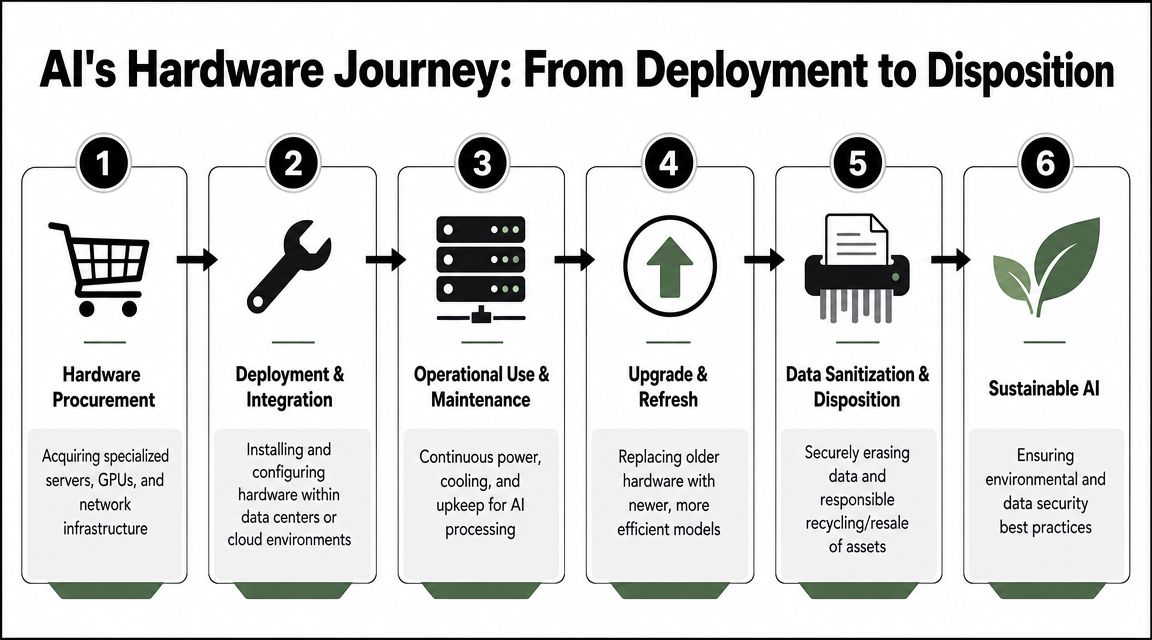
That's why AI planning should connect directly to asset lifecycle decisions. Companies that treat procurement, deployment, maintenance, refresh, and retirement as one continuous chain usually avoid the worst surprises. This is the core idea behind IT asset lifecycle management, and it's especially relevant once AI starts changing how quickly equipment ages out of production.
What responsible disposition looks like
There are three practical goals when AI-driven refreshes begin:
Protect the data
Every retired device needs documented sanitization or destruction based on risk, media type, and policy.Handle environmental obligations
Electronics can't be tossed into general waste streams. Businesses need compliant channels for recycling and downstream handling.Recover value where possible
Some decommissioned equipment still has market value, especially in structured enterprise environments.
Hardware retirement is part of your AI operating model. If you don't plan it early, it shows up later as risk, clutter, and avoidable cost.
A Practical Roadmap for AI and IT Asset Disposition
The strongest AI programs don't begin with a grand transformation plan. They begin with a controlled use case and a clear operating policy.
Here is the practical sequence I recommend for Atlanta organizations that want useful AI adoption without creating a mess downstream.
Start small and choose a real workflow
Pick one task that already consumes staff time every week. Good candidates include drafting standard client communications, summarizing support tickets, organizing intake information, or preparing first-pass internal reports.
Don't start with the most sensitive workflow in the company. Start with the one that's repetitive, measurable, and easy to review.
Set rules before access spreads
Write a plain-language AI use policy. Keep it short enough that managers will use it.
Include the basics:
- Approved tools: Name which apps employees may use.
- Restricted data: Define what cannot be pasted, uploaded, or processed.
- Review requirements: State when a human must approve outputs.
- Ownership: Assign responsibility for tool administration and policy updates.
Forecast the infrastructure impact
Before adoption expands, inventory what your current environment can support. Look at endpoint age, storage practices, network reliability, device management, and any on-prem systems likely to be affected by heavier AI use.
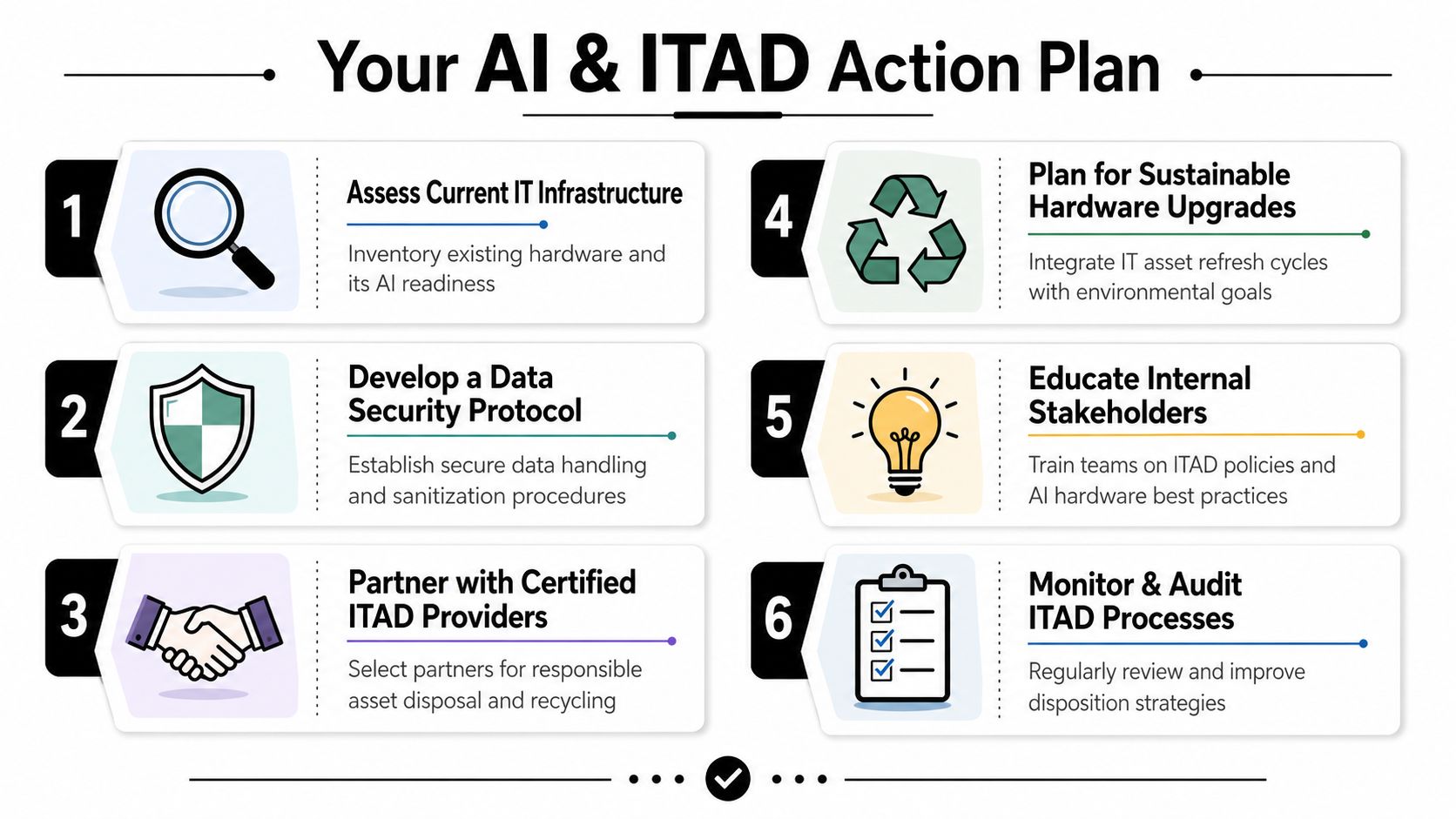
This is also the point where an IT asset disposition plan should stop being informal. If AI adoption is likely to trigger laptop, server, or storage refreshes, decide in advance how assets will be tracked, wiped, removed, recycled, or remarketed. For organizations that want a local option, Montclair Crew's IT asset disposal services cover business equipment removal, data destruction, compliant recycling, and asset handling for retired IT gear.
Treat disposition as part of the project
Leaders often budget for software and hardware but forget retirement logistics. That's a mistake. If your AI rollout changes what equipment stays in production, retirement planning belongs in the same conversation as procurement and security.
A workable roadmap usually looks like this:
- Pilot one workflow with clear business ownership.
- Train the users who will touch the tool first.
- Publish the policy before wider access rolls out.
- Review infrastructure readiness across endpoints, storage, and network dependencies.
- Schedule asset retirement procedures for gear leaving production.
- Audit the process after the first round of deployment and refresh.
How Atlanta businesses are adopting AI tools isn't just a story about software licenses. It's about operational discipline. The firms that get this right usually move in a steady sequence: useful pilot, clear guardrails, infrastructure review, then secure retirement of displaced equipment.
If your organization is expanding AI use and that shift is triggering laptop, server, storage, or telecom refreshes, Montclair Crew Recycling can help you handle the physical side responsibly with business IT equipment disposal, data destruction, recycling, and asset recovery support across Metro Atlanta.
