
More than half of Georgia small businesses are already using AI. A Capital Analytics survey reported 56% adoption, and 87% of those users said AI had a positive operational impact. Research heading into 2026 showed the pattern strengthening to 58% using AI and 89% reporting positive effects, according to Capital Analytics on Georgia small business AI use.
That changes the conversation in Metro Atlanta. The question isn't whether AI matters. It's whether your business is adopting it in a way that's operationally useful, secure, and sustainable.
Most coverage of AI stops at software. In practice, Atlanta companies feel the impact across the whole stack. New tools affect device fleets, server capacity, vendor management, telecom dependencies, security controls, and eventually disposal. If a business adds AI copilots, document processing, analytics automation, or customer service bots, it also inherits physical consequences. More hardware. Faster refresh cycles. More data sitting on retired drives. More e-waste if decommissioning is handled badly.
That's where the operational difference emerges. Companies that treat AI as only a software purchase usually create hidden problems later. Companies that treat it as an IT lifecycle issue tend to scale more cleanly.
AI Adoption Is Already Reshaping Atlanta's Business Landscape
Atlanta businesses aren't easing into AI anymore. They're folding it into normal operations. In small firms, that usually starts with practical jobs like drafting customer communications, summarizing notes, automating scheduling, or speeding up reporting. In larger organizations, the same pattern expands into support workflows, internal knowledge search, fraud review, procurement analysis, and service desk automation.
The local significance of the Georgia numbers is straightforward. Once adoption clears the halfway mark among small businesses, AI stops being an edge case. It becomes part of the baseline operating environment. Owners start hearing about it from peers, vendors start bundling it into existing software, and employees begin using it whether leadership has a formal policy or not.
What adoption looks like on the ground
In Metro Atlanta, most businesses don't begin with custom models. They begin with tools layered onto systems they already use. That could mean AI features inside a CRM, an accounting platform, a document workflow tool, or an MSP management stack. Teams looking at service automation often review platforms and operational tooling together, which is why resources like Atera for MSPs can be useful when you're evaluating where AI fits in day-to-day support work.
The infrastructure side matters just as much. AI usage increases dependence on stable connectivity, cloud access, endpoint visibility, and vendor coordination. For firms reviewing local providers as they modernize operations, a look at Metro Atlanta's telecom landscape can help frame the network side of the decision.
Practical rule: If your employees can access AI tools faster than your IT team can govern them, you already have an AI adoption program. It's just unmanaged.
The opportunity comes with physical consequences
AI can reduce repetitive work. It can also create a pile of overlooked IT issues:
- Older endpoints struggle: Lightweight browser use is one thing. Heavy local workloads, large datasets, and multiple AI-enabled apps can expose aging laptops and desktops.
- Storage risk grows: Teams feed AI systems contracts, customer records, support logs, and internal documents. That data doesn't disappear when a device is retired.
- Refresh cycles speed up: Hardware that still works fine for email and spreadsheets may be a poor fit for AI-assisted analytics, media processing, or engineering workloads.
That is how Atlanta businesses are adopting AI tools in real life. Not as a single purchase. As an operational shift that touches software, hardware, security, and disposal.
How Key Atlanta Industries Are Leveraging AI Tools
The national pattern helps explain what Atlanta firms are doing. The Federal Reserve reported strong work-related generative AI adoption in sectors that map closely to the local economy, including 63% in financial services and 62% in professional services, according to the Federal Reserve note on AI adoption across the U.S. economy. That matters in a region with deep benches in banking, consulting, logistics, healthcare administration, and retail operations.

Fintech and financial services
Atlanta's financial firms tend to adopt AI where speed and pattern recognition matter. The common use cases are document review, fraud screening support, customer communication drafting, call summarization, and internal search across policy libraries.
A Sandy Springs wealth management office, for example, might use AI to summarize adviser notes before follow-up calls. A payments company in Midtown might apply AI to flag unusual transaction behavior for human review. The winning pattern is narrow scope plus strong oversight. The losing pattern is giving a model broad access to sensitive financial data without clean role permissions, logging, or a defined approval chain.
What works:
- Limited-scope assistants: Internal copilots for note summaries, email drafting, and research support
- Human-in-the-loop review: Analysts validate outputs before action is taken
- Tight data boundaries: Restricted access to regulated and client-sensitive records
What usually doesn't work is treating AI output like a final answer in regulated workflows.
Logistics and supply chain
Atlanta's logistics base makes AI especially useful for planning and exception handling. Firms use it to help dispatch teams interpret changing conditions, summarize shipment issues, organize vendor data, and surface patterns from maintenance or inventory records.
An Alpharetta distribution operation might use AI to reorganize messy inbound data from suppliers. A fleet-focused business south of the city might use it to summarize service histories so operations managers can spot recurring equipment issues faster. The practical value often comes from reducing the administrative drag around routing, scheduling, and status communication.
AI delivers more value in logistics when it shortens the time between a disruption and a human decision.
Healthcare and care administration
Healthcare organizations in Metro Atlanta use AI carefully because privacy and compliance come first. Administrative use cases usually move faster than clinical ones. Think intake summaries, documentation support, scheduling assistance, revenue-cycle workflows, and internal knowledge retrieval.
The organizations that move responsibly start with tasks around paperwork and staff efficiency. They don't dump unrestricted patient data into whatever tool an employee found online. They review vendor terms, define approved workflows, and keep legal and compliance teams involved early.
Professional services and retail operations
Consulting firms, law-adjacent service providers, agencies, and accounting teams are using AI to accelerate drafting, summarize meetings, extract action items, and sort large document sets. In retail and e-commerce, the same underlying tools support customer service responses, merchandising analysis, and product content generation.
The pattern across these sectors is consistent:
| Industry | Common early AI use | Main operational concern |
|---|---|---|
| Financial services | Fraud review support, client communication drafts | Data handling and auditability |
| Logistics | Exception summaries, routing support, vendor analysis | Data quality from multiple systems |
| Healthcare admin | Documentation and intake support | Privacy and approved workflows |
| Professional services | Research summaries, proposal drafts | Accuracy and client confidentiality |
| Retail | Product content, support responses, analytics help | Brand control and system integration |
Atlanta firms aren't adopting AI in one uniform way. They're fitting it to the pressure points already present in their industries.
Overcoming the Top Three Barriers to AI Implementation
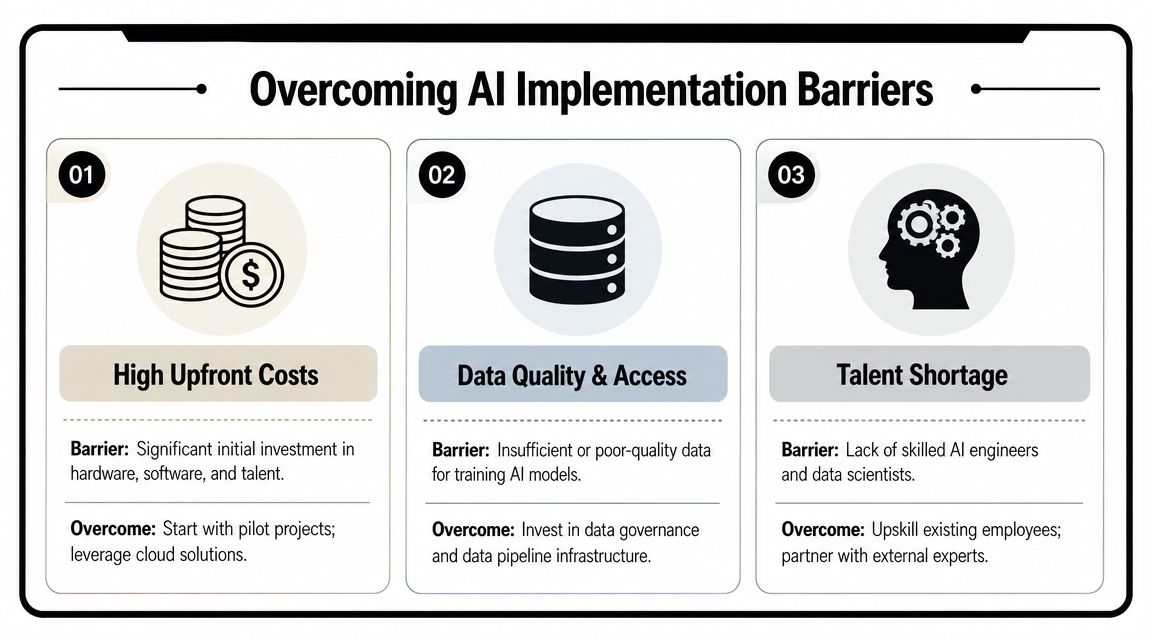
Most failed AI rollouts don't fail because the tools are weak. They fail because the business skipped the operational basics. In Atlanta, the same three barriers show up repeatedly. Teams don't have enough internal expertise. The implementation path looks more complex than expected. And the underlying data is messy enough to make the output unreliable.
Barrier one is the talent gap
Many companies don't need a full internal AI team. They do need someone who can evaluate vendors, map use cases to workflows, and spot security mistakes before they become incidents. That's a different role than a pure data scientist, and many SMBs don't have it in-house.
The practical move is usually to assign cross-functional ownership. IT, operations, legal, and a business-unit lead should all be involved. If you're standardizing external relationships at the same time, these IT vendor management practices help prevent tool sprawl and overlapping contracts.
Barrier two is cost and complexity
Free AI tools make adoption look simple. Integrated deployment isn't simple. Once a company wants SSO, role-based access, audit trails, approved data flows, and process integration, the true work begins.
A useful local example comes from Atlanta's startup ecosystem. An Atlanta-based analytics startup described an application-layer model that connects to spreadsheets and data warehouses, automates data discovery and cleaning, performs integrity checks in real time, and can be deployed quickly, according to Tech Square Atlanta's coverage of AI layered onto existing data stacks. That approach matters because many businesses don't need to build custom models. They need to reduce manual prep work and get usable answers from the systems they already have.
Barrier three is data trust
Bad data breaks AI faster than budget constraints do. If customer records are inconsistent, naming conventions are chaotic, and spreadsheet versions conflict across departments, AI will only speed up confusion.
A simple operating model helps:
- Start with one workflow: Pick a process with obvious friction, such as support summarization or invoice review.
- Clean the source systems first: Remove duplicate files, stale records, and conflicting data owners.
- Lock down approved inputs: Define which repositories and document types the tool may use.
- Review outputs manually: Watch where the model misreads context or overstates confidence.
- Expand only after governance is stable: More access should follow trust, not the other way around.
Field note: If a team says the model is inconsistent, check the source data before you replace the tool.
Companies that clear these barriers usually don't do it with one big launch. They do it by removing friction one workflow at a time.
The Physical Infrastructure Powering Your AI Strategy
AI may look like a browser tab to the end user, but the underlying requirements are physical. Compute has to live somewhere. Data has to move through networks and storage. Devices have to be capable enough to handle the workloads pushed onto them. That is where many businesses discover that software decisions have hardware consequences.

Cloud first doesn't mean hardware free
Many Atlanta businesses start with cloud AI services, which is sensible. It avoids immediate spending on specialized servers and lowers the burden on internal IT. But cloud adoption doesn't eliminate infrastructure work. It shifts it.
You still need strong endpoint management, enough network reliability for heavy cloud workflows, proper identity controls, and clear storage policies. Companies in fast-growth environments often run into these gaps quickly, especially when office expansion and remote work both increase complexity. This breakdown of Atlanta IT infrastructure challenges during rapid growth captures the operational side well.
On-prem AI changes the asset mix
When organizations bring more AI processing in-house, the hardware profile changes fast. Standard office desktops and aging rack servers aren't built for every AI-related workload. Businesses may need denser compute, faster storage, more memory, stronger cooling, and tighter capacity planning.
That shift affects several asset categories at once:
- Servers: Older general-purpose systems may be reassigned, retired, or sold off
- Storage: AI workflows often increase demand for faster and cleaner data access
- Networking gear: Bottlenecks become visible when data movement intensifies
- User devices: Employees running local AI features or heavier analytics may need refreshes sooner than expected
What works and what doesn't
The companies that handle AI infrastructure well tend to make boring decisions early. They inventory what they already own. They map likely workloads. They decide which tasks belong in the cloud and which might justify local compute. Then they build procurement and retirement plans around that reality.
The companies that struggle usually make one of these mistakes:
| Mistake | Consequence |
|---|---|
| Buying hardware before defining workloads | Expensive gear sits underused or mismatched |
| Ignoring power and cooling constraints | Performance suffers and reliability drops |
| Letting teams self-provision tools without IT review | Device fleets and software stacks become fragmented |
| Delaying refresh planning | Critical systems age out while sensitive data remains on them |
Specialized AI hardware isn't just a purchasing decision. It's a lifecycle decision from day one.
The hidden cost is turnover
AI hardware becomes operationally outdated faster than many traditional office assets. Even if a server still powers on and passes basic checks, it may no longer fit the new workload mix, performance expectations, or support model. That creates a steady stream of displaced equipment. Some of it still has value. Some of it carries sensitive data. All of it needs a disposition plan.
That is why AI strategy and asset management have to be connected. If they aren't, the back half of the project becomes a security and logistics problem.
Managing Critical Security and Compliance Risks in AI
The biggest AI security mistake isn't usually a dramatic breach. It's a quiet policy failure. An employee uploads a contract set, customer export, or internal roadmap into a tool that hasn't been approved, logged, or reviewed. The organization gets speed in the short term and exposure in the long term.
Data in use needs rules
Every business using AI should answer a few plain questions before scaling access. Which tools are approved? What data can employees enter? Are prompts retained by the vendor? Can the provider use submitted data for training or service improvement? Who can connect the tool to internal drives, email, CRM platforms, or ticketing systems?
For small and midsize firms, basic controls go a long way:
- Approved tool list: Don't leave staff guessing which AI tools are allowed
- Role-based access: Marketing, finance, HR, and operations shouldn't all have the same permissions
- Prompt hygiene training: Employees need examples of what must never be pasted into a chatbot
- Logging and review: High-risk workflows need traceability
For a practical baseline, these cybersecurity tips for small businesses are a useful checkpoint.
Data at end of life is just as important
Many AI conversations become incomplete because businesses focus on securing active systems and ignore retired ones. But decommissioned laptops, servers, storage arrays, and backup devices can hold exactly the same sensitive information that created the original risk.
That matters even more when AI projects involve internal datasets, financial records, legal documents, customer histories, support archives, or proprietary reporting. If those assets move through a server or storage system, then the retirement process becomes part of the security program.
A sound policy should require all of the following before any device leaves control of the business:
- Asset identification: Know which systems participated in AI-related workflows
- Chain of custody: Document who handled equipment from removal to final disposition
- Certified data destruction: Use defensible wiping or physical destruction based on the asset and risk profile
- Disposition records: Keep paperwork that supports internal compliance and outside audits
If your AI policy stops at access control and ignores retired hardware, the policy has a hole in it.
Security teams often understand this immediately. Operations teams usually feel it once they start replacing equipment faster. Either way, AI governance isn't complete until it covers devices after their productive life ends.
The E-Waste Challenge and Responsible IT Asset Disposition
AI projects often speed up hardware turnover before companies are ready for the operational consequences. In Atlanta, that usually shows up in a familiar pattern. New AI workloads get approved, a few servers or high-spec workstations are replaced, and the retired gear ends up stacked in a storage room while everyone stays focused on deployment.

That delay creates physical risk, not just administrative clutter.
Every AI rollout has a hardware lifecycle behind it. Laptops get replaced to support heavier local processing. Edge devices age out. Storage gear is retired after data pipelines change. Older servers get pulled because they draw too much power for too little performance. If the retirement process is loose, the business inherits three problems at once: data-bearing assets are harder to track, resale value drops while equipment sits idle, and more material ends up in the waste stream than necessary.
What responsible disposition actually includes
Responsible IT asset disposition is a controlled business process tied to security, finance, facilities, and compliance. It starts well before a truck arrives for pickup. Teams need to know what is being retired, what data may still sit on it, whether any of it has resale value, and what records the company will need after processing.
A practical ITAD workflow usually includes these steps:
Secure pickup and intake
Equipment is removed from offices, server rooms, labs, or data centers under documented handling procedures.Asset audit
Devices are logged by type, serial, condition, and disposition path so the business can reconcile what left the site.Data destruction
Storage media is wiped or physically destroyed based on the device, the data classification, and whether the asset will be reused or scrapped.Value recovery
Selected assets, especially enterprise gear and usable components, may be resold or returned to secondary use.Recycling and final documentation
Non-reusable equipment moves through approved recycling channels, and the client receives records that support audits, internal controls, and reporting.
Why AI makes this more urgent
AI adoption changes refresh timing. Companies do not replace everything in one clean cycle. They swap out a batch of engineering workstations, then a few storage nodes, then networking gear that cannot keep up, then older endpoints that fall short on memory or security requirements.
That uneven turnover is where mistakes happen.
A server pulled for an AI pilot may still contain old project files, customer exports, or cached credentials. A stack of retired laptops from a department upgrade can sit untouched because nobody owns the next step. Finance may still be tracking those assets. Security may assume they were wiped. Facilities may just want the room back.
Common failure points look like this:
- Closet storage: Retired drives, access points, and servers sit for months with no formal status
- Informal handoffs: Equipment leaves the building without documented custody or matching asset records
- Incomplete wiping: Teams treat deleted files or quick formatting as data destruction
- Mixed disposition: Resalable hardware, hazardous materials, and scrap all get handled the same way
Retired AI-related hardware creates risk until its final disposition is documented.
What a better process looks like in Atlanta
Local execution matters here. Atlanta businesses often need onsite pickup, short transit windows, clear chain-of-custody records, and a partner that can separate equipment for wiping, shredding, remarketing, or recycling without adding more confusion to the project. Montclair Crew Recycling is one example of a local firm that handles business IT equipment disposal, asset audit logistics, data destruction, and recycling for organizations decommissioning servers, laptops, telecom gear, and related assets.
Internal policy matters just as much as the vendor. If the company has no written rules for retirement approval, media destruction standards, record retention, and approved downstream handling, even a good recycler cannot fix the governance gap. For teams writing that process now, this guide to managing electronic waste in a business setting is a useful starting point.
Businesses should define at least these policy areas:
| Policy area | What it should define |
|---|---|
| Ownership | Who approves retirement and release of equipment |
| Security | What destruction standard applies to each asset type |
| Documentation | What records must be retained after pickup or processing |
| Remarketing | Which assets may be resold or returned to secondary use |
| Recycling | Which vendors and downstream practices are acceptable |
Treat disposal as part of the AI program
The physical afterlife of AI hardware belongs in the project plan. If an Atlanta business budgets for new endpoints, upgraded servers, or storage expansion, it should also budget for collection, data destruction, documentation, and approved recycling or resale.
That approach reduces risk and cleans up operations. It also keeps useful equipment in circulation longer and limits avoidable e-waste. Poor disposal does the opposite. It leaves sensitive devices untracked, turns storerooms into dead asset warehouses, and creates compliance problems long after the AI tool itself is live.
Next Steps and Key Resources for Your AI Journey in Atlanta
Atlanta businesses don't need another abstract AI strategy deck. They need a workable operating model. The companies getting traction usually follow a simple sequence. They choose one or two high-friction workflows, approve a limited toolset, tighten data handling, verify infrastructure readiness, and decide early how displaced hardware will be managed.
A practical checklist for local teams
If you're building or expanding AI use now, start here:
- Choose one business problem first: Good starting points include support documentation, internal search, reporting assistance, and repetitive admin work.
- Review your data boundaries: Decide what can and can't be entered into approved AI systems.
- Check infrastructure readiness: Look at endpoint age, network reliability, identity controls, and storage practices.
- Set a retirement path for replaced assets: Know where old laptops, drives, servers, and networking gear will go before the refresh begins.
- Assign ownership: AI projects stall when no one owns policy, procurement, and lifecycle planning together.
Local resources that actually help
Metro Atlanta has a strong support network for organizations trying to adopt AI responsibly.
Consider tapping into:
- Georgia Tech research and innovation programs: Useful for businesses that want exposure to applied AI thinking, technical partnerships, and talent pipelines.
- Technology Association of Georgia and local business groups: Good for peer learning, vendor discovery, and industry-specific events.
- Atlanta's startup and venture community: Often the fastest place to see practical AI products aimed at operations, analytics, and workflow automation.
- ITAD and electronics recycling partners: Essential when AI initiatives trigger hardware replacement or data-bearing asset retirement.
The full-stack view matters
How Atlanta businesses are adopting AI tools is no longer just a software story. It is a procurement story, a governance story, a network story, a hardware story, and eventually a disposal story. The firms that understand that full chain make better decisions earlier. They avoid shadow adoption, reduce avoidable risk, and keep technology transitions from becoming cleanup projects.
If you're leading AI adoption in Atlanta, the useful question isn't which tool to buy. It's this: what happens to your systems, your data, and your equipment before, during, and after that tool changes the way your business operates?
If your AI rollout is triggering server refreshes, endpoint upgrades, or a backlog of retired IT equipment, Montclair Crew Recycling can help you handle the physical side responsibly. The company works with Atlanta-area businesses on pickup, asset audit logistics, secure data destruction, and compliant electronics recycling so replaced hardware doesn't become a security gap or an e-waste problem.
