
On a Monday morning in Atlanta, the problem usually doesn't look strategic. It looks annoying.
A department lead can't get a laptop replaced because nobody knows whether the old one is under warranty, in storage, or already assigned to someone else. A payroll issue turns into an IT issue because access rights weren't updated after a role change. A compliance question lands on an operations manager's desk, and the answer is buried across tickets, spreadsheets, email threads, and a server room inventory that nobody fully trusts.
That's where IT Service Management starts to matter. Not as software for the help desk, but as the operating model that decides how technology requests get handled, how changes get approved, how assets get tracked, and how risk gets documented.
The Growing Need for Strategic ITSM in Atlanta
A lot of Atlanta businesses grew fast and built their IT processes in pieces. One team uses a ticketing tool. Another tracks hardware in a spreadsheet. Security has its own process for approvals. Finance cares about depreciation. Nobody owns the full lifecycle.
That setup works until the business hits friction. A simple employee onboarding request touches identity, laptop inventory, software licensing, manager approvals, and security controls. If those systems don't connect, the issue isn't just inconvenience. It becomes lost time, audit exposure, and rising support costs.
Why this feels urgent now
The broader market is moving in the same direction. The global IT Service Management market was valued at USD 10.5 billion in 2023 and is projected to reach USD 22.1 billion by 2028, reflecting a 15.9% CAGR, and North America is the largest regional market, which places Atlanta directly inside the strongest growth corridor for ITSM adoption and service desk modernization, according to MarketsandMarkets' ITSM market outlook.
That matters locally because Metro Atlanta companies aren't dealing with textbook IT environments. They're dealing with hybrid work, branch offices, warehouse networks, healthcare devices, aging laptops, cloud sprawl, and hiring growth that strains every process at once. Many of the same pressures show up in Atlanta's IT infrastructure challenges during rapid growth, especially when operations scale faster than governance.
Businesses rarely decide they need ITSM because they love frameworks. They decide after disconnected support starts slowing down revenue, hiring, compliance, or customer response.
What changes when ITSM becomes strategic
A strategic ITSM approach does three things that break-fix support can't do well:
- Creates a shared system of record so IT, operations, security, and finance aren't working from different facts.
- Standardizes work for requests, incidents, changes, and asset handling, which cuts rework and finger-pointing.
- Makes risk visible before a failed audit, a missed renewal, or a retired device with unclear data status forces attention.
For Atlanta organizations, that shift isn't reserved for enterprise giants. Mid-market firms, schools, clinics, logistics businesses, and local government teams need it too. If your company depends on technology for daily operations, then service management is already a business issue. The only question is whether you're managing it deliberately.
What Modern ITSM Means for Your Business
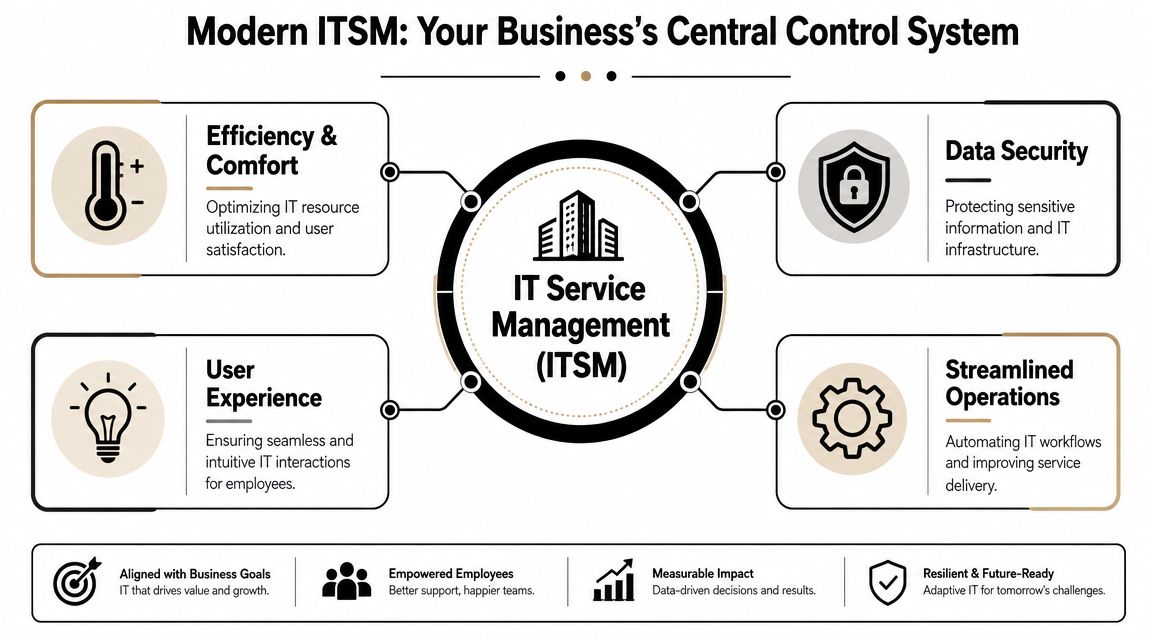
Think of ITSM like a city's traffic control system. Drivers only see a small part of it. But behind the scenes, signals, routing rules, incident response, lane closures, and monitoring all work together so movement stays orderly and safe.
Your business technology works the same way. Employees see a help desk portal, a laptop request form, or a password reset. Behind that, modern ITSM coordinates approvals, ownership, asset records, service dependencies, support workflows, and policy enforcement.
The core functions that actually matter
If you strip away the acronyms, modern ITSM usually comes down to a few practical capabilities:
| Function | What it handles | Why owners should care |
|---|---|---|
| Incident management | Outages, failures, user-impacting issues | Restores operations fast and creates accountability |
| Request management | Access requests, new equipment, software needs | Reduces chaos and speeds up routine work |
| Change management | Planned updates to systems and services | Prevents avoidable disruptions |
| Asset management | Devices, status, assignment, lifecycle | Supports budgeting, compliance, and refresh planning |
| Knowledge management | Repeatable fixes and support documentation | Cuts dependence on tribal knowledge |
A mature environment doesn't treat these as separate admin tasks. It ties them together. If a user opens repeated tickets on the same laptop, asset history should inform the support decision. If a website slows down after a change, the service desk should know what changed and who approved it. If you're trying to speed up your website, the technical fix matters, but so does the service process around change approvals, rollback plans, and ownership.
Reactive support versus managed service delivery
Most growing companies start in reactive mode. Something breaks, someone emails IT, and the loudest issue gets attention first. That's normal early on. It doesn't scale.
Modern ITSM shifts the organization toward managed delivery:
- Work gets routed by service type, not by whoever notices the email first.
- Approvals become traceable, which matters for access, licensing, and regulated workflows.
- Assets stay connected to users and locations, rather than disappearing into side spreadsheets.
- Support trends become visible, so leadership can fix recurring causes instead of funding endless firefighting.
That's why enterprise asset data matters so much. A business can't manage service well if it doesn't know what it owns, where it is, and who depends on it. That's also why enterprise IT asset management belongs inside the ITSM conversation, not off to the side as a procurement chore.
Operational test: If an employee leaves today, can your team identify every system, device, approval path, and data-bearing asset tied to that person without chasing five people for answers?
If the answer is no, your business doesn't just have an IT problem. It has a service management gap.
Top ITSM Trends Shaping the Atlanta Business Landscape
A Monday outage in Atlanta rarely stays small. A few failed logins at 8:15 can turn into delayed branch work, a backed-up onboarding queue, missed customer calls, and a security review before lunch. That is where current ITSM trends show their real value, or expose weak process design fast.

AI moves from chatbot novelty to workflow execution
The most visible shift is the move away from treating the ticket queue as the center of IT operations. In 2026, ITSM is shifting from ticket-centric operations to AI-enabled workflow automation, where platforms increasingly summarize tickets, suggest fixes, and resolve simple incidents before a technician is engaged, reducing mean time to resolution for lower-complexity requests, according to Giva's 2026 ITSM trends review.
For Atlanta businesses, the question is not whether AI belongs in ITSM. It does. The question is where it saves time without creating audit, security, or support problems later.
Useful starting points include:
- Ticket summarization so technicians can see the issue quickly instead of reading long email threads.
- Knowledge recommendations when a request matches a known service pattern.
- Automated routing by service, site, device class, or business priority.
- Low-risk task resolution for repeatable work such as password resets or standard software fixes.
The weak implementations usually fail for predictable reasons:
- Complex diagnosis without enough environment data
- Automations with no approval checks or rollback path
- AI-generated answers that sound plausible but do not match your systems, policies, or asset records
For companies with lean internal teams, workflow-specific automation usually performs better than broad AI rollouts. Many start with tailored AI automation solutions tied to a few service workflows, then expand after the process, ownership, and exception handling are proven.
Resilience-first operations replace passive monitoring
The next trend is resilience. Basic monitoring reports that something failed. Resilience-focused ITSM tries to catch service degradation earlier, connect technical signals to business impact, and reduce the flood of duplicate tickets that follows a visible outage.
That requires more than alerts. It requires service mapping, event correlation, endpoint data, configuration records, and a clear view of dependencies across cloud apps, identity systems, office networks, remote devices, and third-party tools. Without that context, teams lose time debating whether the issue belongs to IT support, infrastructure, security, or a vendor.
Atlanta companies run into this every day because many operate hybrid environments across offices, field staff, warehouses, and remote users. That is one reason Atlanta's rise as a cybersecurity hub affects day-to-day operations. Security review, incident response, and service restoration now touch the same systems, the same users, and often the same asset records.
The organizations that recover fastest usually have one thing in common. They know which business services matter most, what those services depend on, and who has authority to act.
Employee experience becomes a service metric
Another change worth paying attention to is how companies measure service quality. Response time and ticket closure still matter, but they do not tell an owner whether employees can work.
A service desk can hit its SLA targets while staff still lose hours to unstable VPN sessions, worn-out laptops, repeated printer failures, bad conference room setups, or login issues tied to stale device records. On paper, support looks efficient. On the ground, productivity drops and replacement costs rise because root causes stay in circulation.
The stronger Atlanta ITSM programs are starting to measure disruption where work happens:
- Which recurring issues interrupt revenue-generating teams
- Which devices or users generate repeat tickets
- Where aging hardware is driving support volume
- Which service processes add delay to onboarding, access changes, or device replacement
That last point matters more than many firms expect. Employee experience is tied directly to asset lifecycle management. If a company waits too long to replace unreliable endpoints, loses track of who has what, or handles device refreshes without a documented disposal process, the service desk inherits the fallout. More tickets. More security exposure. More wasted labor. Better ITSM now means seeing service delivery, asset control, and end-of-life handling as one operational system.
The Unseen Driver Governance and Compliance in ITSM
AI gets the headlines. Governance decides whether any of it is safe to use.
For many Atlanta organizations, especially in healthcare, banking, education, and government-adjacent work, the buying question isn't “Can this automate tickets?” It's “Can this prove control?” That means audit trails, approval records, separation of duties, policy enforcement, data handling rules, and clear ownership when a workflow touches sensitive systems.
Why governance moved to the top
In a 2025 ITSM trend survey, governance, including AI governance, ranked #1 at 37%, ahead of GenAI at 35%, according to ITSM.tools coverage of the 2025 trend survey. That ordering tells you a lot about the market. Buyers still care about AI, but they're asking tougher questions about risk, accountability, and evidence.
That shift is overdue. Plenty of organizations deployed service tools quickly, then discovered they couldn't answer basic audit questions. Who approved privileged access? Why was a device replacement issued outside policy? Which workflow changed after a security review? Was an AI-assisted recommendation accepted by a human, or executed automatically?
What governance looks like in practice
Governance-heavy ITSM isn't bureaucracy for its own sake. It's a design choice. It means the platform and processes can show how decisions were made.
A sound governance model usually includes:
- Role-based approvals for access, procurement, and system changes
- Documented change paths so emergency fixes don't become permanent shadow process
- Asset traceability from deployment through retirement
- Policy-aware automation so workflows don't bypass compliance requirements
- Reviewable records that legal, security, finance, and auditors can use
Local context is important. A private clinic in Metro Atlanta has different obligations than a manufacturer, and both differ from a school district or municipal office. But all of them benefit from the same principle. If a process matters, it needs evidence.
Governance in ITSM isn't about slowing people down. It's about making decisions repeatable, reviewable, and defensible when something goes wrong.
Atlanta firms that are strengthening governance usually start by tightening data ownership and service records. The same discipline behind improving data governance in Atlanta firms applies directly to service catalogs, change logs, asset records, and approvals.
Where companies still get it wrong
The common mistake is treating governance as a layer you add after automation. That usually fails.
If you automate first and govern later, you end up with fast workflows that are hard to audit, harder to trust, and painful to unwind. The better sequence is to define policy boundaries first. Then automate the parts that fit safely inside those boundaries.
That's especially true when AI enters the service desk. The question isn't whether AI is allowed. The question is which decisions should stay human, which can be assisted, and which low-risk tasks can run with guardrails.
Practical ITSM Strategies for Atlanta Organizations
A common Atlanta scenario looks like this. A new employee starts Monday, their laptop is late, access approvals are sitting in two inboxes, and the old device from the last person in that role is still in a storage room with no clear retirement record. That is not a tooling problem alone. It is an ITSM problem with operational, security, and cost consequences.

Practical strategy starts with that kind of friction. Atlanta organizations rarely need a full reset first. They need tighter control over the work that creates delays, audit gaps, and avoidable spend.
Analysts at TeamDynamix on emerging ITSM trends found that automation was cited less often as a top trend in 2025 than in 2024. The takeaway is straightforward. Buyers are done paying for automation that looks impressive in a demo but does not shorten resolution times, reduce rework, or improve records.
What to do based on your organization type
SMBs
Start with visibility. If requests still arrive through email, text, and hallway conversations, put one intake process in place before adding anything advanced.
The first milestone is basic operational control:
- Track assigned devices by user, location, and status
- Standardize common requests like onboarding, offboarding, and access changes
- Route all work into one service queue with simple approval steps
That gives a small team something more valuable than extra features. It gives them a record of what was requested, who approved it, what asset was involved, and whether the task closed.
Large enterprises
Large Atlanta companies usually have enough tools already. The problem is handoffs. A business service depends on infrastructure, SaaS vendors, endpoint inventory, identity systems, and multiple support teams, but ownership is often split or unclear.
Start by mapping core services to the systems, assets, vendors, and internal teams behind them. Then automate the parts with stable rules and clear approvals. If ownership is fuzzy, automation just moves confusion faster.
Schools and higher education
Education teams need repeatable intake and better device control. Labs, classroom devices, shared carts, loaners, and seasonal turnover create constant movement. If asset records lag behind reality, support slows down and refresh planning turns into guesswork.
Build self-service for common requests, but keep the forms disciplined. Account access, loaner checkouts, repairs, and returns should all connect back to current asset records. A lot of schools improve this by tightening IT asset tracking practices used by Atlanta companies and applying the same discipline to academic environments.
Healthcare providers
Healthcare ITSM has to reflect clinical risk. A delayed password reset for a billing user is inconvenient. A delayed workstation replacement in a patient-facing setting can disrupt care, create workarounds, and increase exposure around data-bearing devices.
Service workflows should separate routine support from requests involving regulated information, specialty equipment, or urgent access changes. Retirement procedures matter here too. If a device leaves service without documented handling, the problem is no longer just inventory accuracy.
Government and public sector teams
Public sector teams need procedures that survive staffing changes, procurement delays, and heavier documentation requirements. Clever shortcuts age badly in these environments.
Use service catalogs, approval paths, and retirement checklists that another employee can follow without relying on memory or tribal knowledge. If a process cannot be reviewed and repeated, it will fail under turnover or audit pressure.
Where automation works and where it disappoints
Automation works best where the rules are clear, the risk is low, and the inputs are consistent. It performs poorly where requests are politically sensitive, exception-heavy, or dependent on context that only a person can judge.
A practical evaluation framework looks like this:
| Good candidate | Bad candidate |
|---|---|
| Password or access request routing | Exception-heavy requests with unclear ownership |
| Device provisioning checklists | High-risk change approvals |
| Ticket classification and summaries | Incidents spanning multiple business units |
| Knowledge surfacing for common issues | Situations requiring legal or compliance judgment |
One step gets overlooked in a lot of Atlanta environments. Connect service workflows to the full asset lifecycle from day one. If your team replaces laptops, mobile devices, network gear, or storage media on a regular schedule, the ITSM process should trigger collection, data handling, status updates, and retirement records as part of the same workflow.
That is where operations, compliance, and disposal meet. Some organizations can handle the final step internally. Others use an ITAD provider such as Montclair Crew Recycling because they need stronger chain-of-custody documentation, data destruction support, or more consistent processing than an internal team can provide.
The Lifecycle Connection ITSM and Responsible IT Asset Disposition
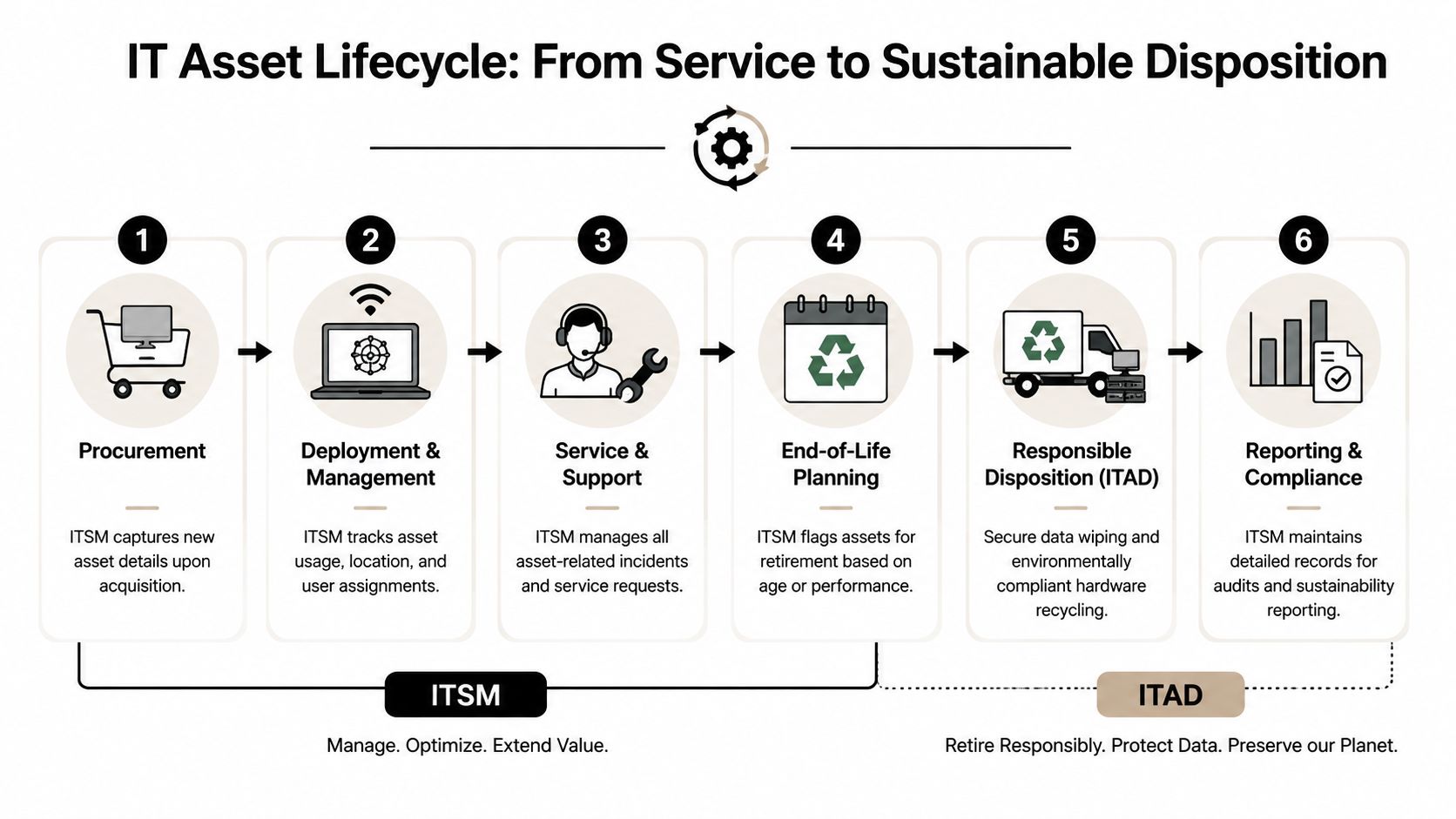
A mature ITSM program doesn't end when the device stops working well. It ends when the asset is retired, data is handled correctly, and the organization can prove what happened to the hardware.
That's where many companies break the chain. They invest in ticketing, onboarding, endpoint tools, and asset records, then treat disposal like facilities cleanup. It isn't. End-of-life handling is part of service governance.
Why the last stage is often the weakest
A 2024 ITSM trends report found that only 53% of companies use real-time user or telemetry data to manage digital employee experience, which shows that many organizations still operate with limited proactive visibility, according to Ivanti's ITSM trends research. In practice, that same lack of visibility often shows up at end of life. Teams lose track of devices, replacement timing gets fuzzy, and retired assets sit unprocessed.
If an asset record doesn't reflect actual condition and location, retirement decisions become messy. The service desk may think a laptop is still active. Finance may think it was replaced. Security may not know whether the drive was wiped. That gap creates risk fast.
How ITSM should connect to ITAD
A well-run process links service records to disposition steps:
- Asset status changes from active to pending retirement.
- Approvals trigger based on policy, business unit, or data sensitivity.
- Chain of custody begins when equipment is collected or prepared for pickup.
- Data destruction and disposition records get attached to the asset history.
- Final reporting closes the loop for audit, finance, and sustainability review.
That's why asset lifecycle discipline matters long before disposal day. Good retirement starts with good tracking. Atlanta organizations looking to tighten that discipline can learn a lot from broader IT asset tracking trends among Atlanta companies, especially where equipment moves between offices, remote workers, and storage.
Field rule: If retired hardware can't be matched back to an owner, location, and disposition record, the process isn't complete.
Responsible disposal is part of service quality
Responsible IT asset disposition affects more than compliance. It affects storage space, procurement planning, environmental reporting, and user trust. Employees notice when old devices pile up in unsecured rooms. Auditors notice when records don't line up. Leadership notices when retired assets still appear on inventory reports.
The organizations that handle this well don't separate digital service from physical hardware. They treat the entire lifecycle as one managed system, from procurement to support to secure retirement.
Building a Future-Ready IT Strategy for Your Atlanta Business
The most important IT Service Management trends in Atlanta aren't about buying the newest platform feature. They're about running technology with more control, better visibility, and fewer avoidable surprises.
AI can help when it handles narrow, repeatable work. Governance matters more than commonly expected, especially when compliance, approvals, and auditability are on the line. Asset lifecycle management belongs inside ITSM, not outside it. And disposal is part of that lifecycle, not an afterthought.
If your organization still treats service requests, hardware records, security approvals, and retired equipment as separate administrative tasks, that fragmentation will keep costing time and increasing risk. Strong ITSM pulls those pieces together into one accountable operating model.
If your Atlanta organization needs a cleaner end-of-life process for laptops, servers, networking gear, or other business electronics, Montclair Crew Recycling can help complete the last stage of your ITSM lifecycle with secure handling, data destruction options, and documented disposition workflows that support compliance and operational control.
