
Monday starts with something small. A salesperson leaves a laptop in a car after a meeting in Buckhead. An accounts-payable employee in Alpharetta gets an email that looks like it came from a vendor. A manager offboards a departing employee but forgets about one shared account tied to cloud storage. None of that feels dramatic in the moment. That's why breaches keep happening.
For Atlanta business owners, the actual problem isn't just hackers. It's the mix of busy staff, aging devices, shared passwords, third-party vendors, and old equipment sitting in closets or heading out the door without proper sanitization. That's the gap most generic cybersecurity advice misses. How Atlanta businesses prevent data breaches isn't just about firewalls and antivirus. It's about controlling risk from the first login to the last day a device exists in your environment.
Understanding the Real Risks to Your Atlanta Business
A lot of business owners know they should care about cybersecurity. Fewer know where the actual exposure sits. In practice, it usually looks ordinary. A remote employee uses a personal phone for work email. A bookkeeper opens an attachment while rushing through invoices. An old server gets replaced, but nobody confirms what data is still on the drives.
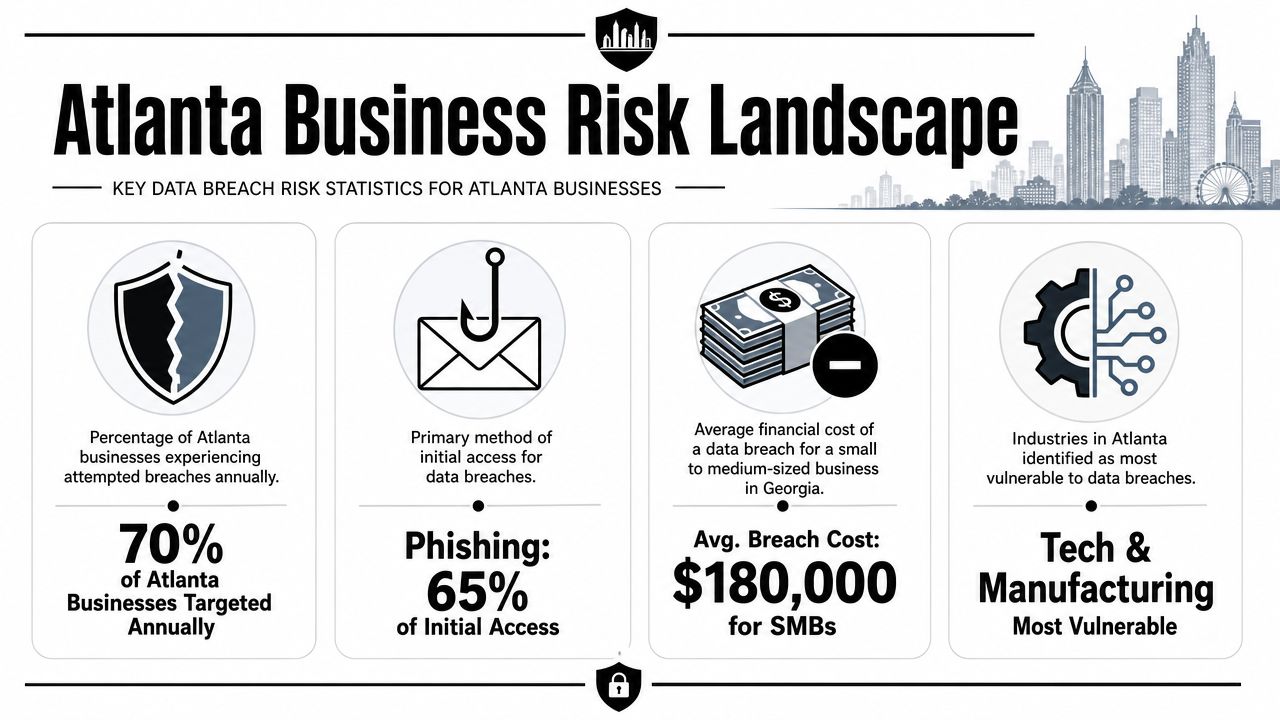
That matters because breaches rarely stay confined to one mistake. SentinelOne's 2026 breach statistics estimate that human error causes about 60% of security breaches, and it reports that breaches resolved in under 200 days average about USD 3.87 million, while breaches lasting past 200 days rise to over USD 5.01 million in cost, according to SentinelOne's data breach statistics. For a small or midsize Atlanta company, those figures aren't abstract. They point to the same operational truth. The longer confusion lasts, the more expensive the problem becomes.
Why Atlanta firms feel this risk differently
Metro Atlanta has a dense mix of healthcare practices, manufacturers, logistics firms, professional services, schools, and fast-growing startups. That means a lot of businesses handle customer records, employee files, payment information, and regulated data without having enterprise-sized security teams.
At the same time, local companies often run hybrid environments. They have cloud apps, office desktops, warehouse devices, personal smartphones, retired laptops, and old backup drives all in the same ecosystem. That creates more openings than most owners realize. Atlanta's growth as a tech market also means more businesses are digitizing quickly, which is good for efficiency but often leaves security controls uneven. That's part of why Atlanta's rise as a cybersecurity hub matters to local business leaders. The threat environment is maturing, and so are expectations around how firms protect data.
Practical rule: If your business stores customer data in more than one place, uses outside vendors, or replaces devices regularly, you already have breach risk beyond your network perimeter.
What this risk actually looks like on the ground
The most common mistake I see is treating security as a software purchase instead of an operating discipline. Owners buy a tool, assume they're covered, and move on. Meanwhile, nobody checks who still has access, whether backups are isolated, or how old devices are handled when they leave service.
A stronger view is simpler. Ask where sensitive data lives, who can reach it, how quickly you could cut off access, and what happens to equipment at end of life. If you can answer those questions clearly, you're already ahead of many companies. If you can't, that's where the work starts.
Building Your Data Breach Prevention Blueprint
Most Atlanta SMBs don't need a giant security program first. They need a map. Until you know what data you have, who touches it, and which devices can expose it, spending money on tools is mostly guesswork.
A practical workflow is to inventory every system that stores, transmits, or processes sensitive data, map who can access it, classify the risk of each asset, and then apply controls. SecurityScorecard recommends this approach and emphasizes strong identity and access management with multi-factor authentication in its guidance on best practices for preventing a data breach. That's the right order for small businesses because it keeps you from protecting the wrong things first.
Start with inventory, not software
Build a list of every place business data lives. That includes more than your office server or Microsoft 365 tenant.
Use a working inventory that covers:
- Core systems such as laptops, desktops, servers, NAS devices, phones, tablets, and Wi-Fi-connected printers
- Business apps like email, accounting platforms, CRM systems, payroll tools, cloud storage, remote access software, and collaboration tools
- Data repositories including shared folders, archived email, external drives, old backup devices, and retired hardware waiting for disposal
- People and vendors who can log in, administer systems, or receive exported data
Many firms discover their biggest blind spot here. They know their active systems. They don't know their dormant ones.
Map access before you buy more tools
Once the inventory exists, map who has access to what. Keep it plain. Name the system, the users, the admin accounts, and the vendor accounts. Include former employees if accounts haven't been fully removed yet. Include generic shared logins if they still exist.
A lot of unnecessary risk surfaces in situations like these. One shared admin account used by multiple people can undo a lot of expensive security work. So can a vendor account that nobody reviewed after implementation.
A useful next step is a quick access review table:
| Asset | Data sensitivity | Who can access it | Admin access | Immediate concern |
|---|---|---|---|---|
| Accounting platform | High | Finance team | Internal IT, vendor | Shared credentials |
| Shared file drive | Medium to high | Multiple departments | Office manager | Former user access |
| Retired laptops in storage | High if unsanitized | Unknown | None documented | Data still on drives |
For businesses trying to tighten governance, this kind of disciplined visibility is the same mindset behind how Atlanta firms are improving data governance. Good governance isn't paperwork. It's knowing exactly what you control.
Classify risk in business terms
Don't overcomplicate classification. A small company usually needs three buckets.
High risk
Systems with customer records, payroll data, financial information, health information, legal documents, or admin credentials.Moderate risk
Internal files that would hurt operations or reputation if exposed, but aren't your most regulated data.Lower risk
Public-facing or low-sensitivity material that still needs management but doesn't require the same urgency.
The point of classification isn't labels. It's deciding where to spend time first.
Apply controls based on actual exposure
After inventory, access mapping, and classification, you can make smarter decisions. High-risk systems should get your strongest controls first. Moderate-risk systems come next. Lower-risk assets still matter, but they don't get the same urgency.
That sequence saves money and reduces noise. It also helps owners ask better questions of IT providers. Instead of saying, "What security tools should we buy?" you can ask, "Which controls reduce risk fastest for the systems that would hurt us most if compromised?"
Implementing Essential Digital Safeguards
Once the blueprint is clear, the next step is putting a few high-impact controls in place and enforcing them consistently. Nevertheless, many businesses lose momentum at this point. They try to do everything at once, create a complex policy stack, and end up with spotty execution.
For most Atlanta SMBs, the first wins come from tightening network basics, locking down endpoints, and reducing unnecessary access.

Lock down the network you already have
You don't need exotic architecture to improve your baseline. You need a business-grade firewall that's configured and reviewed, separate Wi-Fi for staff and guests, and remote access that isn't casually exposed.
Three immediate actions matter:
- Split your wireless environment so guests, visitors, and unmanaged devices don't land on the same network as business systems.
- Review remote access tools and remove any that were installed for convenience and never revisited.
- Limit admin rights on network gear to a short list of people who need them.
Businesses often overfocus on perimeter hardware and underfocus on configuration discipline. A decent firewall with poor change control is still a problem.
Protect the endpoints people actually use
Your laptops, desktops, and mobile devices are where staff click, download, sync, and store. That's why endpoint protection isn't just antivirus. It's patching, device encryption, standard configuration, and fast offboarding when someone leaves.
A practical endpoint baseline looks like this:
- Patch operating systems and key applications on a fixed schedule, with exceptions tracked instead of ignored
- Require full-disk encryption on portable devices so a lost laptop doesn't become a data exposure event
- Use endpoint protection that alerts on suspicious behavior, not just known malware signatures
- Standardize device setup so new machines don't inherit different security settings depending on who deployed them
One area businesses routinely miss is old equipment waiting for reuse, resale, or recycling. If a laptop or drive once held company data, it needs proper sanitization before it leaves your control. That's why it helps owners understand what data sanitization is in practical terms. Deleting files or doing a quick reformat isn't the same as making data unrecoverable.
Tighten access harder than you think you need to
If I had to choose one control that delivers immediate value for many SMBs, it would be multi-factor authentication, combined with a serious review of who has privileged access. Passwords alone fail too easily through phishing, reuse, and poor storage habits.
Use this decision guide:
| Control | Why it matters | What to do this month |
|---|---|---|
| MFA | Stops many account-takeover attempts from succeeding with just a password | Enforce it on email, VPN, payroll, accounting, and admin accounts first |
| Least privilege | Reduces damage when one account is compromised | Remove local admin rights from users who don't need them |
| Password management | Cuts down reuse and unsafe storage | Move shared credentials into a business password manager |
Security gets stronger when fewer people can do fewer high-risk things.
What doesn't work is giving broad admin access because it's convenient, letting shared accounts persist, or postponing patching because operations are busy. Those choices feel small until one compromised machine gives an attacker lateral movement across the business.
Strengthening Your Human Firewall
Technology helps, but people decide whether an email gets opened, a password gets reused, or a suspicious request gets challenged. That's why staff behavior isn't a soft issue. It's a core control.
This is especially important for smaller companies because they don't have unlimited time or budget. Much of the available advice still reads like an enterprise checklist. The better question for SMBs is which controls reduce risk fastest for their size, industry, and hardware turnover rate, as noted in this discussion of security priorities for smaller businesses. In many cases, phishing resistance and access reviews move faster than adding another complex tool.

Train for decisions, not awareness theater
A once-a-year slide deck doesn't create a human firewall. Staff need short, recurring training tied to the choices they face every week.
Focus on situations like:
- Invoice and payment requests that arrive with urgency, changed banking details, or pressure to bypass normal approval steps
- Login prompts and password resets that appear to come from Microsoft 365, Google Workspace, payroll, or benefits systems
- Public Wi-Fi and travel use where employees may connect from airports, hotels, or coffee shops and expose sessions on unmanaged networks
- Text messages and calls from someone claiming to be a vendor, executive, or internal support person asking for codes or credentials
Good training uses examples from your own workflows. If your staff approves wire transfers, train on payment fraud. If your business ships product, train on fake delivery notices and vendor impersonation. If you use outside IT support, train employees never to approve unexpected remote access.
Build reporting habits that don't punish honesty
Employees need a clear way to report suspicious emails, lost devices, and access mistakes quickly. If they think they'll get blamed, they'll wait. Delay makes containment harder.
Use a simple internal rule set:
- Report suspicious messages before deleting them.
- Report lost or stolen devices immediately, even after hours.
- Report accidental sharing, wrong-recipient emails, and password mistakes without delay.
- Escalate anything involving customer data, payroll, or administrator credentials.
If employees are afraid to report mistakes, management has built a silence problem, not a security culture.
For companies that need a practical baseline, these cybersecurity tips for small businesses are useful as a starting point, but significant improvement comes from repetition and accountability inside your own processes.
Treat vendors as part of your attack surface
Third parties can create openings even when your internal team is careful. Vendors may have remote access, receive data exports, handle payroll, maintain phone systems, or support cloud applications. If they connect to your environment or process sensitive information, they belong in your risk conversations.
Ask vendors direct questions. Who has access? How is access removed? What happens to your data when hardware is replaced? How do they notify clients when a security issue affects shared systems?
Small firms often spend too much energy on edge-case threats and too little on ordinary vendor exposure. A disciplined vendor review and a strong employee reporting culture usually reduce risk faster.
Securing Data Through the Entire Asset Lifecycle
A lot of companies protect live systems reasonably well and then lose control at the end. That's where retired assets become a breach problem months later.
Take a common Atlanta scenario. A company replaces ten employee laptops after a refresh cycle. The new devices are deployed quickly. The old ones go into a storage room while someone decides whether to donate, recycle, resell, or hold them for spares. During that gap, those laptops may still contain email archives, saved browser sessions, local downloads, HR files, customer spreadsheets, and cached credentials.
That's why asset retirement needs its own process, not an afterthought.

What chain of custody means in real life
Chain of custody means you can account for a device from the moment it leaves active use until its data is destroyed or the asset is cleared for resale or recycling. In practical terms, that means no informal piles of drives, no mystery boxes in a warehouse, and no employee taking equipment home "for later."
A usable chain-of-custody process includes:
- Asset identification when devices are pulled from service
- Documented transfer to whoever stores, transports, wipes, or destroys them
- Controlled storage so unauthorized staff can't access the equipment
- Final record showing the sanitization or destruction outcome for each item
This discipline matters because old hardware still carries present-day risk.
Why deletion and formatting aren't enough
Many owners assume a factory reset or file deletion solves the problem. It doesn't reliably eliminate recoverable data from every storage medium or every business workflow. Browsers cache files. Local folders sync unevenly. Old partitions remain. Backup drives and failed drives create their own issues.
For organizations with regular hardware turnover, one option is to use a documented IT asset disposition process that includes certified wiping and, where needed, physical destruction. Montclair Crew Recycling, for example, provides DoD 5220.22-M three-pass hard drive wiping and optional on-site shredding as part of IT equipment decommissioning and recycling services. The broader management discipline behind that process is the same one described in asset lifecycle management for IT equipment. The point isn't the label. It's making sure no retired asset leaves your control with usable data still on it.
A simple disposal decision model
Not every retired asset needs the same treatment. Use the data exposure and hardware condition to decide.
| Asset type | Typical risk | Practical handling choice |
|---|---|---|
| Working laptop with prior user data | High | Certified wipe before reuse or resale |
| Failed hard drive from server | High | Physical destruction |
| Network gear with saved config files | Moderate to high | Reset, verify data removal, document disposition |
| External backup media | High | Secure destruction or tightly documented sanitization |
Old equipment doesn't become harmless when it's unplugged. It becomes easy to overlook.
This is one of the most overlooked parts of how Atlanta businesses prevent data breaches. Companies spend on cloud security, email filtering, and endpoint tools, then inadvertently create exposure by mishandling the last stage of the asset lifecycle. That gap is preventable if disposal is treated as a security control.
Creating Your Incident Response and Compliance Plan
Even a disciplined business can still face an incident. What separates a manageable event from a prolonged mess is speed, authority, and clarity. The U.S. Federal Trade Commission advises companies to “move quickly to secure your systems and fix vulnerabilities” and to take affected equipment offline immediately, as explained in the FTC's data breach response guidance for businesses. That's practical advice because compromised machines can keep leaking data or give attackers more time if they remain online.
The first moves after you suspect a breach
Your response plan should identify who can make decisions fast. Not after a meeting. Immediately.
Use a short first-action checklist:
- Isolate affected systems by taking compromised equipment offline
- Preserve evidence such as logs, emails, and device details instead of wiping first and asking questions later
- Assess scope by identifying what systems, accounts, and data may be involved
- Fix the opening whether it was a vulnerable system, a compromised credential, or an exposed process
- Coordinate communications across IT, management, legal, and customer-facing staff
A weak response plan is one that lives only with IT. A useful one tells leadership who approves shutdowns, who contacts vendors, who handles customers, and who documents the event.
Compliance is part of response, not a separate project
Atlanta businesses in healthcare, finance, education, and government-facing work need response plans that line up with their regulatory obligations. If you handle background checks or volunteer screening in nonprofit settings, understanding related compliance duties also matters. For organizations reviewing hiring and screening practices, this guide to nonprofit background screening regulations is a useful companion resource because breach response often overlaps with how sensitive personal information is collected, stored, and disclosed.
The common mistake is waiting until after an incident to figure out who needs to be notified and what records you need. Build that into the plan now. Keep contact lists current. Define outside counsel, IT support, communications leads, and decision-makers before an incident tests you.
A response plan should answer three questions without hesitation. Who shuts it down, who investigates it, and who communicates it.
The businesses that recover fastest usually aren't the ones with the thickest binders. They're the ones that rehearsed simple actions, assigned ownership, and kept security tied to daily operations instead of treating it as a side function.
If your Atlanta organization is replacing laptops, retiring servers, clearing storage devices, or cleaning out a server room, Montclair Crew Recycling can be part of the prevention side of that work. They handle B2B IT equipment disposal, asset audit and logistics, data destruction options including DoD 5220.22-M three-pass hard drive wiping and on-site shredding, plus environmentally compliant recycling for retired IT assets.
