

You’re probably searching “telecommunications company near me” because something has started breaking under normal business use.
The warning signs are familiar. Video calls freeze when two teams meet at once. Your phone system works, but it feels bolted together from another era. File transfers crawl. Staff members start using personal cell phones because desk phones, hunt groups, voicemail routing, or remote extensions don’t work the way the business works anymore.
At that point, most owners do what the market trains them to do. They start collecting provider quotes. That’s reasonable, but it’s not the best first move. A telecom upgrade isn’t just about buying faster internet or replacing an old PBX. It’s a full business infrastructure decision that affects uptime, customer experience, internal productivity, security, and what happens to the gear you remove from service.
That last part gets ignored constantly. Businesses plan the install and forget the retirement. Old desk phones, switches, routers, cabling, PBX hardware, and server room equipment don’t just disappear cleanly. Some of it holds configuration data, call records, or storage media that should be handled carefully.
A smarter approach is to think in lifecycle terms. Define what you need. Compare providers on the right criteria. Negotiate the contract with your eyes open. Then close the loop by retiring old hardware securely and responsibly.
Is Your Business Outgrowing Its Internet and Phone System
At 10:15 on a Tuesday, the front desk is trying to transfer a caller, two people are on Zoom with clients, the warehouse camera feed is stuttering, and the accounting system starts lagging. Nobody calls that a telecom problem at first. They call it a bad day. In a lot of Metro Atlanta offices, that pattern is the definitive sign the business has outgrown its setup.

Growth exposes weak telecom decisions fast. A connection that felt fine for a small team starts struggling once you add cloud apps, more concurrent calls, remote staff, cameras, guest Wi-Fi, or a second site. The failure usually shows up as constant friction instead of one clean outage, which is why owners often wait too long to address it.
That delay gets expensive. Sales calls drag. Staff repeat themselves on broken audio. File syncs run late. Front office teams create workarounds, and those workarounds usually cost more in lost time than the monthly service bill.
A local search adds another layer of confusion. Searching for “telecommunications company near me” can surface carriers, managed IT firms, VoIP vendors, structured cabling installers, and brokers. Those are not interchangeable roles. One company may sell the internet circuit but not manage call flow design. Another may install phones but never touch your switching closet. If you compare them as if they offer the same scope, you can sign the wrong contract and still have the same problems 60 days later.
The symptoms that justify a real review
A business usually needs a closer look when these issues keep showing up:
- Calls fail or sound poor during busy periods. That can point to bandwidth limits, weak QoS settings, old firewall rules, or a voice platform that was never sized correctly.
- Cloud apps slow down at the same time every day. Sometimes the carrier is the issue. Sometimes the bottleneck is inside the office, especially on aging switches, poor Wi-Fi design, or overloaded cabling runs.
- Your telecom stack feels patched together. Internet, phones, cabling, and support live with different vendors, and nobody is accountable when performance drops.
- Adding people or locations creates a mess. If every move, add, or change turns into a mini-project, the system is no longer keeping pace with the business.
One sign matters more than owners think. If employees have stopped trusting the desk phone, the conference setup, or the office network, they will route around it. They use personal cell phones, ad hoc apps, and one-off fixes. That creates security gaps, inconsistent customer experience, and a harder migration later.
I also advise clients to look past the install. An upgrade is not finished when the new circuit is live and the new handsets ring. Old PBX gear, routers, switches, phones, and storage-capable devices still need to be removed, documented, and retired correctly. In regulated industries or any business with sensitive records, careless disposal can turn a routine upgrade into a compliance problem.
That is why it helps to evaluate providers and support firms that can address the full transition, including planning, cutover support, and local telecom service support for businesses. The best decision is rarely the cheapest quote. It is the option that fits how your business operates now, leaves room to grow, and closes the job cleanly when the old equipment comes out.
First Define Your True Telecommunication Needs
A 15-person office in Metro Atlanta can look fine on paper and still be set up wrong. I see this when an owner asks for a faster connection and a new phone system, then gets a polished bundle that does not match how the staff works, how calls flow, or what needs to stay online during a busy day.
Start by defining demand inside the business before you talk to providers. If you skip that step, the quote usually reflects what the seller wants to package, not what your office needs to run well.
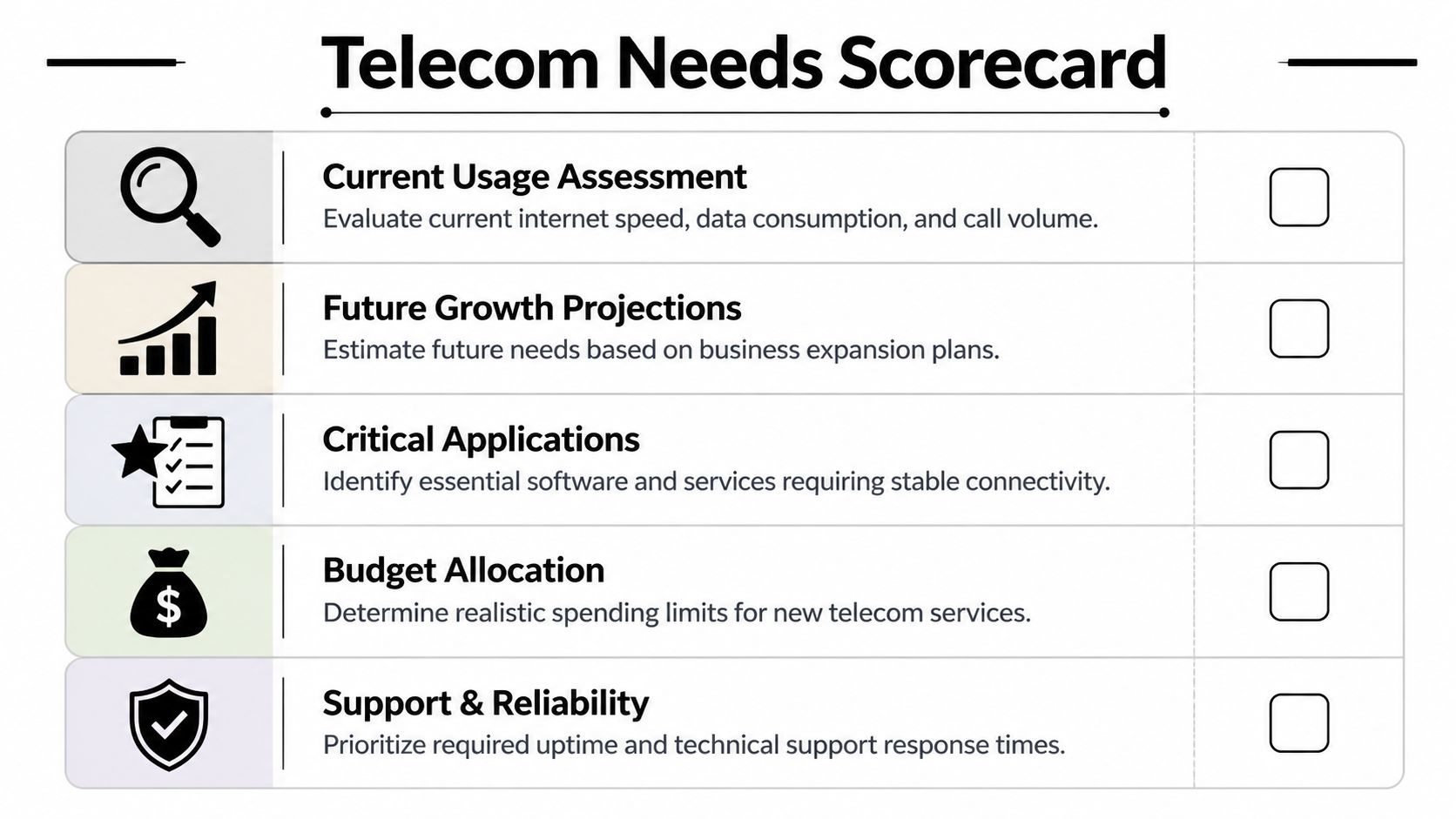
Audit what people do all day
Begin with observed use, not guesses from management. Watch the front desk, the accounting team, remote staff, and anyone who lives in Teams, Zoom, or a line-of-business app.
Ask these questions:
- How many people are on calls at the same time during peak periods?
- Which applications fail first when the connection slows down?
- Are employees primarily desk-based, hybrid, mobile, or split across sites?
- Which cloud platforms handle CRM, file storage, accounting, tickets, or scheduling?
- Does the office need call routing, ring groups, auto attendants, voicemail-to-email, or call recording?
Write the answers down in one place. A short worksheet is enough, but it needs to be specific. This is the same discipline I recommend in IT procurement planning for business technology purchases, because vague requirements almost always lead to expensive revisions later.
Two companies with the same headcount can need very different telecom setups. A small clinic may care most about voice reliability and privacy. A warehouse may care more about Wi-Fi coverage, handheld devices, and camera traffic. A professional services firm may push far more data through cloud apps than through the phone system.
Separate internet requirements from phone requirements
Owners often combine these into one decision, and that is where projects drift off course. Internet access, internal networking, and voice service affect each other, but they should still be scoped separately.
If you are moving to VoIP, estimate concurrency instead of counting total employees. A ten-person office with two or three calls happening at once needs a different design than a sales team with constant outbound calling. Voice quality also depends on the local network, switch configuration, firewall settings, and whether other traffic competes with calls during peak hours.
CWSTX notes that VoIP planning should account for call concurrency, network overhead, and support capability, not just a basic bandwidth figure, in its VoIP implementation guidance.
One warning here. Small business owners sometimes look at a personal guide to saving on home internet and assume the lowest advertised rate will translate to an office. It usually will not. Business circuits, support terms, uptime expectations, static IP needs, and installation scope are different purchases.
Build a requirements document vendors cannot blur
You do not need a long formal spec. You need a clear internal document that fixes the scope before the sales process starts.
Include these categories:
Current environment
List the carrier, circuit type, firewall, switches, phone system, known dead spots, cabling issues, and recurring complaints.Operational priorities
Identify what must stay available. Front desk calls, payment processing, scheduling, dispatch, VPN access, guest Wi-Fi, security cameras, and cloud application access each have different tolerance for downtime.Usage profile
Note peak calling windows, large file transfers, video meetings, remote access, and any after-hours activity such as backups or overnight processing.Growth and change
Record likely additions such as new hires, another suite, a branch office, or heavier cloud use over the next 12 to 24 months.Support model
Decide who owns troubleshooting after cutover. Internal IT, the carrier, a managed service provider, or a shared model.Retirement of old equipment
List what is being removed, including PBX hardware, handsets, routers, switches, patch panels, and any storage-capable devices that may require secure handling at the end of the upgrade.
That last item gets missed all the time. A telecom project is not complete when the new service turns up. Old gear still has to be disconnected, documented, and retired properly so the transition is clean and the site does not end up with security risk, clutter, or disposal problems later.
A good requirements document gives you control. It helps you buy the right service, plan the migration with fewer surprises, and set up the final equipment retirement step before old hardware becomes someone else’s forgotten problem.
How to Compare Local Provider Quotes and SLAs
A Metro Atlanta owner gets three telecom quotes on the same week. One looks cheapest. One looks safest. One looks confusing enough to set aside until later. That is usually the point where a bad decision gets made.
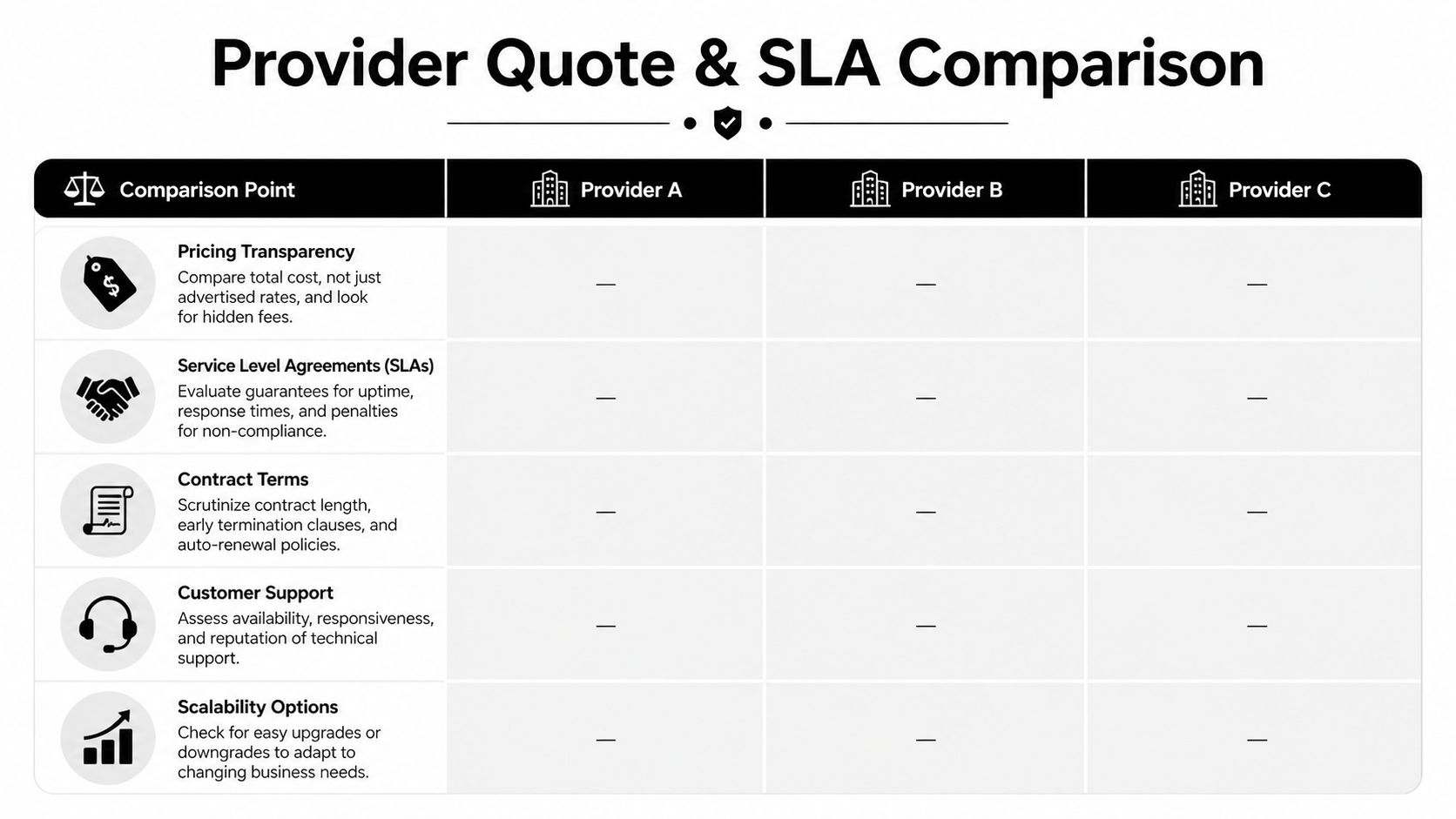
Quotes only become useful after you force them into the same format. A provider can show a low monthly number and still cost more over the term because install work, handset setup, after-hours support, failover, or replacement hardware sit outside the base price. Another provider may cost more on paper but include the work that keeps your office running during cutover and after the first outage.
Use a side-by-side sheet and normalize every proposal before you compare it.
| Area | What to check |
|---|---|
| Monthly charges | Whether pricing is promotional, bundled, or scheduled to increase |
| Installation scope | Who handles cabling, phone deployment, testing, training, and cutover |
| Equipment ownership | Whether hardware is leased, rented, or yours at the end of term |
| Support model | Business-hours support or true after-hours response |
| Exit terms | What happens if service misses targets or your business relocates |
Small business owners can also sharpen their pricing instincts by reading consumer telecom advice. This guide to saving on home internet shows a pattern that carries over into business buying. The advertised rate is often the least useful number in the proposal.
Read the quote like someone who has to live with it
Sales reps sell the monthly rate. Operations teams live with everything around it.
That means looking past the headline price and checking what work is included. If you are replacing phones and internet at the same time, ask who owns number porting, firewall changes, handset staging, call flow testing, and day-one user support. If the quote stays vague on those items, expect change orders or finger-pointing later.
In Metro Atlanta, building conditions matter more than many owners expect. Older suites in Buckhead, Decatur, Marietta, or mixed-use properties around the Perimeter often have wiring surprises, access restrictions, or landlord approval steps that never show up in the first quote. A provider that has worked your area before will usually ask better questions up front.
Ask questions that expose weak proposals
Direct questions save money.
Who owns the cutover plan?
Get a clear answer on porting, testing, rollback, and first-day support.What is excluded from installation?
Internal wiring, patching, rack cleanup, firewall work, and handset deployment are common omissions.How are adds, moves, and changes handled after go-live?
Many projects look fine at install, then become expensive when every small office change requires a ticket and a fee.What happens when service fails at 8:00 a.m. on a Monday?
Ask who answers, how quickly they engage, and whether after-hours support is actually included or simply available at extra cost.What equipment stays on site from the old system?
If the answer is “we can deal with that later,” you do not have a full transition plan yet.
Compare written obligations, not verbal confidence.
The SLA matters more than the brochure
A Service Level Agreement is where the provider states what they will stand behind. Many owners skim it because the language is dry. That is expensive.
Check the SLA for these points:
Uptime definition
Read how uptime is measured and what events get excluded.Response and repair targets
Separate “we responded” from “we fixed it.” Those are different commitments.Maintenance windows and exclusions
Some agreements exclude provider maintenance, third-party failures, power issues, and on-site equipment problems so broadly that the SLA gives you little practical protection.Service credits
Bill credits are common, but many are too small to matter if your phones or internet fail during business hours.Escalation path
Confirm how support gets escalated when the first technician cannot solve the issue.
If your company already uses a standard vendor review process, apply it here too. These IT procurement best practices help keep a telecom purchase from being treated like a simple utility signup when it is really an infrastructure decision.
Compare the full lifecycle, not just the live service
A strong telecom quote covers more than install and monthly billing. It should also show what happens to the equipment coming out.
Ask whether the provider disconnects and inventories retired phones, PBX hardware, switches, routers, and any storage-capable devices tied to the old setup. Ask who is responsible for secure handling, who documents asset removal, and whether disposal follows your compliance requirements. Many providers stop at activation. That leaves old gear in a closet, on a rack, or in a back office with no ownership and no disposal record.
That final step matters. A smart telecom upgrade includes selection, cutover, support, and proper retirement of replaced hardware. If a quote ignores the last part, it is incomplete.
Negotiating Your Contract and Avoiding Hidden Traps
By the time a provider sends the contract, many owners are mentally done with the project. That’s when expensive details slip through. The quote gets attention. The contract gets skimmed. It should be the other way around.

The U.S. telecom market is competitive for a reason. The 1984 AT&T divestiture broke up the monopoly and helped create today’s large mix of regional and local providers, while regulation is split across federal and state bodies, as outlined by PUCO’s telecommunications overview. More choice is good, but it also means more contract formats, more service structures, and more room for ambiguity.
Negotiate the clauses that actually hurt later
The monthly rate matters, but these terms often matter more over the life of the agreement:
Auto-renewal language
If the contract renews automatically unless you cancel in a narrow window, put that date on the calendar the day you sign.Promotional pricing expiration
Make the provider state when pricing changes and what the non-promotional rate becomes.Early termination terms
If your business moves, downsizes, or gets acquired, this clause becomes very real very quickly.Installation responsibility
Clarify what the provider includes and what becomes your problem if the building wiring or handsets need work.
Push for written specificity
A phrase like “unlimited calling” can still carry restrictions. “Managed support” can mean full coverage or almost nothing. “Business class service” can be marketing language with no practical consequence.
Use direct wording in your revisions. Ask for statements such as:
- support hours listed plainly
- included moves, adds, and changes defined clearly
- replacement responsibility for failed provider-supplied equipment
- any non-recurring charges itemized
If a salesperson says, “Don’t worry, we always handle that,” ask them to add it to the contract.
That isn’t being difficult. It’s being professional.
Treat vendor management as an operating discipline
Telecom agreements should sit inside your broader vendor governance process, especially if you’re managing multiple providers, cloud platforms, and hardware contracts at once. A structured approach to IT vendor management best practices helps prevent the usual problems: unclear accountability, support finger-pointing, and renewal surprises.
A simple internal checklist before signature can save a lot of grief:
- Confirm who owns issue resolution after go-live.
- Confirm what happens if service quality doesn’t match the proposal.
- Confirm every hardware item and whether you own it.
- Confirm cancellation timing and notice method.
- Confirm what the provider removes and what stays behind.
The best telecom contracts don’t just get signed. They get edited until the business can live with them for the full term.
The Final Step Securely Retiring Your Old Telecom Hardware
This is the part almost nobody talks about when businesses search for a telecommunications company near me.
The new service goes live. Phones are cut over. Internet is stable. Everyone exhales. Then somebody looks at the old PBX, a stack of desk phones, obsolete switches, patch panels, spare handsets, old routers, and boxes of mixed cables sitting in a closet or server room. That equipment often sits there for months because no one planned the final step.

That’s a mistake for two reasons. First, old telecom gear may still hold sensitive information. Second, disposal isn’t just a trash problem. It’s a security and compliance decision.
Old telecom gear can still expose your business
A major gap in online advice is the lack of guidance on decommissioned telecom equipment. At the same time, 70% of data breaches stem from lost or stolen devices, a risk highlighted in the background used for Valley Telecom-related research. Whether the device is a server, network appliance, or telecom system component, abandoned equipment deserves the same seriousness as active equipment.
That includes items businesses often underestimate:
- Legacy PBX systems that may store configuration and communication records
- VoIP phones with retained settings and account data
- Routers and switches that can reveal network structure
- On-site appliances tied to call routing, messaging, or security systems
- Storage-bearing telecom equipment removed during office upgrades
What proper retirement looks like
A clean retirement process should include more than pickup.
Look for these steps:
Asset identification
Know what is being removed before it leaves the site.Data destruction
Use certified wiping or physical destruction where appropriate.Chain of custody
Keep records of what left, when it left, and how it was handled.Environmentally compliant disposition
Reuse, resale, recycling, and material recovery should come before landfill disposal.
The install isn’t finished until the old system is out of the building and handled properly.
If your team is replacing telecom gear as part of a larger office or data center refresh, it helps to work from a formal process for disposal of IT assets. That keeps decommissioning from becoming an afterthought assigned to whoever has space in a storage room.
Why this matters in Metro Atlanta
Atlanta-area businesses upgrade quickly. Offices expand, move, and reconfigure. Data closets get rebuilt. Branch locations open. Healthcare practices, schools, logistics firms, and professional offices all cycle through telecom hardware over time.
What doesn’t work is letting retired equipment pile up because disposal feels separate from procurement. It isn’t separate. It’s the end of the same project. If the gear has any chance of containing sensitive data, or if you need a documented, responsible chain of handling, professional IT asset disposition is the safer path.
A Complete Telecom Strategy From Selection to Disposal
The strongest telecom decisions don’t start with provider logos. They start with operational clarity.
A business that defines usage, call flow, support expectations, and growth plans buys differently from a business that just asks for “better internet.” A business that reads the SLA and edits the contract avoids pain later. A business that plans the retirement of old hardware closes the loop instead of leaving risk behind in a back room.
That full-lifecycle view matters because telecom systems are tightly connected to the rest of your environment. Approximately 60% to 70% of data center downtime incidents originate from cabling infrastructure failures rather than active equipment, according to Waco Business Phone Systems’ data center cabling overview. The lesson isn’t limited to data centers. Infrastructure decisions succeed or fail based on the entire chain, including installation quality, support, maintenance, reconfiguration, and decommissioning.
The practical takeaway
If you’re evaluating a telecommunications company near me in Metro Atlanta, keep this order:
- Define your real requirements.
- Compare quotes on scope, support, and SLA language.
- Negotiate the contract like an operating agreement, not a brochure.
- Retire the old hardware with the same care you used to install the new system.
That’s how telecom becomes a business advantage instead of a recurring source of frustration. And if your upgrade includes old phones, switches, servers, PBX hardware, or related electronics, build secure retirement into the plan from day one with a process for corporate electronic asset recycling.
If your business in Metro Atlanta is upgrading telecom infrastructure and needs a secure, practical way to remove old phones, PBX hardware, servers, switches, or cabling-related IT assets, Montclair Crew Recycling can help close out the project properly. They support Atlanta-area organizations with on-site pickup, asset audit and logistics, data destruction options, compliant recycling, and resale recovery when applicable, so old telecom equipment doesn’t become a security or storage problem after the new system goes live.
