

Your staff logs into a video meeting with a client. The audio clips, the screen share freezes, and someone says, “Can we try that again?” At the same time, files crawl into the cloud, your phone system still depends on aging hardware in a closet, and your office manager keeps hearing different answers from different providers.
That’s a common spot for businesses shopping for telecom services in Houston. The problem usually isn’t one broken line or one bad bill. It’s that the business has outgrown a setup that was “good enough” a few years ago.
Houston gives businesses real options. It also gives them a lot to sort through: fiber, cable, hosted voice, SD-WAN, managed circuits, mobile failover, and contract terms that look similar until you read the details. The decision affects daily productivity, customer experience, remote work, and how much risk you carry when something fails.
A second issue gets missed until the project is already underway. When you replace internet circuits, PBX systems, switches, routers, and structured cabling, you also create a decommissioning job. Old telecom gear can hold data, configuration details, and materials that need proper handling. If that part isn’t planned early, it becomes the messy final step nobody budgeted for.
Is Your Business Outgrowing Its Internet Connection
A lot of owners notice the problem before they know the cause. Calls drop during busy periods. Cloud apps feel fine at 7 a.m. and sluggish by midday. Uploading design files, camera footage, or backups starts affecting everything else in the office. The internet bill hasn’t changed much, but the business has.
That mismatch matters because connectivity isn’t a side utility anymore. It supports phones, payments, file sharing, CRM access, Microsoft 365, Google Workspace, remote users, and security tools. When the connection struggles, employees don’t just wait. Work piles up around the bottleneck.
The broader market reflects how central telecom has become. The U.S. telecom services market was valued at USD 468.08 billion in 2023 and is projected to reach USD 725.68 billion by 2030, with a CAGR of 6.6% from 2024 to 2030 according to Grand View Research's U.S. telecom services market report. That same report notes that in Houston, fiber infrastructure reaches up to 90% availability, with some providers offering speeds up to 7,000 Mbps.
What this looks like in practice
A small office can often tolerate minor slowdowns until it adds cloud phone seats, starts backing up more data, or brings on hybrid staff. Then the old connection gets exposed fast.
A warehouse or light industrial site feels it differently. Inventory systems, scanners, VoIP handsets, and guest or contractor Wi-Fi all compete for the same pipe. The issue isn’t always raw speed. Sometimes it’s stability, upload performance, or lack of priority for business traffic.
Don’t judge a business connection by the advertised top speed alone. Judge it by how it behaves at your busiest hour.
If you’re still sorting out the basic differences between shared broadband and more dedicated business circuits, Blowfish Technology on business internet gives a useful plain-English explanation.
For companies also thinking ahead about what happens to replaced voice and network hardware, it helps to keep the service upgrade tied to a decommissioning plan from day one. Businesses comparing providers often start by reviewing local support and lifecycle considerations such as telecom solutions near me.
Decoding the Types of Business Telecom Services
Businesses often hear a provider say “fiber,” “managed,” or “hosted” and assume those terms answer everything. They don’t. The category tells you the shape of the service, not whether it fits your operation.
One simple way to think about telecom is to compare it to roads. Some services are private lanes with predictable performance. Others are shared highways that work well for many companies but can feel crowded at the wrong time. And some are traffic-control systems that decide which route your data should take.
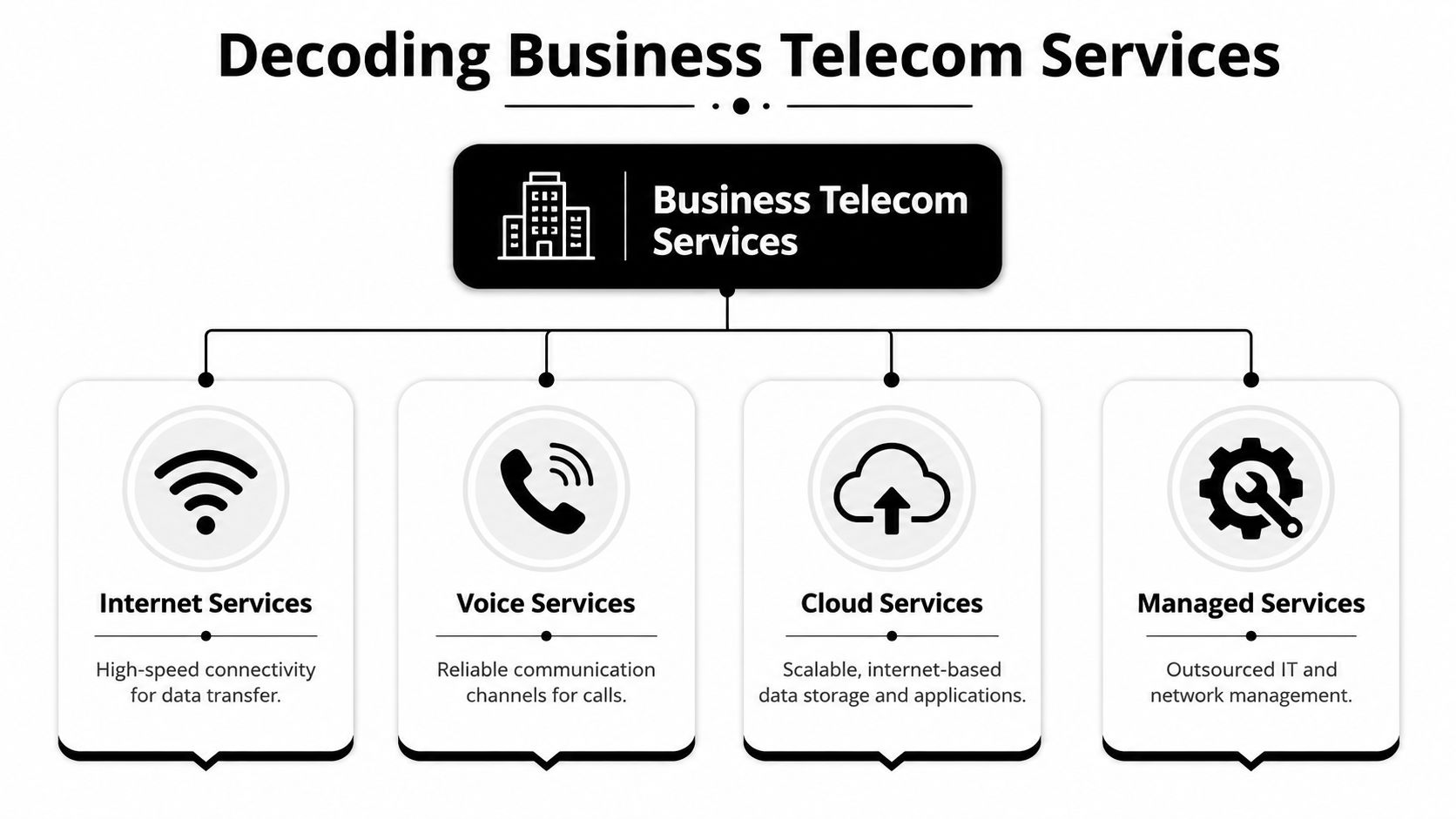
Internet access options
Dedicated internet access is the private road comparison. It’s built for businesses that need more predictable performance, stronger service commitments, and cleaner support for cloud applications, VPN traffic, large uploads, or public-facing systems.
Business cable broadband is the shared highway. It can be a practical fit for smaller offices, retail locations, or businesses with lighter uptime requirements. It’s usually easier to buy and often easier to install, but it may not offer the same consistency or contractual guarantees as a dedicated circuit.
Fixed wireless or mobile failover is the alternate route. It’s useful as backup connectivity, for temporary sites, or for locations where wireline options are limited. It can work well in a layered design, but most established offices shouldn’t treat it as an automatic replacement for a properly engineered primary connection.
Voice and communications services
Traditional phone systems kept the equipment on-site. That meant a business owned or maintained PBX hardware, handsets, cabling, and all the headache that came with changes, moves, and repairs.
VoIP shifts voice onto your data network. UCaaS, or Unified Communications as a Service, goes further by bundling calling, messaging, video meetings, and collaboration tools into one hosted platform.
That’s why many companies don’t buy “phones” anymore. They buy a communications workflow.
A modern voice platform is less about dial tone and more about how fast your team can answer, transfer, message, and work from anywhere.
Network and managed services
SD-WAN sits above the circuits and helps route traffic intelligently across locations or across multiple connections. For a business with branches, remote users, cloud apps, or a need for failover, this can matter more than adding another random line.
Managed services means someone else monitors, maintains, and supports the environment. That can include the firewall, router, switching, Wi-Fi, voice platform, and the provider relationship itself.
For a broader primer on how different network types support business environments, Constructive-IT's data network guide is a helpful companion read.
If your business operates beyond one office, it’s useful to compare how providers and support models are handled in other markets too, especially in guides such as telecom services in Atlanta.
Mapping Houston's Digital Backbone and Coverage
Houston’s telecom story is heavily shaped by its geography and business mix. The metro includes dense office corridors, industrial sites, medical and research campuses, retail centers, and sprawling suburban locations. That means availability can look strong on paper while still varying a lot by building, park, or even suite.

The most important local reality is this: Houston’s enterprise telecom environment leans on fiber-optic systems combined with SD-WAN for business-grade connectivity. According to Wilkins' Houston telecommunications services overview Houston enterprise telecom infrastructure uses fiber and SD-WAN to support high-capacity data transport at speeds over 1 Gbps and redundant failover capabilities aimed at near-100% uptime.
What fiber changes
Fiber isn’t just “faster internet.” In a business setting, it usually means better support for cloud applications, large file movement, video collaboration, off-site backups, and multi-user traffic that hits both downloads and uploads. That last part matters more than many owners expect.
Cable can still be the right answer in some buildings, especially if the workload is lighter and cost sensitivity is high. But once a company depends on cloud voice, remote access, and line-of-business apps all day, fiber tends to remove more friction.
The practical upside of a fiber-first market is that Houston businesses can often design around resilience, not just speed. That includes primary and backup paths, traffic prioritization, and cleaner support for branch connectivity.
Where SD-WAN earns its keep
SD-WAN makes the biggest difference when a company has multiple offices, warehouses, field locations, or a mix of on-premise and cloud systems. Instead of treating every connection the same, SD-WAN can steer important traffic over the better path.
That matters for voice, video, and critical apps that don’t handle delay well. It also matters during provider outages or degraded service, because failover becomes a planned process instead of a scramble.
A few practical questions help cut through provider marketing:
- Building readiness: Is fiber already lit in the building, or will construction be required?
- Path diversity: Does the backup route follow a different path, or does it fail at the same point?
- Inside wiring responsibility: Who owns the handoff, demarc extension, and cabling changes?
- Support model: Who answers after hours when the circuit is up but performance is poor?
In Houston, “available” doesn’t always mean “ready for service.” It may mean the carrier can serve the address after construction, permitting, or building coordination.
If your telecom project is part of a larger office move or infrastructure change, the network decision should stay aligned with the physical migration plan. Many organizations use broader data center migration best practices to keep connectivity, cutover timing, and hardware removal in sync.
Matching Telecom Services to Your Business Needs
The right service depends less on industry buzzwords and more on how your people work. Two Houston businesses in the same building can need completely different telecom setups because their risk tolerance, application mix, and hours of operation are different.

Three common business profiles
A retail or service storefront usually needs reliable payments, stable Wi-Fi, security system connectivity, and phones that don’t go down during business hours. This type of business may not need the most complex network, but it does need predictable support and simple failover.
A professional services firm often relies on video calls, cloud documents, hosted phone systems, and secure remote access. For this environment, upload consistency and voice quality matter as much as headline speed.
A warehouse, shop floor, or light manufacturing site often has a wider spread of needs. Office staff need ordinary connectivity, but operations may also depend on scanners, cameras, cloud dashboards, vendor portals, and traffic across a large physical footprint. Wi-Fi design and cabling quality become part of the telecom conversation, not separate projects.
The PBX to cloud shift changes the project
Houston businesses are moving from on-premise PBX systems to hosted communications platforms. According to Enter-sys on Houston enterprise telecom services, that transition creates substantial e-waste from legacy telecom hardware. The same source notes that the retired equipment often contains sensitive data and hazardous materials, which means it needs certified data destruction and environmentally compliant recycling.
That point gets ignored in a lot of telecom discussions. A business signs the new UCaaS contract, ports numbers, installs new handsets or softphones, and then realizes the old PBX cabinet, voicemail appliance, switches, and copper-era hardware are still sitting in a closet.
Here’s what usually needs a decision:
- Legacy PBX hardware: Keep it only if there’s a real rollback plan and a defined retention date.
- Voicemail and call recording components: Treat them as potential data-bearing assets.
- Old switches and routers: Review whether they can be repurposed, securely wiped, or retired.
- Copper cabling and patching remnants: Remove them when they create clutter, confusion, or maintenance issues.
The cleaner telecom upgrade is the one that includes the retirement plan for the gear being replaced.
A good provider recommendation should match your business model. A better one should also flag the assets that become obsolete the moment the cutover is complete.
How to Choose Your Houston Telecom Provider
At 9:15 on a Monday, your phones are being ported, the new circuit is live, and someone realizes the old PBX still holds voicemail data and nobody owns the removal plan. That is how a routine telecom change turns into an operations problem.
A Houston provider is not just selling bandwidth or dial tone. They are taking a role in uptime, support, security, and the cleanup work that starts as soon as new service replaces old hardware.
Read the SLA like an operator
Monthly price and advertised speed belong on the spreadsheet, but they should not drive the decision by themselves. I look for how a provider handles trouble tickets, who is accountable during an outage, what performance is guaranteed, and how clearly they explain install risks in your building.
Ask direct questions:
- What is guaranteed versus advertised? Sales sheets highlight best-case speeds. The contract defines what you can hold the provider to.
- Who owns incident resolution? If your carrier, voice vendor, and firewall provider all support different pieces, your staff can end up coordinating the outage.
- How fast can service scale? Growth should not force a redesign every time you add staff, space, or another location.
- What are the exit terms? Review early termination fees, auto-renewals, install contingencies, and any language tied to construction delays.
A good comparison process looks a lot like other infrastructure buying decisions. The same discipline behind how to pick a hosting provider applies here. Compare reliability, support quality, accountability, and fit with your business, not just the first-year promo rate.
Budget for the transition, not just the new service
Houston businesses often approve the new telecom quote and miss the labor and risk tied to the old environment. That gap shows up later as surprise disposal costs, storage headaches, or unsecured equipment left in a closet.
According to Lightyear's Houston dedicated internet access guide, companies often overlook the operating costs tied to decommissioning displaced routers, PBX systems, and network cabinets. The guide also notes that certified removal and data destruction should be treated as part of total ownership cost.
That matters in practice. A provider change is not complete if retired handsets, voicemail appliances, edge devices, or carrier gear are still sitting on-site without a disposition plan. Some equipment can be returned. Some needs secure wiping or certified destruction. Some may have resale or recycling value. If your provider never raises those questions, you need to raise them.
Choose the provider that can handle the whole project
The better providers communicate in plain language, document who supports what, and set expectations for cutover day, post-install support, and the retirement of replaced equipment. They do not treat decommissioning as someone else's problem.
Promo pricing can still make sense. It just should not outweigh service history, local delivery reality, contract terms, and how much work your team will inherit after installation. In Houston, building access, construction lead times, and multi-tenant wiring conditions can affect the result as much as the quoted service itself.
For companies comparing several carriers and integrators, a structured buying process keeps the decision grounded in business risk and operating cost. In this context, solid IT procurement best practices help. They make it easier to compare proposals fairly, assign responsibilities early, and keep old telecom assets from becoming an afterthought once the new service is live.
The Telecom Procurement and Installation Roadmap
Good telecom projects aren’t won in the final quote review. They’re won in the planning. The businesses that have the smoothest cutovers usually define requirements early, force vendors to answer the same questions, and treat hardware retirement as part of the project scope.
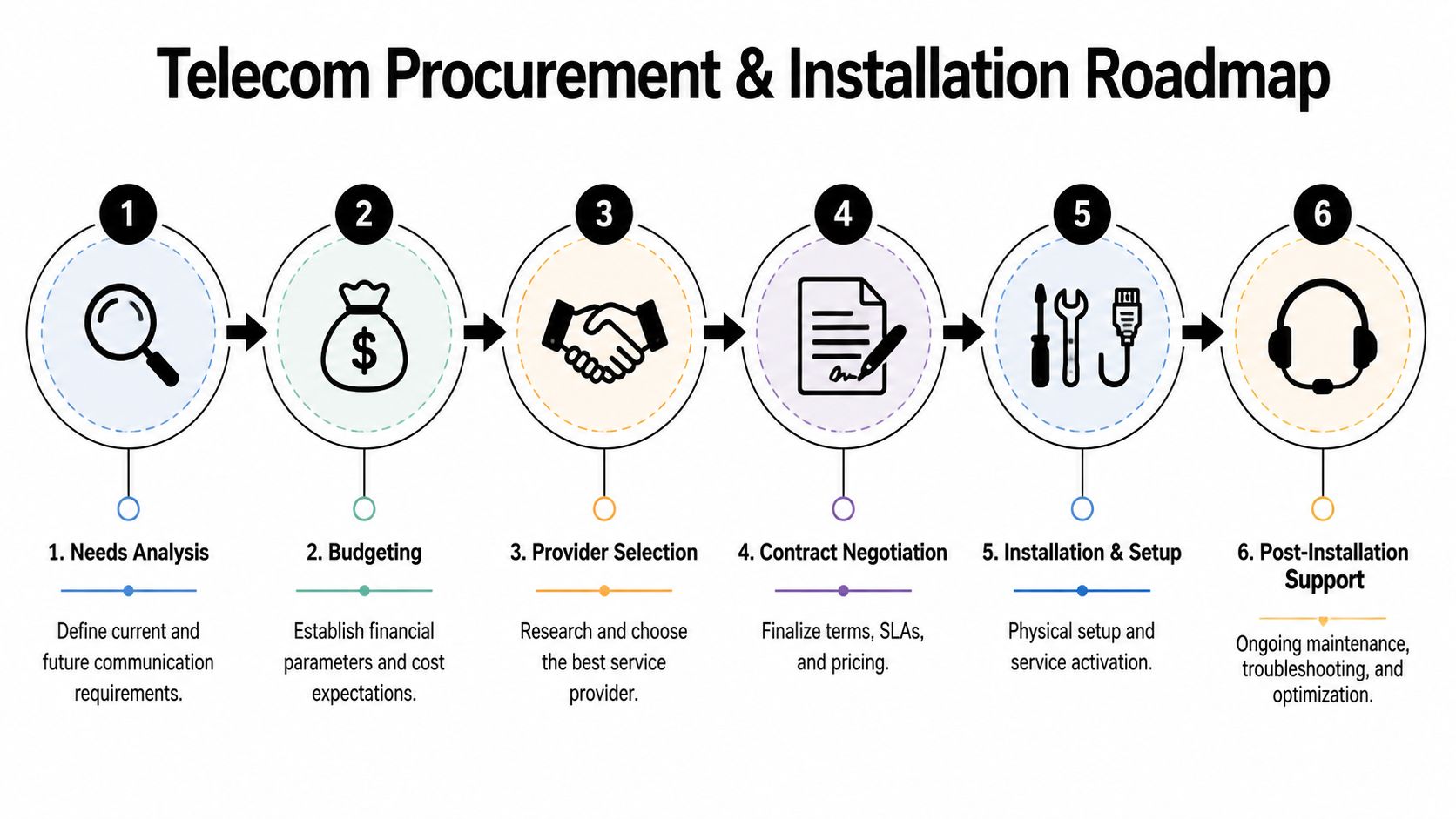
Houston businesses upgrading broadband also face the back-end consequence of modernization. As noted by Harris County's broadband initiative information, modern broadband upgrades generate significant quantities of outdated networking gear, and integrating IT asset recycling and certified data destruction into the transition plan improves operational efficiency and supports growing ESG expectations.
A practical six-step approach
Define the business need first
List locations, cloud apps, voice requirements, guest Wi-Fi needs, remote access, support hours, and any uptime sensitivity. Don’t start with bandwidth. Start with operations.Audit your current environment
Identify every circuit, firewall, switch, PBX component, rack asset, and carrier-owned device. If you skip this, old hardware will surprise you at the end.Request comparable quotes
Make each provider respond to the same scope. Ask for install assumptions, SLA details, demarc responsibilities, support model, and failover options in writing.
Build decommissioning into procurement
This step is where experienced teams save time. Get your asset disposition plan quoted while you’re still choosing the new service.
That means deciding which assets are provider-owned, which are yours, which may hold data, and which need certified destruction or environmentally compliant recycling. It also means deciding where removed equipment will stage during the cutover.
Field rule: If disposal isn’t assigned to a named owner before installation starts, it usually becomes a delayed cleanup project.
Negotiate the contract with cutover in mind
Don’t just negotiate monthly recurring charges. Confirm construction assumptions, porting dependencies, cancellation triggers, and acceptance criteria.Coordinate installation and migration windows
Assign who handles on-site access, internal cabling changes, handset swaps, testing, and rollback decisions if something fails.Close the project properly
Remove obsolete gear, document what stayed and what left, confirm account closures, and update diagrams and vendor records.
Businesses that want a broader sourcing process can borrow from established IT procurement best practices, especially when telecom, hardware refresh, and office changes happen in the same quarter.
Your Checklist for Comparing Telecom Providers
A Houston owner reviewing three telecom quotes can end up choosing the wrong provider for a simple reason. The monthly price is clear, but the service boundaries are not.
Good comparisons strip the sales language out of the proposal. Put every provider on the same worksheet, force written answers, and score the offer based on how it will perform during installation, daily use, and eventual replacement. That last point gets missed often. If a new circuit, firewall, gateway, or phone system goes in, old gear has to come out, and that creates security, storage, and disposal work that should be compared now, not after cutover.
Provider Comparison Checklist
| Criteria | Provider A | Provider B | Provider C |
|---|---|---|---|
| Service type proposed | |||
| Primary connection media | |||
| Backup connectivity option | |||
| Stated speed tiers | |||
| SLA terms that are actually committed in writing | |||
| Support coverage and escalation ownership | |||
| Building, construction, or access assumptions | |||
| Contract term and renewal structure | |||
| Early termination liability | |||
| Provider equipment versus customer-owned equipment | |||
| Voice or UCaaS platform included | |||
| Security, monitoring, or managed support add-ons | |||
| Number porting and cutover coordination | |||
| Removal of replaced equipment included | |||
| Data-bearing devices identified for destruction or recycling |
A useful checklist does more than compare bandwidth. It exposes where one cheap quote turns expensive. A provider that offers a lower monthly rate but leaves inside wiring, after-hours work, equipment removal, and support escalation on your team may cost more in staff time and project risk than a higher-priced competitor.
Questions worth asking every provider
- What is not included in this quote? Ask them to list excluded labor, construction, cabling, hardware, taxes, and cutover work.
- Which devices will be retired if we buy this service? Routers, firewalls, handsets, modems, and voice gateways can all create disposal and data handling obligations.
- Who owns the installed equipment at the end of the term? That affects replacement planning, return obligations, and whether your team is stuck storing old gear.
- What happens on day two if service degrades? Get the exact support path, not just the sales answer.
- Will you remove and document retired equipment? If not, assign that task internally or to an ITAD partner before installation begins.
One more check matters in practice. Ask each provider how they work with the rest of your vendor stack. Businesses that already have formal purchasing and accountability processes can apply the same discipline here through IT vendor management best practices.
The best proposal is not always the cheapest or the fastest on paper. It is the one that fits the site, supports the business, and leaves you with a clean transition plan for the equipment being replaced.
Frequently Asked Questions About Business Telecom
What's the real difference between business and residential internet
Business internet usually comes with stronger support expectations, more suitable contract terms for commercial use, and options for service levels, static design choices, and managed equipment. Residential service may look cheaper, but it often isn’t structured for business uptime, troubleshooting urgency, or multi-site planning.
Do I need a telecom consultant to help me choose
Not always. A small single-site office with straightforward needs can often buy well if it asks disciplined questions and compares proposals carefully. A consultant becomes more useful when you have multiple sites, a voice migration, building construction variables, or several vendors involved.
Is 5G a viable primary internet option for my business yet
Sometimes, but it depends on the site, workload, and tolerance for variability. It can be useful for backup connectivity, temporary offices, and some low-complexity environments. For operations that depend on stable voice, file transfers, cloud access, or always-on service, most businesses should evaluate it cautiously as part of a layered design.
How long does a typical fiber installation take
It varies by building readiness, permitting, construction needs, landlord coordination, and whether the provider already serves the property. If a carrier says the address is serviceable, ask whether that means “lit and ready” or “possible after construction.”
Should I keep old telecom gear after migration
Keep it only for a defined reason, such as a short rollback window or a compliance hold. Otherwise, old PBX hardware, routers, switches, and storage devices tend to become clutter and risk. If the equipment may hold data or sensitive configurations, handle its retirement as a security task, not just a cleanup job.
What should I prepare before meeting providers
Bring a list of users, locations, current services, recurring pain points, expected growth, critical applications, and any equipment you believe will be replaced. That last item matters because telecom upgrades don’t end at activation. They end when the old environment is properly retired too.
If your business is replacing PBX systems, switches, routers, or other retired telecom hardware, Montclair Crew Recycling can help you handle the back end of the project responsibly. They support organizations that need secure IT asset disposition, certified data destruction, environmentally compliant recycling, and practical removal logistics for telecom and IT equipment that no longer belongs in production.
