

Your office probably isn't asking for “cabling.” It's asking for relief.
Relief from video calls that freeze in the conference room but work fine at one desk. Relief from file transfers that crawl for no obvious reason. Relief from the scramble that starts when a Dallas office move, remodel, or headcount jump turns a few random patch cords into a real business problem.
That's usually when business owners and IT managers start looking for network cabling services in Dallas. The mistake is treating it like a basic wiring purchase. It isn't. A structured cabling system is the physical platform your switches, phones, access points, cameras, and business apps all depend on. If that platform is messy, underdesigned, or undocumented, every future move, add, and change gets slower and more expensive.
Your Digital Backbone Why Professional Cabling Matters
A common Dallas scenario goes like this. A company adds staff faster than expected, squeezes in more desks, hangs more wireless access points, and repurposes a storage room into usable office space. Nothing looks dramatic at first. Then the help desk tickets pile up. Phones cut out, meeting rooms behave unpredictably, and nobody trusts the labels in the closet because half of them are wrong or missing.
That isn't just an IT annoyance. It's a business operations problem.
Professional structured cabling gives you a system instead of a pile of connections. It creates predictable pathways, clean terminations, tested links, and records your team can use later. That matters in a market like Dallas, where businesses expand, relocate, and reconfigure space constantly.
Dallas also isn't a place where cabling should be treated as an afterthought. One local provider notes it was founded in 1981 and serves DFW with a Dallas office in Carrollton, which shows more than four decades of regional market development for professional network infrastructure services and the local expectation for staffed support and emergency response in a major commercial market (Dallas network cabling services overview).
Practical rule: If the business depends on the network every hour of the day, the cabling plant should be managed like infrastructure, not furniture.
Good cabling also works best when paired with visibility after the install. Once the physical layer is in place, an Infrastructure monitoring platform helps IT teams spot switch, uplink, and device issues before users turn them into complaints.
Understanding What Professional Cabling Services Include
A real cabling project has a sequence. When that sequence gets skipped, costs show up later as rework, downtime, and confusion.
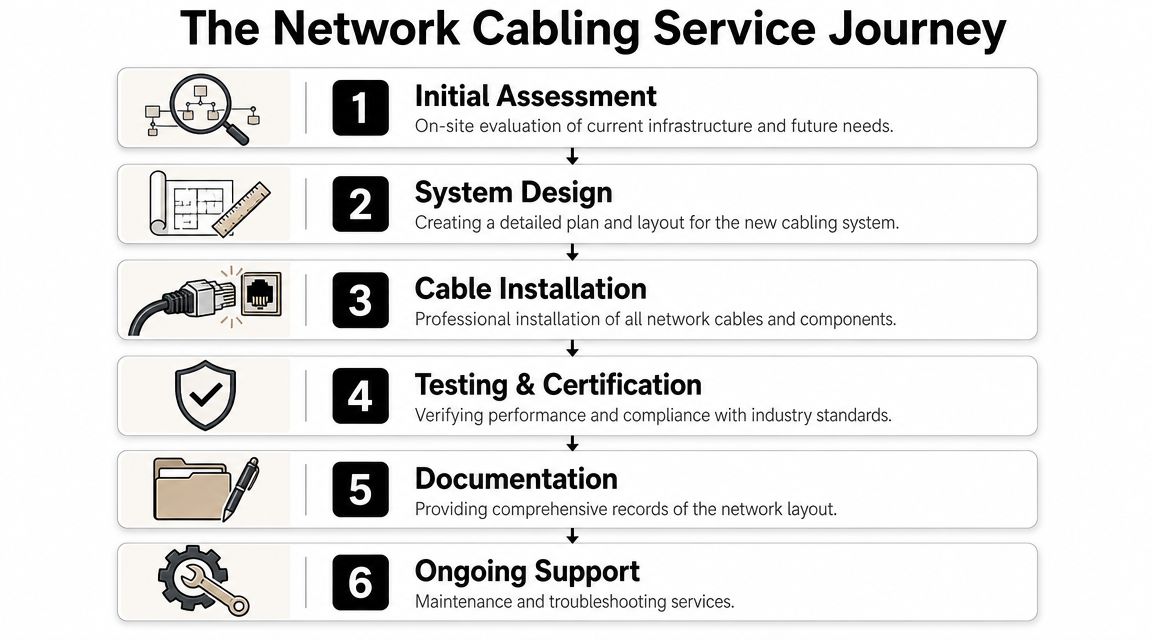
Assessment and design come first
The first step is the site survey. The cabling team should walk the space, inspect pathways, identify telecom room locations, review ceiling conditions, and understand where users, phones, printers, access points, cameras, and specialty devices will live.
Weak projects start to show if an installer jumps straight to “How many drops do you want?” without asking how the space will be used. They're pricing labor. They're not designing infrastructure.
A proper design also includes rack layout, patch panel planning, pathway strategy, labeling logic, and room for future growth. If you're coordinating telecom with AV, security, or a relocation, it also helps to review related telecommunications services in Dallas so the low-voltage scope stays aligned across trades.
Cable type selection drives long-term value
Dallas providers commonly support Cat5e, Cat6, Cat6a, and fiber, with Cat6a and fiber used for higher-performance deployments. Cat6a is often the preferred choice when an organization wants headroom for 10G-class networking, while fiber is used where backbone scale, distance, or growth demands more capacity (Dallas cabling options and future-proofing guidance).
That choice shouldn't be based on what's cheapest this week. It should be based on what you'll need the space to do for years.
A simple way to think about it:
| Environment | What usually works | What often causes regret |
|---|---|---|
| Standard office user areas | Well-planned copper runs with consistent labeling | Random mixed categories installed wherever space is available |
| Dense collaboration zones | Higher-performance cabling with room for more devices | Bare-minimum drop counts that force unmanaged expansion later |
| IDF to MDF or building backbone | Fiber where scale and backbone growth matter | Treating backbone needs like ordinary desk cabling |
| Renovations and phased growth | Design for future MACs and spare capacity | Filling every pathway without planning for additions |
Installation is only one part of the service
The physical pull matters, but it's only one layer of the job. A professional crew also handles pathway management, terminations, rack and patch panel work, faceplates, cable management, separation from interference sources, and cleanup that leaves the closet usable instead of chaotic.
A lot of business owners underestimate how much disciplined installation affects later support. The “neat and labeled” part isn't cosmetic. It determines whether your IT staff can isolate a bad link quickly or spend half a day tracing mystery cables.
For readers outside the U.S. who manage multi-site operations, many of the same principles apply in international rollouts too. This guide to IT networking for Philippine companies is a useful comparison point because the core issues are similar: planning, standards, scalability, and maintainability.
Testing, certification, and documentation complete the job
A finished cabling plant should be tested and documented before handoff. The install isn't complete when the link light comes on. It's complete when the contractor can show what was installed, where it goes, how it was labeled, and that it passed the required test standard.
That handoff package should include items such as:
- As-built records: Actual installed pathways, room IDs, and termination points.
- Labeling schedules: Jack, panel, and cable identifiers that match what's in the field.
- Test results: Certification records for the installed links.
- Rack and closet documentation: Enough detail that another technician can work on the system later without guesswork.
A cabling system without documentation is harder to own than it is to install.
Budgeting Your Dallas Network Cabling Project
Most Dallas businesses start with one question: what's the cost per drop? That's fair, but it's incomplete.
A smart budget for network cabling services in Dallas looks at three layers at once. The per-drop price, the labor environment inside your building, and the long-term cost of changes after the project is done.

The numbers Dallas buyers should know
Dallas-focused pricing guides report that commercial Cat6A network cabling commonly runs from $125 to $250 per drop for a certified installation, while other local sources place structured cabling services at $150 to $350 per data drop depending on cable type, building layout, and installation complexity. The same Dallas pricing guide says experienced installers may charge about $90 to $150 per hour, which is why serious budgets are usually built per drop, per foot, and per labor hour rather than as one flat number (Dallas network cabling pricing guide).
Those ranges tell you something important. There is no honest universal price for a Dallas cabling project.
What moves the quote up or down
A quote gets pushed by conditions, not just by cable count. Common cost drivers include:
- Building layout: Long horizontal runs, difficult pathways, and spread-out work areas increase labor.
- Ceiling and wall conditions: Finished spaces are different from open construction.
- Retrofit versus new build: Working around an occupied office usually costs more in time and coordination.
- Closet readiness: A clean, prepared telecom room is cheaper to work in than a cramped, disorganized one.
- Testing and turnover requirements: Certification and complete closeout packages take time, but they're worth paying for.
If you're comparing proposals, ask whether the quote assumes standard business-hours access, whether patch panels and racks are included, and whether change requests are likely if your scope shifts midstream. If equipment is being removed as part of a remodel, some firms also look at secondary recovery options through channels like telecom equipment buyers in Dallas, which can help offset disposal or decommissioning decisions.
Cheapest per drop usually costs more later
The low bid often wins by leaving something out. Usually that's documentation, testing rigor, pathway planning, or room for future additions.
If your team expects growth, the cheapest quote can become the most expensive network you own.
The better way to budget is to ask one more question: what will it cost to support this cabling over its life? That's where total cost of ownership becomes real.
How to Evaluate and Choose a Dallas Cabling Provider
A Dallas cabling contractor can make a project look easy on paper. The true difference shows up six months later, when your team needs to troubleshoot a user issue, add desks, expand wireless coverage, or trace a link inside a crowded telecom room.
That's why provider selection should be based on process quality, not just bid price.

Start with design oversight
One of the clearest signs of a serious provider is certified design involvement. Industry specifications used by Texas institutions can require the installation company to have a Registered Communications Distribution Designer (RCDD) on staff and full-time during all phases of the installation, including testing and documentation. That requirement matters because certified oversight reduces common failure points such as mis-termination, label drift, and undocumented pathways that later increase troubleshooting time and outage risk (RCDD requirement and documentation importance).
If a contractor treats design as optional, expect operational problems later.
Ask questions that expose risk
A good interview with a cabling provider shouldn't sound polite. It should sound specific.
Use questions like these:
- Who owns the design? If the answer is vague, the project will be too.
- What test results do you provide at handoff? “We test everything” isn't enough.
- How do you label jacks, panels, and pathways? If they don't have a naming convention, you'll inherit confusion.
- Who updates the as-builts when field conditions change? Many projects frequently falter in this area.
- What does support look like after completion? You need to know how MACs and troubleshooting will be handled.
A lot of businesses also benefit from outside review before signing a contract. Independent telecom consulting services in Dallas can help validate scope, check assumptions, and identify what a bid leaves out.
What good providers do differently
Strong providers usually show their discipline before the project begins. You'll see it in the proposal structure, the site walk, the questions they ask, and the way they document assumptions.
Here's a quick screen:
| What to look for | Why it matters |
|---|---|
| Clear scope language | Prevents change-order fights and hidden omissions |
| Defined testing and closeout | Gives IT something usable after install |
| Logical labeling plan | Cuts support time during MACs |
| Familiarity with local commercial conditions | Reduces friction during scheduling and coordination |
| Post-install responsiveness | Matters when punch-list items or later changes appear |
The cheapest installer might be able to pull cable. That doesn't mean they can deliver a cabling system your business can manage.
A Pre-Installation Checklist for IT Managers
Internal prep changes the outcome more than is commonly expected. Even with a good contractor, a poorly prepared site creates delays, bad assumptions, and expensive last-minute changes.

What to have ready before the crew arrives
- Current floor plans: Mark offices, open areas, conference rooms, reception, break rooms, and specialty spaces.
- Device counts by area: Don't just count people. Count phones, printers, access points, cameras, AV gear, and anything else needing a connection.
- Port location decisions: Walk the space and approve outlet locations before installation starts.
- Closet access: Make sure telecom rooms can be opened, cleared, and worked in safely.
- Coordination with other trades: Electricians, furniture installers, security vendors, and general contractors can interfere with each other if sequencing isn't handled.
- Downtime plan: Identify any cutovers or temporary service interruptions before they become a surprise.
The practical items people forget
Occupied offices create their own constraints. Building access, badge requirements, after-hours work windows, elevator reservations, and noise restrictions can all affect labor efficiency.
If your project includes new backbone links or uplink planning, it's also a good time to review specialized options for fiber optic installation near you so that copper access cabling and backbone decisions stay coordinated.
The fastest cabling project is usually the one where the client made decisions before the first cable pull, not during it.
One more point. Confirm who on your side can approve field changes. If every small routing decision has to wait for multiple stakeholders, the schedule drifts quickly.
Common Network Cabling Pitfalls to Avoid
The phrase “good enough” causes more bad cabling decisions than any technical issue.
It usually shows up when someone tries to save money on cable category, skips certification, accepts incomplete labeling, or assumes permits and building requirements will sort themselves out. Those shortcuts don't stay cheap for long.
Buying for today instead of the service life
A short-term mindset leads teams to install only what the current floor plan needs. Then a year later, the office changes, wireless density increases, or the company adds systems that need cleaner backbone performance and more disciplined patching.
That's when underbuilt cabling starts charging rent. Every move becomes harder. Every addition needs a workaround. Every closet gets messier.
Accepting work without proof
A network link that “seems fine” is not the same as a tested, documented link. If your contractor leaves without a closeout package, your IT team inherits uncertainty.
Watch for these red flags:
- Missing certification records: You can't verify what was delivered.
- Inconsistent labels: MAC work takes longer because nobody trusts the identifiers.
- No as-built updates: The field install no longer matches the original drawings.
- Ad hoc pathway use: Future additions become cramped and messy faster.
Ignoring building and project coordination issues
Low-voltage work still has to fit the building environment. Landlord rules, site access restrictions, occupied-space scheduling, and coordination with other trades can disrupt a project if nobody owns them.
Businesses also forget the end-of-life side. During renovations or network refreshes, old switches, patch panels, phones, and related gear have to go somewhere. In those situations, Montclair Crew Recycling is one example of a provider that handles business IT equipment and networking equipment recycling as part of decommissioning and disposition workflows.
Poor cabling isn't always dramatic. Often it just wastes time every week until the waste becomes normal.
Frequently Asked Questions About Dallas Cabling
Is structured cabling different from just running Ethernet where I need it
Yes. Structured cabling is a planned system. It organizes pathways, termination points, patching, labeling, and records so the network can be supported over time.
Running a few cables point to point may work temporarily. It usually fails when the office changes, the network grows, or another technician has to troubleshoot what was done.
Should I choose copper or fiber
It depends on the role of the link. Copper is common for work-area connections. Fiber is often the better fit for backbone links, data center interconnects, and environments where growth, distance, or higher-performance requirements make it the stronger long-term choice.
The right answer usually includes both, used intentionally.
How long should a professionally installed cabling system last
A properly designed cabling plant should support your business for years if the original category choices, pathways, labeling, and documentation were done well. What shortens useful life isn't always cable failure. It's poor planning, crowded pathways, undocumented changes, and repeated ad hoc additions.
Do I really need documentation if my office is small
Yes. Small offices change too. Staff moves desks, conference rooms get upgraded, wireless gear gets added, and service providers need demarcation points identified. Documentation prevents small environments from becoming confusing environments.
What should I ask for at project closeout
Ask for certification results, as-built documentation, labeling records, and a clear explanation of what was installed in each room and closet. If a provider can't hand over a usable record set, the project is unfinished from an operational standpoint.
Is network cabling only about internet access
No. Your cabling plant supports much more than internet connectivity. It may carry voice, wireless access point uplinks, cameras, access control, printers, AV systems, and internal network traffic between business systems. That's why a sloppy install affects far more than browsing speed.
Build a Foundation for Future Growth
The right cabling project doesn't just solve today's trouble tickets. It lowers the cost of future MACs, shortens troubleshooting time, and gives your IT team a network they can manage.
That value comes from four decisions. Plan the system around how the space will operate. Budget for quality instead of chasing the lowest number. Choose a provider with disciplined design and handoff practices. Demand documentation that stays useful after move-in.
If your Dallas business is planning an office buildout, relocation, refresh, or data room upgrade, start with a professional site survey. Get the layout, category selection, and closeout requirements right before cable is pulled. If your project also includes retiring old communications hardware, it can help to plan downstream disposition through services related to sustainable telecom recycling in Dallas.
If your project includes removing old phones, switches, servers, patch hardware, or other retired IT assets during a cabling upgrade, Montclair Crew Recycling is one option to evaluate for business IT equipment disposal, data destruction support, and electronics recycling as part of the broader refresh process.
