

You’re probably here because the current setup is annoying everyone.
Calls drop in the middle of customer conversations. Internet slows down when staff jump on video meetings. A provider rep promises “business-grade” service, but the proposal mixes phones, fiber, routers, and managed support into a bundle that’s hard to compare. Then there’s the part almost nobody mentions when searching business telecom services near me. What happens to the old desk phones, PBX hardware, switches, and server gear once the new system goes live?
That full lifecycle matters. In Atlanta, a small business owner usually isn’t just buying bandwidth or VoIP seats. You’re making a decision that affects service continuity, staff productivity, security, contract risk, and eventually equipment disposal. If you skip the front-end planning, you get oversold. If you skip the back-end cleanup, you keep paying for dead lines or leave sensitive data sitting on retired hardware.
The practical way to shop for telecom is simple. Define needs first, shortlist local providers second, compare quotes on equal terms, read the contract like an auditor, manage the cutover like a project, and retire old equipment like it still contains business data. Because it often does.
Assess Your Business Needs Before You Search
Typing business telecom services near me into Google too early usually creates noise, not clarity. The best vendors can only solve the problems you can describe accurately.
Most Atlanta businesses start with a vague request. Better internet. Better phones. Better support. That’s not enough. A useful buying process starts with a written requirements sheet that covers how your team works today and what will break if the wrong system gets installed.
Audit what your team actually uses
Start with a simple internal review. Don’t guess. Pull bills, look at call records, ask department heads where service quality hurts work, and list every location that depends on the connection.
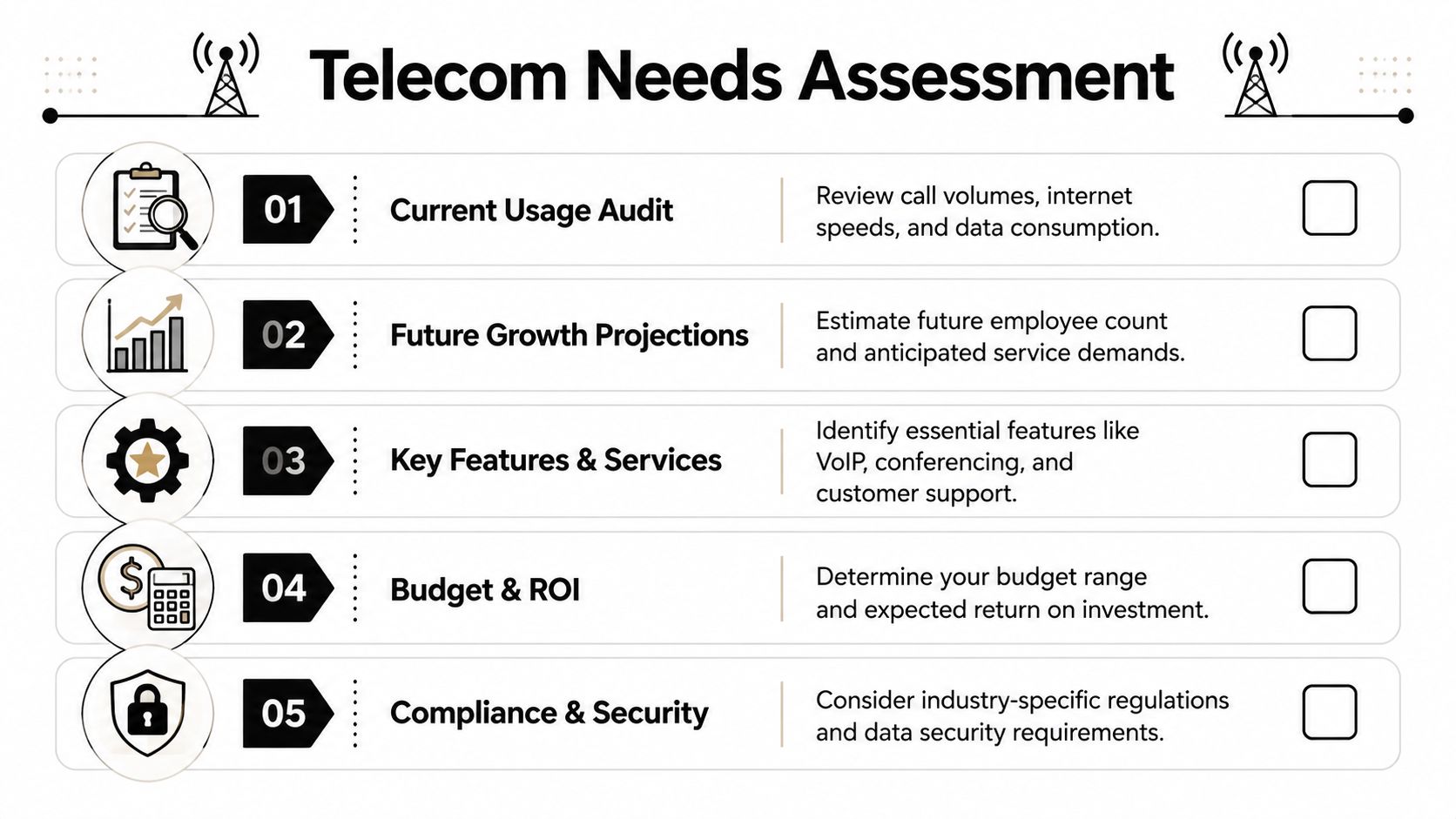
Use a checklist like this:
- Internet dependency: Which tasks stop when the connection slows down? Think cloud accounting, VoIP calls, EMR access, CRM usage, file sync, security cameras, and card processing.
- Calling patterns: Do you have a front desk taking inbound calls all day, or mostly outbound sales calls, or a hybrid schedule where staff answer from mobile and desktop apps?
- Remote access needs: Who works from home, who travels, and who needs the same extension behavior from a laptop or mobile device?
- Location complexity: One office is simpler than a company with an Alpharetta office, a warehouse in Smyrna, and field staff across Metro Atlanta.
- Existing equipment: List desk phones, firewalls, switches, routers, patch panels, PBX hardware, conference units, and any server dependencies.
If you don’t know how to think through the phone side specifically, a practical primer on choosing a phone system for your business can help you sort hosted VoIP from more traditional setups before you talk to sales teams.
Practical rule: If a requirement matters enough to complain about later, write it down now.
Define future needs, not just current pain
A lot of bad telecom decisions come from buying for today’s headcount only. If your business plans to add staff, open another office, move suites, or push more work into cloud platforms, your network and phone design need room to grow.
Write down likely changes over your next planning cycle:
- New employees who need phones, softphones, call routing, or secure Wi-Fi access.
- Additional locations that may need site-to-site connectivity, standardized support, or centralized billing.
- Application changes such as moving more files, backups, or line-of-business tools into cloud services.
- Compliance pressure if you handle patient data, financial records, student records, or regulated customer information.
This doesn’t need to become an overbuilt enterprise design. It just keeps you from buying a cheap system that you’ll outgrow the first time you add a second office or need cleaner call handling.
Build your minimum requirements document
A one-page requirements document is enough for most small businesses. It should answer the questions vendors always dance around when they want to pitch a bundle instead of a fit.
Include these items:
| Requirement area | What to document |
|---|---|
| Internet service | Primary connection type, reliability issues, backup connection need, critical apps |
| Voice system | Number of users, desk phones vs softphones, call routing, voicemail, mobile app need |
| Office layout | Current cabling issues, Wi-Fi dead zones, conference room needs, front desk setup |
| Support expectations | Response speed, onsite vs remote support, after-hours needs |
| Growth plan | New hires, future offices, likely service expansion |
| Security and compliance | Data handling concerns, access control, vendor responsibilities |
A strong requirements document changes the tone of the buying process. Instead of asking, “What do you sell?” you ask, “How do you meet these needs, and where are the trade-offs?”
That’s a much better place to buy from.
Finding and Shortlisting Local Telecom Providers
The search results for business telecom services near me aren’t neutral. Ads dominate the page. Large carriers show up first. Review platforms flatten meaningful differences between a national provider with a local sales office and a local firm that sends the same project manager to your site.
That’s why shortlisting should be deliberate.

Search with business context, not generic phrases
A broad search term pulls broad results. Add your business type, city, and service need. A medical office in Sandy Springs should search differently than a manufacturer in Kennesaw or a law office in downtown Atlanta.
Examples of better searches:
- Business fiber internet Marietta GA
- VoIP provider for medical office Alpharetta
- Managed telecom support Norcross multi-location
- Business failover internet Roswell
- Hosted phone system for law firm Atlanta
The point isn’t to find more vendors. It’s to find the right category of vendors.
Why local shortlists matter more than ever
The range of providers is broad. In 2026, the United States is home to 1,630 Internet Service Providers, up 3.6% from 2025, with a 4.6% CAGR from 2021 to 2026 according to IBISWorld’s ISP industry data. For an Atlanta business, that means you’re not limited to the biggest brands. You can often compare major carriers with regional fiber providers, MSP-led telecom offerings, and firms focused on backup connectivity.
That competition is good, but it also makes weak shortlists more common. If you grab the first three names you see, you may compare companies that aren’t even solving the same problem.
National carriers often win on footprint. Smaller providers often win on responsiveness, design flexibility, and the quality of local follow-through.
Use offline channels too
Some of the best referrals never appear in search results. Ask other businesses in your office park, building, or trade network who they use and what happened after install day. Support quality usually shows up in those conversations fast.
Good places to source recommendations:
- Property managers: They know which providers already serve your building and which ones have caused repeated tenant complaints.
- Local chambers and B2B groups: Members will often share unfiltered installation and support experiences.
- Your IT provider: If they aren’t selling telecom directly, they may still know who coordinates well during installs and who creates ticket chaos.
- Low-voltage contractors: Cabling teams often know which telecom projects run cleanly and which arrive with sloppy scopes. If you need a parallel example of how local trade directories can surface niche providers, this guide to locate AV installers in Wisconsin shows the same idea in another service category.
For a local starting point that’s closer to Atlanta business needs, you can also review telecom-related options through this Atlanta telecom solutions resource.
Build a shortlist that’s actually comparable
A useful shortlist usually includes a mix, not a monoculture:
| Provider type | What they often do well | What to verify carefully |
|---|---|---|
| National carrier | Coverage, bundled services, broad product catalog | Support escalation, contract complexity, install coordination |
| Regional fiber provider | Local network focus, personalized service | Building availability, service depth beyond connectivity |
| MSP with telecom offering | Integrated support with IT environment | Whether telecom is core expertise or a sideline |
| Hosted VoIP specialist | Call flow design, user management, business phone features | Internet dependency, hardware compatibility, support hours |
Aim for 3 to 5 vendors on your shortlist. That’s enough to compare seriously without turning the process into a second job.
If a vendor can’t clearly explain service availability at your address, support ownership, installation scope, and how they’ll meet your written requirements, remove them early. A longer list doesn’t make the decision better. It just adds meetings.
Evaluating Vendors and Comparing Quotes
By this point, most problems shift from search to interpretation. Vendors rarely quote services in the same format. One bundles handsets. Another pushes leasing. A third keeps recurring fees low but leaves out install work, licensing details, or support limits.
The fix is to make every provider respond to the same questions.
Use an RFP that forces apples-to-apples answers
You don’t need a formal enterprise procurement process. You need a clean document that stops vendors from hiding behind custom wording.
Ask every provider for written responses on:
- Service design: Internet, voice, failover, managed firewall, Wi-Fi, conferencing, contact center functions if needed
- Hardware model: Included, purchased outright, leased, or third-party compatible
- Implementation scope: Site survey, installation, cabling assumptions, training, number porting, testing
- Support model: Hours, response process, escalation ownership, onsite availability
- Billing structure: Recurring services, one-time fees, taxes, surcharges, overage conditions, change fees
- Exit conditions: Term length, auto-renewal terms, early termination exposure, equipment return requirements
A vendor that resists structured comparison is telling you something. Usually that their quote looks strongest only when details stay fuzzy.
Score the vendors in one place
Use a simple table and keep your notes blunt. A “4” with a useful note is better than a vague feeling that one rep seemed polished.
Telecom Vendor Comparison Checklist
| Criteria | Vendor A Score (1-5) | Vendor B Score (1-5) | Vendor C Score (1-5) | Notes |
|---|---|---|---|---|
| Fit to requirements | ||||
| Internet reliability approach | ||||
| Voice features and usability | ||||
| Backup connectivity options | ||||
| Installation clarity | ||||
| Support responsiveness | ||||
| Contract transparency | ||||
| Hardware flexibility | ||||
| Security alignment | ||||
| Overall confidence |
This works especially well if one person from operations, one from finance, and one from IT each score the proposals separately. You’ll catch blind spots faster.
For a broader framework on keeping vendors organized and accountable, this practical guide on IT vendor management best practices is worth reviewing.
Ask questions that expose weak proposals
A polished demo can hide a messy deployment. Push vendors into specifics.
Ask things like:
- What exactly happens if our primary connection fails?
- Who owns number porting, and how do you prevent porting errors?
- Which features require add-on licensing later?
- What equipment remains on-premises in our office?
- What dependencies exist on our current network switches, firewall, or cabling?
- Who handles post-install user training?
- Which support issues are handled locally versus routed through a national queue?
A good quote explains what is included. A great quote also makes clear what is not included.
Compare the real trade-offs
Different vendors can all be “good” and still suit different businesses.
A law office with a receptionist-heavy call flow may prioritize clean hunt groups, voicemail handling, and support responsiveness over the lowest monthly price. A small manufacturer may care more about stable fiber, backup connectivity, and warehouse Wi-Fi coverage. A medical practice may need confidence that voice quality, failover behavior, and support accountability won’t collapse during patient-facing hours.
Here’s where many buyers slip. They compare price before they compare operational fit.
Use this lens when reading quotes:
- Low setup cost may mean more of the burden lands on your staff during deployment.
- Bundled hardware may reduce upfront pain but create long-term lock-in.
- Leasing can preserve cash flow but often deserves harder scrutiny than buyers give it.
- All-in-one providers reduce finger-pointing, but only if they own support end to end.
- Bring-your-own-device flexibility helps if you already have usable handsets or network gear.
Don’t reward the slickest presentation. Reward the provider that made it easiest to understand risk, responsibility, and operational impact.
Navigating Contracts and Service Level Agreements
The monthly rate on the first page is rarely the whole story. Telecom contracts hide risk in renewal language, service definitions, implementation assumptions, and billing details that don’t look dangerous until the first dispute.
That’s why the contract deserves the same scrutiny as the technology.

Read for obligations, not marketing
Sales decks describe outcomes. Contracts describe what the provider is promising. Those are not always the same thing.
Look closely at these areas:
- Term length: Know the initial commitment and what happens when it ends.
- Auto-renewal: Many businesses get trapped here because nobody tracks notice windows.
- Price adjustment language: If the contract gives broad room for increases, the “great rate” may only be temporary.
- Installation exclusions: A quote can sound turnkey while the contract leaves cabling, electrical work, permits, or hardware readiness to you.
- Support scope: “24/7 support” may mean call intake, not actual resolution.
- Service credits: If uptime or performance misses target, what remedy do you get, and how do you claim it?
If a provider says, “Nobody ever asks about that,” ask harder.
Your SLA should contain measurable promises
An SLA that says the provider will use “commercially reasonable efforts” is weak. You want commitments you can verify.
Review whether the agreement defines:
| SLA area | What good language should do |
|---|---|
| Uptime | State the service target and how downtime is measured |
| Incident response | Define severity levels and response expectations |
| Performance | Clarify how latency, packet handling, or voice quality issues are addressed |
| Maintenance windows | Explain when planned work may affect service |
| Credits and remedies | Spell out what compensation applies if targets are missed |
| Escalation | Identify how unresolved problems move upward |
If the provider offers voice and internet together, make sure support responsibility stays clear. Businesses lose time when the carrier blames the phone platform and the phone vendor blames the circuit.
Audit invoices from day one
Billing errors are not rare in telecom. Up to 14 percent of telecom bills contain errors, typically favoring the carrier, and a systematic audit process can recover 8 to 12 percent of annual telecom spend by catching issues such as charges for retired services according to this telecom management analysis from GDS.
That matters even more after a migration, when old circuits, unused lines, and forgotten features tend to linger on invoices.
A practical invoice review process looks like this:
- Create a service inventory with every circuit, line, license, device, and location.
- Map each service to an owner inside your business.
- Review invoices line by line against what is live and approved.
- Flag retired equipment ties such as old PBX lines, analog backups, or decommissioned site services.
- Dispute errors quickly and track resolution dates.
Contract habit: Put renewal notice dates and billing review dates on your calendar the day you sign.
For local buyers comparing providers in Atlanta, this telecommunications company near me guide can help frame what to ask before a contract gets signed.
Negotiate the parts that matter most
Small businesses often assume contracts are fixed. Some terms are. Some aren’t.
You may have room to negotiate:
- Notice periods for non-renewal
- Implementation deliverables in writing
- Support escalation contacts
- Service credit language
- Responsibility for number porting errors
- Removal of unused quoted components before signature
The best time to get clarity is before the provider has your business and your phone numbers.
Planning a Smooth Migration and Minimizing Downtime
The buying decision feels important. The migration is where mistakes become public.
Customers hear dead air. Staff can’t log in to softphones. Calls reach the wrong voicemail box. The front desk loses visibility. None of that usually comes from one catastrophic technical failure. It comes from weak project ownership and incomplete testing.
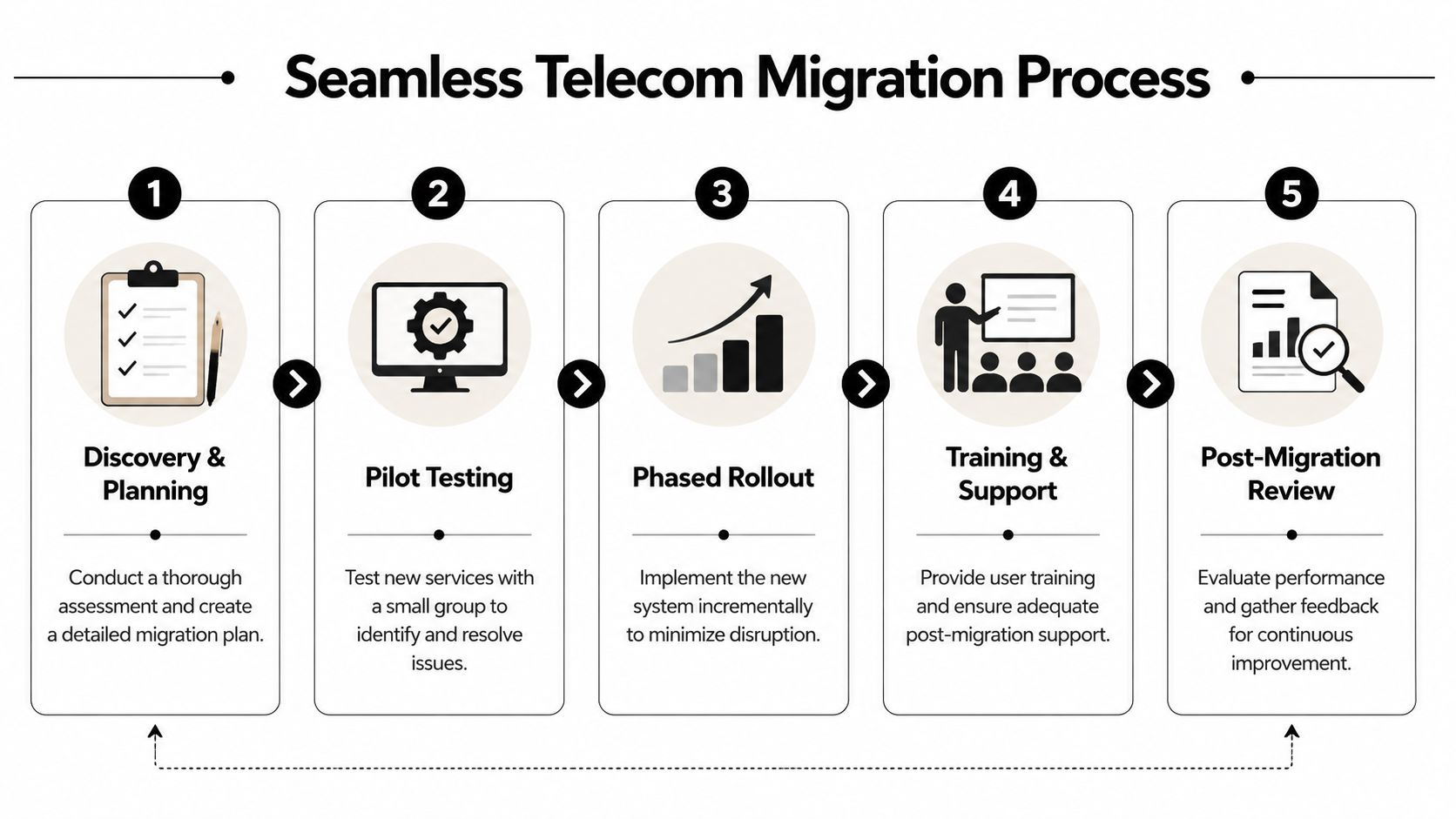
Treat the cutover like a project, not an install
A telecom transition needs a named owner on your side and one on the vendor side. Without that, tasks scatter. Number porting, handset delivery, firewall readiness, call flow testing, training, and invoice cleanup all start drifting.
Successful telecom projects work better when teams define SMART KPIs up front, including targets such as 99.9% uptime during cutover and a VoIP Mean Opinion Score above 4.0. Organizations that set clear success criteria and responsibilities before work begins achieve over 95% on-time completion rates, compared with 60-70% for ad-hoc projects, according to this telecom project management reference.
That difference is exactly why informal migrations create so much pain.
Build a migration sequence your team can follow
Use a staged sequence, even for a small office.
Discovery and dependency review
Confirm all lines, numbers, call flows, hardware, internet dependencies, cabling assumptions, and user groups.Pilot testing
Test a small set of users first. Front desk, remote staff, and one manager usually expose the biggest real-world issues.Cutover planning
Lock in the date, time window, escalation contacts, and fallback plan if number porting or device provisioning fails.User communication
Tell staff what changes, when to expect downtime, how to log in, and who to call for help.Post-cutover validation
Test inbound and outbound calls, ring groups, voicemail, mobile apps, conference rooms, and failover behavior.
A general utility guide like Emmanuel Transport's NBN connection guide isn’t written for Atlanta businesses, but it’s a useful reminder that connection projects succeed when people handle logistics, timing, and readiness before activation day.
Hold the vendor accountable with operational checkpoints
Ask for these checkpoints in writing:
- Service continuity target: What service level should be maintained during the migration window?
- Voice quality acceptance: How will users confirm call quality is acceptable?
- Porting confirmation: When will each number status be checked, and by whom?
- Training completion: Which staff roles get onboarding before launch?
- Issue escalation path: Who answers if front desk phones fail during business hours?
For larger offices or multi-site environments, the same discipline used in data center migration best practices applies here too. Dependencies have to be identified before anything moves.
Don’t schedule cutover based on the vendor’s convenience alone. Schedule it around your customer traffic, billing cycles, and internal tolerance for disruption.
Common mistakes that cause avoidable downtime
The pattern is familiar:
- No number port verification until the day of cutover
- No pilot group, so all issues appear at once
- No front desk test scripts, even though reception is usually the highest-impact role
- No ownership for old services, so legacy lines remain active and confusing
- No user training, which gets misread as a technical failure
A calm migration almost always looks boring from the outside. That’s the standard you want.
Securely Retire Your Old Telecom Equipment
The new system is live. Calls work. Internet is stable. Staff have moved on.
Now you have a closet full of old gear that still matters.
Desk phones may be low risk, but PBX appliances, voicemail systems, routers, firewalls, switches, and telecom-adjacent servers can hold configuration data, credentials, call records, and storage media your business shouldn’t toss in a dumpster. For healthcare, finance, education, and government-adjacent organizations around Atlanta, this isn’t just housekeeping. It’s part of security and compliance.

Old telecom gear can still expose your business
Retired equipment gets ignored because it’s no longer in production. That’s exactly why it becomes risky.
Globally, 62 million metric tons of e-waste were generated in 2023, only 22.3% was formally recycled, and Verizon’s 2025 DBIR linked 15% of data breaches to improperly decommissioned hardware as cited in this business telecom and e-waste reference. The environmental issue is real, but for a business owner the security angle usually matters first. Devices that leave your control without proper data destruction can create avoidable exposure.
What proper retirement looks like
A responsible process usually includes more than pickup.
Look for these steps:
- Asset audit: Identify what is being removed, from handsets and switches to PBX units and storage-bearing appliances.
- Data handling decision: Determine which items need certified wiping and which require physical destruction.
- Chain of custody: Keep records from removal through final disposition.
- Resale or value recovery review: Some business-grade equipment may still have reuse value.
- Environmental compliance: Non-reusable gear should move through compliant recycling channels, not general waste.
For organizations with internal policies or regulated data, documented handling matters as much as the technical destruction step.
Tie disposal back to the original telecom project
The cleanup should be scheduled during the migration plan, not months later when nobody remembers what was removed.
Use a retirement checklist like this:
| Retirement task | Why it matters |
|---|---|
| Confirm replacement is fully live | Prevents accidental disposal of still-needed hardware |
| Match retired gear to service inventory | Helps stop billing for dead services |
| Identify storage-bearing devices | Flags equipment that needs data destruction |
| Document serials and asset tags | Supports compliance and internal records |
| Separate reusable from scrap equipment | Improves sustainability and possible value recovery |
Retired hardware is still part of your risk surface until it’s documented, sanitized, and removed properly.
For Atlanta businesses that need a compliant path for electronics and retired IT hardware, this corporate electronic asset recycling resource gives a practical view of what organized disposition should include.
What doesn’t work
A few bad habits show up over and over:
- Stacking retired devices in storage rooms with no owner
- Letting staff take equipment home without any asset tracking
- Assuming factory reset equals secure data removal
- Throwing mixed electronics into general junk hauls
- Ignoring old telecom invoices after physical removal
The most mature telecom decisions don’t end with a successful install. They end when the old environment has been removed, billing is clean, and your business no longer carries silent risk from obsolete gear.
If your business is replacing phones, network hardware, servers, or other telecom-related equipment in Metro Atlanta, Montclair Crew Recycling can help close out the project properly. Their team handles business IT equipment removal, asset auditing, secure data destruction, and environmentally compliant recycling for organizations across the Atlanta area, including Alpharetta and Smyrna. That gives you a practical final step after a telecom upgrade: clear the old gear, protect the data on it, and document the disposition process so nothing gets left behind.
