
If you're running an Atlanta company in 2026, you're probably staring at a pile of aging laptops, a few servers that still “work fine,” and a budget conversation that keeps getting pushed to next quarter. That's the trap. Hardware refresh decisions rarely blow up all at once. They show up as slow logins, unsupported devices, procurement delays, migration headaches, and old machines that suddenly can't meet current security or operating system requirements.
A lot of businesses bought heavily during the pandemic. Now that equipment is aging at the same time. Add the Windows 10 deadline to the mix, and the old habit of replacing gear only when it breaks stops being cheap and starts being reckless. Smart IT hardware refresh cycles in Atlanta companies aren't about buying shiny equipment. They're about controlling risk, keeping staff productive, and ending the lifecycle with secure, compliant disposal.
The Hidden Costs of an Outdated IT Refresh Strategy
The conversation usually starts like this. A business owner asks why IT wants to replace devices that haven't technically failed. Finance sees working laptops. Operations sees people getting by. IT sees expired warranties, compatibility trouble, and a support queue filled with avoidable noise.
That gap matters because broken hardware isn't the actual threshold. Business damage starts earlier. Staff lose time on sluggish endpoints. Internal IT spends too many hours patching around hardware limitations. New security tools don't run cleanly on older systems. Then one forced OS decision turns a manageable refresh into a rushed one.
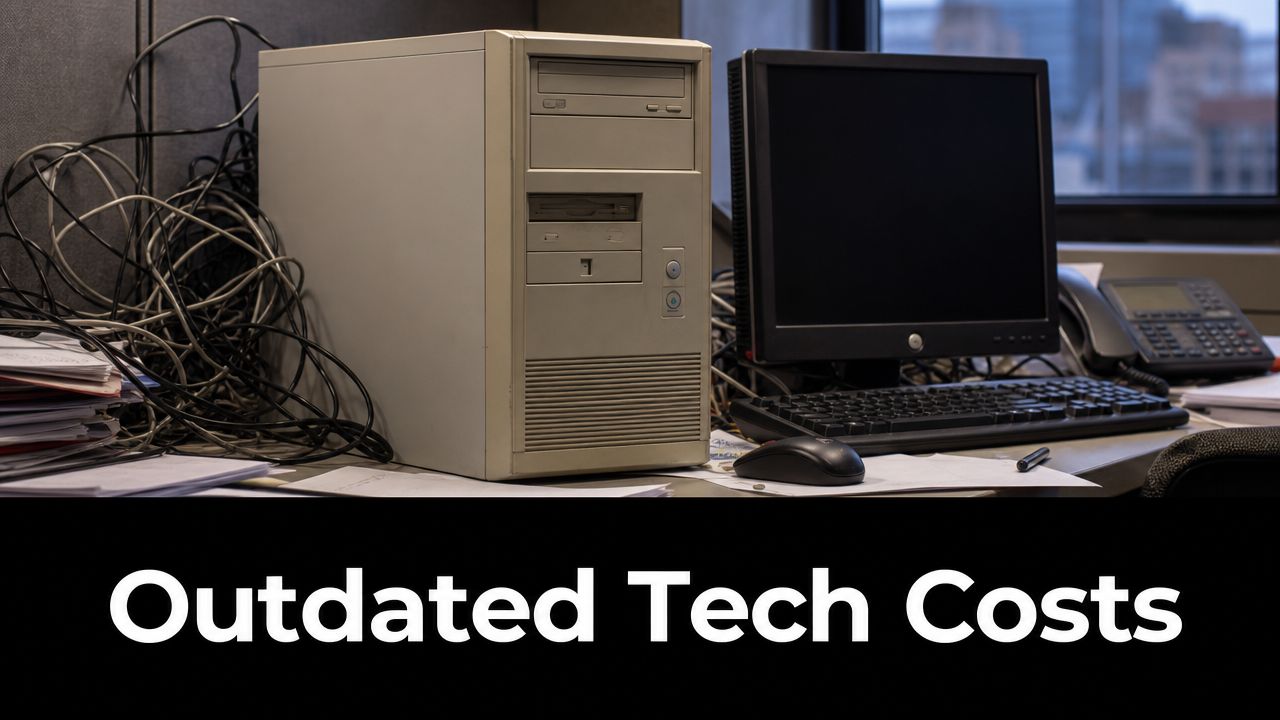
Atlanta companies are running into a timing problem
The pressure is sharper now because the 2025 to 2026 hardware refresh wave is a major inflection point, and the end of support for Windows 10 in October 2025 is expected to trigger simultaneous upgrades, which can create supply constraints and implementation backlogs for companies that wait too long, according to this analysis of the coming hardware refresh wave.
That means delay has a cost even before a device dies. If your team waits until every machine is urgent, you lose your advantage on purchasing, scheduling, deployment, and user support. You also make migration harder than it needs to be.
Old hardware doesn't fail on your timeline. It fails in the middle of payroll, month-end close, client work, or a compliance review.
Replace the break-fix mindset
A refresh cycle is a management discipline, not a shopping list. It gives leadership a predictable way to decide what gets replaced, when, and why. It also forces better procurement habits. If your current process is “ask for quotes when complaints get loud,” fix that first by building a repeatable lifecycle plan tied to budgeting and standards, similar to the discipline outlined in these IT procurement best practices.
The companies handling this well aren't replacing everything blindly. They're identifying which assets create business risk, which assets can be safely extended, and which ones need to leave the environment now. That's the difference between controlled spending and emergency spending.
Understanding the IT Hardware Refresh Cycle
Think of your technology estate like a fleet of delivery vehicles. You wouldn't wait for every truck to die on the highway before replacing it. You'd track age, mileage, service history, and route importance. A delivery van used all day in dense Atlanta traffic gets different treatment than a backup vehicle parked most of the week.
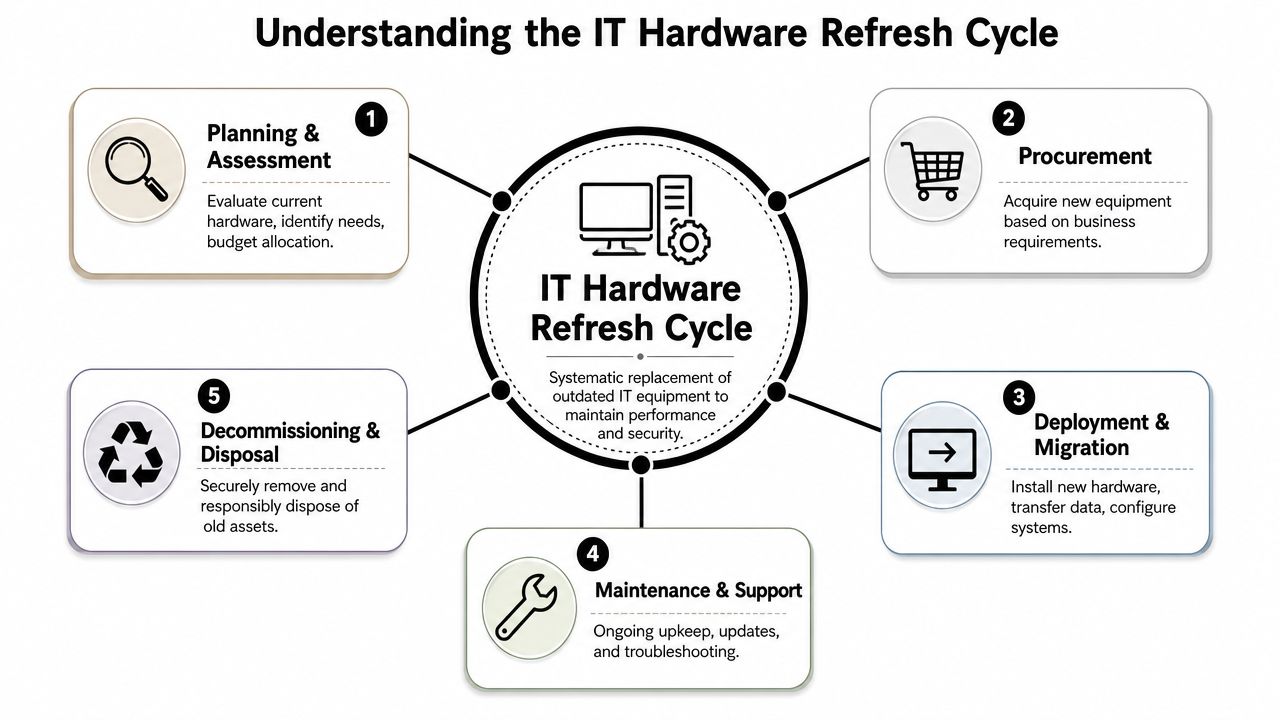
IT hardware works the same way. A refresh cycle is the operating model that decides how assets move from purchase to deployment, support, replacement, and retirement. Without it, companies overspend on emergencies and underspend on planning.
It's a lifecycle, not a one-time purchase
Most leaders think about hardware at the moment of purchase. That's too narrow. Actual cost and risk sit across the full lifecycle:
- Planning: Decide what each role needs. A CAD workstation, a front-desk kiosk, and an executive laptop shouldn't be bought to the same standard.
- Procurement: Standardize models where possible so support, imaging, and parts management stay sane.
- Deployment: Move users with minimal disruption, validate applications, and preserve data.
- Support: Track warranty status, performance issues, and compatibility with current tools.
- Retirement: Sanitize data, document chain of custody, and dispose of assets responsibly.
If you want a strong framework for that broader process, this IT asset management guide is a useful reference because it treats hardware as an operational asset instead of a one-off expense.
What a good cycle actually does
A formal cycle gives you three business advantages.
First, it reduces surprises. You know what's aging out before it becomes an outage.
Second, it improves budgeting. Finance can plan for recurring replacement windows instead of absorbing sudden capital requests.
Third, it tightens control. IT can enforce standards, security baselines, and retirement procedures across the fleet.
Practical rule: If you can't quickly answer when a device was bought, what role it supports, whether it's under warranty, and what data it holds, you don't have a refresh cycle. You have inventory drift.
Asset lifecycle discipline matters more in 2026
Atlanta firms are dealing with a more complex environment than they were a few years ago. Hybrid work increased laptop dependence. Pandemic-era purchases created clustered aging. Security baselines got stricter. AI experimentation is pushing some infrastructure harder than expected.
That's why refresh planning has to connect to broader asset lifecycle management. Hardware decisions aren't isolated. They affect support workloads, software compatibility, onboarding speed, user productivity, and compliance exposure.
Standard Refresh Timelines for Business Hardware
An Atlanta company that bought hundreds of laptops during the 2020 to 2021 scramble is now hitting the same wall at once. Batteries are failing. Windows 11 compatibility is inconsistent. The Windows 10 end date in 2026 turns what looked like a budgeting choice into a deadline.
Set timelines by hardware class, then adjust by business role. That is the only practical way to avoid a rushed replacement cycle and the inflated pricing, downtime, and disposal backlog that come with it.
For Atlanta businesses, a workable baseline is 3 to 5 years for desktops, 3 to 4 years for laptops, 4 to 6 years for servers, and 5 to 7 years for network devices, based on this hardware refresh cycle guidance for Atlanta organizations.
Typical IT Hardware Refresh Cycles for Atlanta Businesses 2026
| Hardware Type | Typical Refresh Cycle | Key Considerations |
|---|---|---|
| Desktops | 3 to 5 years | Extend only in light-duty roles where devices remain supported and still meet application needs |
| Laptops | 3 to 4 years | Mobile wear, battery decline, and daily user impact usually justify faster replacement |
| Servers | 4 to 6 years | Workload growth, virtualization density, warranty status, and OS support should drive timing |
| Network devices | 5 to 7 years | Hardware may last physically, but firmware support and security standards decide useful life |
| Telecom equipment | Varies by vendor support and business use | Replace based on support status, integration fit, and operational importance |
These are planning ranges, not default orders.
A sales laptop used all day on the road should not follow the same cycle as a front-desk desktop. A lightly used workstation in a stable role can stay longer if it runs current software cleanly, passes security standards, and does not waste staff time. If your team is expanding its use of AI tools, that changes the math too. Newer workloads often expose weak memory, storage, and processor performance faster than your old planning model expected. Atlanta firms testing those use cases should tie endpoint and server timing to how Atlanta businesses are adopting AI tools, not just to asset age.
Server timelines deserve tighter scrutiny in 2026
Server refresh guidance changed after years of budget pressure and virtualization gains. Analysts cited in this analysis of data center hardware refresh cycles found many organizations had stretched their server intervals compared with earlier years.
That trend does not justify pushing every server to five or six years. It tells you to separate stable infrastructure from stressed infrastructure. Domain services, file services, and predictable internal applications may support a longer run if the hardware is still under support and performing well. Compute-heavy workloads, dense virtual hosts, analytics jobs, and new AI experiments should be reviewed sooner because failure and performance drag cost more there.
Use role-based timing, not one company-wide number
A smart refresh plan usually looks like this:
- Knowledge-worker laptops: Replace on the shorter end because slow boot times, poor battery life, and compatibility issues hit productivity every day.
- Reception, kiosk, and light-duty desktops: Extend if they stay supported, remain secure, and still run required applications without delay.
- Executive and power-user systems: Refresh sooner if the role depends on video, design, analytics, local processing, or constant travel.
- Core servers: Keep only while vendor support, workload demand, and recovery requirements still make sense financially.
- Switches, firewalls, and other network gear: Replace according to firmware support, security updates, and architecture fit, not because the device still powers on.
The main recommendation is simple. Build a tiered model now, before Windows 10 deadlines and clustered pandemic-era purchases force you into a single large replacement event. That gives you better budget control, fewer support tickets, and a cleaner path to secure retirement and disposal later.
Key Drivers That Dictate Your Refresh Timing
A controller asks why Atlanta companies need another round of hardware spending in 2026. The answer is simple. Many firms are hitting two deadlines at once. Pandemic-era purchases are aging out together, and Windows 10 retirement is turning “still usable” into “needs action now.”
Age belongs on the spreadsheet, not at the center of the decision. Refresh timing should follow business risk, operating cost, compliance exposure, and the demands of the work each asset supports. That is how you justify spend to leadership and avoid replacing equipment too early in one department while keeping risky systems too long in another.
Business pressure sets the real deadline
Old hardware creates visible costs long before it fails. Help desk time rises. Users lose time to slow startups, poor battery life, and unstable peripherals. Auditors ask harder questions when unsupported systems stay in scope. Security teams end up compensating for weak endpoints instead of reducing risk at the source.
Analysts have long noted that regular server replacement cuts support effort and frees IT staff for higher-value work. The exact number matters less than the pattern. Companies that wait too long spend more time maintaining old systems and less time delivering projects that improve operations, customer service, and revenue.
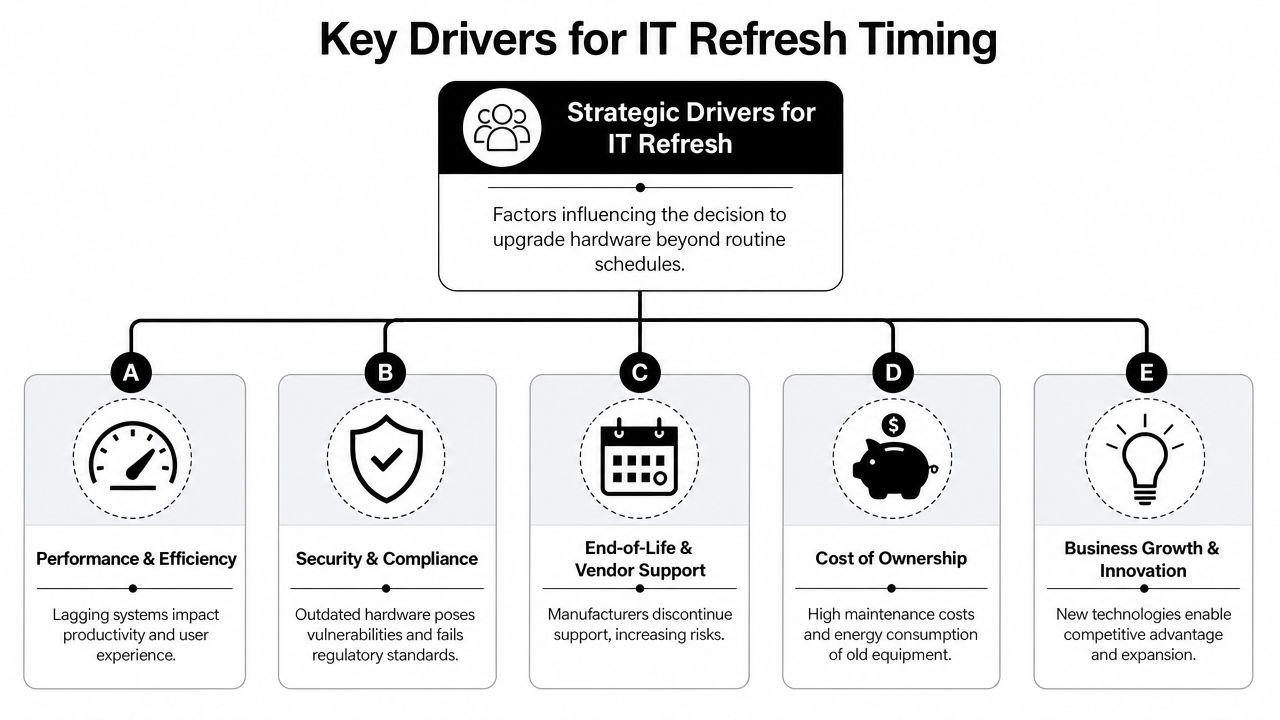
The five triggers I would use in an Atlanta refresh plan
- Support status and warranty coverage: Once vendor support ends, every outage costs more. Parts take longer to find, recovery gets slower, and you own the risk.
- Windows 10 and security tool compatibility: If a device cannot move cleanly to the supported operating system and run current endpoint protection, identity controls, and encryption, retire it. Do not budget around exceptions.
- Performance against actual work: Measure login times, application load times, storage latency, memory pressure, CPU saturation, and video call performance. Replace systems that slow down employees in revenue, service, or operational roles.
- Maintenance burden: Frequent tickets, battery replacements, adapter workarounds, fan noise, overheating, and scavenged parts are signs that the asset is already too expensive to keep.
- New workload requirements: AI pilots, heavier collaboration platforms, and denser virtualization change the hardware baseline. If your team is expanding automation or experimenting with copilots, review how Atlanta companies are adopting AI tools at work and decide which devices can support those workloads without dragging down users.
If the hardware still turns on but cannot support the business securely and efficiently, its service life is over.
Criticality beats age every time
A five-year-old front-desk desktop and a five-year-old file server do not belong in the same conversation. Neither do a lightly used conference room PC and a sales executive's travel laptop. Refresh timing should follow consequence. Start with four questions. What happens if this system fails, who depends on it, what data does it touch, and can your team still support it without wasting time?
That approach matters more in 2026 because Atlanta companies are dealing with a post-pandemic hardware glut. Many devices were bought in compressed waves, which means many now look old at the same time. If you refresh by age alone, you will create a budget spike and replace low-impact assets before high-risk ones. Sort by business impact first. Then replace, reassign, upgrade, or retire based on what the business needs.
How to Build a Practical Hardware Refresh Plan
A useful plan fits on a page before it grows into a spreadsheet. If it starts as a giant transformation program, it will stall. Keep it simple. Inventory what you own, sort it by business importance, define replacement windows, and phase the work so your team can execute it.
Start with a clean inventory
You can't refresh what you can't see. Build a live inventory that includes purchase date, model, serial, assigned user or system owner, warranty status, operating system, and business role. For servers and network gear, add workload or function. “Server 12” isn't useful. “ERP database host” is useful.
Then tag each asset into one of three buckets:
- Replace now for unsupported, high-risk, or visibly underperforming hardware.
- Replace on schedule for assets still stable but approaching their planned window.
- Extend with review for gear in low-risk roles that remains supported and performs adequately.
Use a phased schedule, not a mass replacement
A phased refresh cycle produces better technical outcomes because it reduces migration risk and allows performance baselining before and after deployment, as described in this hardware refresh planning article. That advice is right. Big-bang replacements look efficient on paper and create chaos in practice.
Use phased rollouts because they let you test imaging, application compatibility, user data migration, and deployment logistics in controlled batches. They also smooth spending across quarters instead of cramming every purchase into one painful event.
A sensible sequence often looks like this:
- First wave: Devices blocked by current security or operating system requirements
- Second wave: High-dependency user groups such as finance, operations, engineering, or customer-facing teams
- Third wave: Shared systems, lower-risk endpoints, and equipment suitable for reassignment
- Final wave: Decommissioning, validation, and disposal
Build your budget around business impact
Don't ask for a lump sum “hardware upgrade budget.” That language invites pushback. Ask for funding tied to risk reduction and operational outcomes.
Use plain business cases:
- User productivity: Replacing lagging laptops shortens daily friction for staff who live in Microsoft 365, Teams, browsers, ERP screens, or creative apps.
- Support load: Standardized replacements reduce one-off troubleshooting and hardware exceptions.
- Security posture: Hardware that can't support current OS and endpoint requirements shouldn't remain in production.
- Compliance readiness: Regulated businesses need clear retirement controls, not a back closet full of old devices.
What to document for approval: asset list, age, support status, user impact, replacement window, migration approach, and disposal method.
Treat replacement and reassignment as separate decisions
Not every retired device needs to leave the building immediately. Some systems can be reassigned to lighter-duty roles if they remain supported and useful. But make that an intentional decision, not a reflex.
A laptop moved from a power user to a kiosk role still needs documentation, security review, reimaging, and a planned retirement date. Otherwise, you've just hidden old risk in a different department.
Lock in the retirement step before deployment starts
Many plans fall apart because teams focus on buying and installing new gear, then leave old assets stacked in storage. This creates security exposure, audit trouble, and inventory confusion.
Your refresh plan should include end-of-life handling from day one: who collects equipment, how data is destroyed, how chain of custody is recorded, and when equipment leaves the premises. If you skip that, your project isn't complete.
Navigating Security and Compliance at End-of-Life
A surprising number of companies treat retired hardware like office junk. They move old laptops to a closet, stack drives in a cabinet, or let equipment sit in a warehouse “until someone deals with it.” That's not storage. That's unmanaged risk.
The danger isn't theoretical. End-of-life hardware often still contains user files, cached credentials, saved browser data, email archives, customer records, financial documents, and line-of-business application data. If you don't control disposal, you don't control the data.
The real compliance problem is loose process
Healthcare groups, financial firms, schools, manufacturers, and public sector organizations all face different regulatory pressure, but the operational lesson is the same. You need documented end-of-life handling.
For many Atlanta organizations, that means mapping retired equipment to the requirements that matter most internally and externally, such as:
- HIPAA: Protected health information can't ride out the door on an old workstation or laptop.
- SOX: Public companies need disciplined control over systems tied to financial reporting and records.
- GLBA: Financial institutions need strong safeguards around customer financial information.
None of those frameworks reward vague disposal habits. “We wiped it, probably” is not a control.
The riskiest device is the one everyone forgot
The old server in the storage room. The laptop from a terminated employee. The desktop that got replaced during an office move. Those are the devices that create ugly incidents because nobody owns them anymore.
A secure refresh program requires chain of custody, verified sanitization or destruction, and records that show what happened to each asset. If your disposal process is informal, fix it before the next refresh batch begins. This Georgia ITAD services guide is a useful starting point for understanding what a documented disposition process should include.
Retiring hardware without documented data handling is a security failure, even if the replacement project itself went smoothly.
Compliance starts before the asset leaves
Good end-of-life control begins while the device is still in service. Know who used it, what data classes it touched, whether encryption was enabled, and whether the drive will be sanitized, shredded, or both.
That's especially important in mixed environments where not every asset gets the same treatment. A receptionist PC, an HR laptop, a bank workstation, and a healthcare endpoint should not all follow the same disposal assumptions. Your policy should reflect data sensitivity, not just device type.
Responsible Disposal Your Final and Most Critical Step
A hardware refresh is only successful when the old asset is out of your environment, the data is destroyed appropriately, and the disposition record is complete. Everything before that is only partial execution.
Responsible disposal does three jobs at once. It protects data, supports compliance, and keeps reusable or recyclable equipment out of landfill streams. If your organization wants a broader consumer-facing overview of the environmental side, this guide to a zero e-waste world is a useful companion read.
What responsible disposal should include
A proper closeout process should cover more than pickup.
Look for these elements:
- On-site removal and logistics: Old equipment shouldn't sit around waiting for volunteers to move it.
- Asset audit: Every collected item should be tracked against an inventory list.
- Certified data destruction: Drives need a defined sanitization or destruction method.
- Environmentally compliant disposition: Reusable assets should be recovered when appropriate, and non-reusable assets should be processed through responsible recycling channels.
- Reporting: You need documentation for internal control, audit support, and policy enforcement.
Montclair Crew Recycling is one Atlanta-area option for this final step. The company handles on-site removal, asset audit and logistics, certified data destruction, environmentally compliant disposition, and, when applicable, resale or profit-sharing on datacenter equipment. That matters when your refresh plan includes more than desktops and laptops.
Don't let old hardware become a shadow inventory
The worst outcome after a refresh is a hidden second fleet. New devices go into service, but the old ones remain in closets, cages, branch offices, or storage rooms with no clean ownership trail. That creates confusion during audits and leaves sensitive hardware outside active controls.
Use a hard rule. Once a replacement asset is deployed and validated, the retired asset moves immediately into your disposition workflow. No exceptions for “temporary storage” unless the asset is logged, secured, and scheduled for a defined next step.
Atlanta companies need closure, not accumulation
A practical refresh plan ends with documented closure. That means the device is removed from the asset register, its data handling is verified, and its disposition is recorded. For organizations with recurring refresh cycles, that closeout discipline is what keeps the next cycle manageable.
If you're reviewing options for secure retirement and recycling, these responsible computer disposal services in Georgia show the kind of end-of-life support an Atlanta business should expect from an IT asset disposition partner.
A lot of IT hardware refresh cycles in Atlanta companies fail at the finish line. Not because the buying decision was wrong, but because nobody owned the retirement process. Fix that, and the refresh becomes what it should be: a controlled business process from procurement to disposal.
If your company is planning a hardware refresh, replacing Windows 10 systems, retiring old servers, or clearing out pandemic-era equipment, Montclair Crew Recycling can help you complete the last step correctly. Their Atlanta-area team supports business IT equipment removal, audit-ready tracking, certified data destruction, and responsible recycling so your refresh plan ends with security, compliance, and clean closure.
