

Your office phones still work, technically. Calls come in. People can transfer them, most of the time. But every small change turns into a project. A new employee needs an extension. A remote manager needs the main business number on a mobile app. Someone asks for call reporting, and the old PBX has nothing useful to offer. Then a major headache shows up during an outage, a move, or a carrier billing dispute.
That's where most Dallas businesses start looking at VoIP. Not because it's trendy, but because the old setup has become expensive to maintain, hard to manage, and disconnected from how teams work now. If you're comparing VoIP phone services in Dallas, the biggest mistake is treating it like a simple phone replacement. It isn't. It's a communications platform sitting on top of your network, your workflows, and every odd legacy device nobody remembered until cutover week.
Upgrading Your Business Communications in Dallas
Most companies don't switch phone systems because they love telecom projects. They switch because the current system is slowing down operations. Legacy PBX hardware often leaves teams stuck with rigid call routing, poor mobile support, limited reporting, and service changes that require outside help for basic tasks.
VoIP is no longer a niche option for early adopters. It's a mainstream buying category. The global VoIP services market was valued at $132.47 billion in 2023 and is projected to reach $326.27 billion by 2032, while 36% of software buyers choose VoIP compared with 24% choosing traditional phone systems, according to Nextiva's VoIP market statistics. For a Dallas buyer, that matters because it signals maturity. You're not betting on an experimental platform. You're buying into an established communications model.

What improves when the move is done right
A solid VoIP deployment changes more than dial tone.
- User mobility improves: Staff can answer calls from desk phones, laptops, or mobile apps without exposing personal numbers.
- Administration gets easier: Moves, adds, and routing changes usually happen in a web portal instead of through old carrier tickets.
- Reporting becomes usable: Managers can see how calls flow through sales, support, and reception instead of guessing.
- Expansion gets simpler: Adding a new office, temporary team, or remote user is usually far easier than extending a legacy phone closet.
Dallas businesses also tend to need systems that work across office, warehouse, field, and hybrid environments. That's one reason companies often pair VoIP with broader telecommunications services in Dallas instead of evaluating phones in isolation.
The strongest VoIP rollouts don't start with features. They start with operations. Who answers what, from where, during which failure scenario?
Where sales pitches usually gloss over the hard parts
Provider websites love to highlight lower monthly cost and shiny feature bundles. Those benefits are real, but they don't answer the practical questions that determine whether the migration succeeds:
- What happens to the fax line tied to billing?
- Does the alarm panel still require analog support?
- Can your internet circuit handle voice cleanly during backup jobs and video meetings?
- Who fixes a routing issue at 6 a.m. when the front desk can't receive calls?
Those are the questions worth asking before you sign anything. In Dallas, the right VoIP system isn't the one with the longest feature list. It's the one that fits your workflows, survives everyday network conditions, and doesn't create surprise workarounds after go-live.
Key Criteria for Selecting Your VoIP Provider
The monthly per-user price is the easiest thing to compare, and usually the least useful. A provider can look inexpensive until you discover that analytics are shallow, support is slow, onboarding is weak, and key integrations sit behind a higher plan.
Early in the buying process, use a short list that reflects how your business operates. Modern VoIP systems now function as workflow platforms, with built-in analytics that track call volume, duration, and response times, while bundling video conferencing, SMS, and faxing into one suite, as described in Dallas-focused VoIP guidance from Vested Networks. That means you're evaluating much more than voice quality.
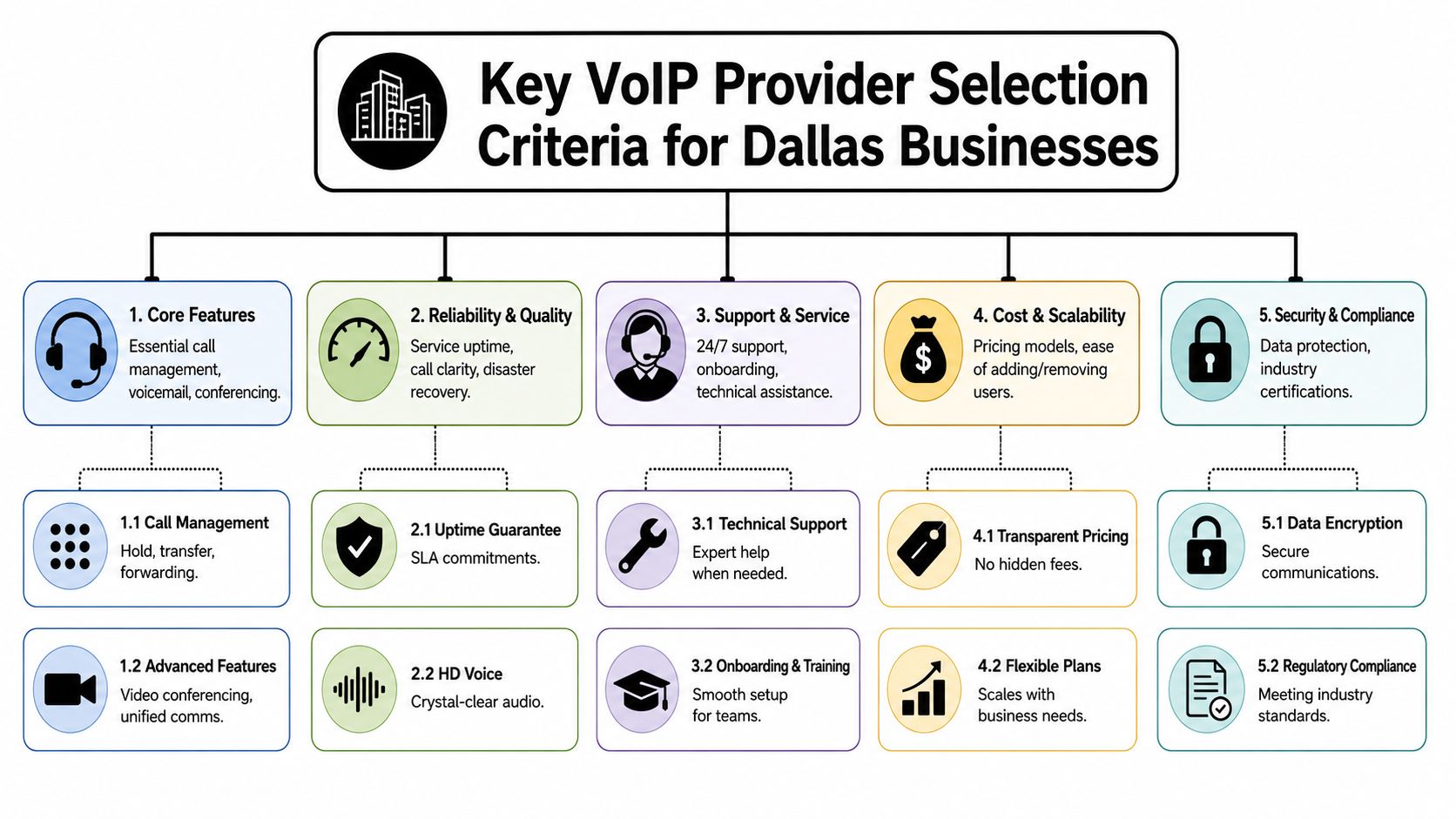
Compare providers on these five areas
| Criteria | What to review | What often gets missed |
|---|---|---|
| Core features | Auto attendants, ring groups, voicemail, mobile apps, call queues | Whether features are included in your plan or locked behind upgrades |
| Analytics | Call reporting, response time visibility, queue reporting | Reporting that's too basic for sales or support management |
| Integrations | CRM, help desk, Microsoft 365, Google Workspace | Extra setup work, sync limits, or one-way integrations |
| Support | Onboarding help, admin training, issue escalation | Long response times after the contract is signed |
| Security and compliance | Encryption, admin controls, auditability | Gaps between what the platform offers and what your policies require |
What works in practice
Start with your call flows, not the product catalog. Map reception, sales, service, after-hours, and executive calling separately. A professional services firm may care most about CRM integration and voicemail routing. A warehouse-heavy operation may care more about call queue reliability, paging compatibility, and shared-device simplicity.
Then test administration. Ask for a live demo of common changes:
- New user setup: How many steps does it take to add a user with a phone, app, and voicemail?
- Call routing change: Can an internal admin update holiday schedules and overflow rules without opening a ticket?
- Reporting export: Can supervisors pull useful reports without vendor assistance?
- Device management: How are desk phones provisioned, replaced, and reassigned?
A lot of Dallas companies also benefit from outside telecom consulting services in Dallas before choosing a vendor, especially when multiple offices, call queues, or compliance requirements are involved.
Practical rule: If the provider can't show you daily admin tasks in a live environment, assume the platform will be harder to run than the sales team claims.
Local support versus national scale
National providers can offer polished apps and broad ecosystems. Local or regional partners often provide more direct implementation help. Neither model is automatically better. The deciding factor is how support works when something breaks.
Ask these questions plainly:
- Who owns number porting issues?
- Who handles handset replacement?
- Who helps tune call flows after launch?
- Is emergency support staffed, or just routed into a ticket queue?
- Can they coordinate with your ISP or firewall vendor when call quality drops?
A provider isn't just selling service. They're becoming part of your operating model. Choose accordingly.
Comparing Top VoIP Providers in Dallas
Below is a practical comparison of widely considered providers for Dallas businesses. This isn't a ranking. It's a fit assessment. The right platform depends on whether you prioritize simplicity, integrations, international reach, admin control, or contact-center depth.
Dallas VoIP Provider Comparison (2026)
| Provider | Starting Price (per user/mo) | Key Features | Best For |
|---|---|---|---|
| RingCentral | Qualitatively varies by plan | Unified communications, strong mobile apps, messaging, video, broad integrations | Mid-sized and larger teams that want an all-in-one platform |
| Nextiva | Qualitatively varies by plan | Business phone, collaboration tools, customer communication features, analytics | Service-driven businesses that want straightforward administration |
| 8×8 | Qualitatively varies by plan | Voice, video, chat, contact center options, international orientation | Multi-site organizations and teams with broader calling needs |
| Zoom Phone | Qualitatively varies by plan | Clean interface, strong app familiarity, meetings integration | Companies already standardized on Zoom |
| Microsoft Teams Phone | Qualitatively varies by licensing setup | Teams integration, calling inside Microsoft ecosystem, centralized collaboration | Microsoft-centric organizations with internal IT support |
If you want broader provider selection help beyond brand-name platforms, local buyers often also search for business telecom services near them to compare implementation support, not just software.
RingCentral
RingCentral is usually strongest when a company wants one platform for calling, messaging, meetings, and a mature app experience. It's often a good fit for distributed teams that don't want to stitch together multiple tools.
RingCentral tends to fit companies that value platform breadth over bare-bones simplicity.
Strengths
- Strong unified communications experience
- Mature mobile and desktop applications
- Broad integration ecosystem
- Good fit for hybrid work
Trade-offs
- The platform can feel heavy for very small offices
- Licensing can get confusing when teams only need a subset of features
- Admins still need to understand routing logic well to avoid messy call flows
Nextiva
Nextiva often appeals to companies that want a business phone platform without overwhelming the admin team. The interface and provisioning experience are usually easier for non-telecom staff to manage than some enterprise-heavy alternatives.
This can work well for law firms, accounting groups, medical offices, and other operations where the phone system needs to be dependable first and highly customizable second.
Strengths
- Clear focus on business communications
- Good balance of features and usability
- Suitable for organizations that want easier day-to-day administration
Trade-offs
- Some advanced workflow needs may still require careful plan selection
- Large multi-department routing designs need upfront planning to avoid later cleanup
8×8
8×8 is worth a close look for organizations with multiple locations or more complex calling environments. It often comes up in conversations where voice, collaboration, and contact-center functions may need to coexist.
8×8 usually makes more sense when the phone system sits inside a larger customer communication operation.
Strengths
- Useful for companies with multiple sites
- Broad communications stack
- Good option when contact center functionality may matter later
Trade-offs
- Can be more platform than a smaller office needs
- Setup decisions matter. If the initial call architecture is sloppy, user adoption suffers
Zoom Phone
Zoom Phone is attractive when the business already lives inside Zoom for meetings. The user learning curve is often lighter because employees already know the app environment.
For a lean team, that familiarity can speed adoption. For a larger business, it's still important to verify call handling depth, device support, and administrative controls before assuming meeting strength translates directly into telephony strength.
Microsoft Teams Phone
Teams Phone makes the most sense when your business is heavily invested in Microsoft 365 and already uses Teams as the center of internal communication. In the right environment, it reduces app sprawl and keeps collaboration in one place.
The catch is operational complexity. Teams-based telephony often works best when internal IT can handle policy, licensing, routing, and user support confidently. If your team doesn't have that depth, the platform can become harder to manage than a dedicated VoIP service.
A practical way to choose between them
Pick the provider whose weaknesses you can live with.
- A small office might prefer a simpler admin experience over maximum customization.
- A growing company may accept more complexity in exchange for stronger integrations.
- A multi-location operation may care less about interface polish and more about call routing consistency across sites.
- A regulated business should press hard on admin controls, auditability, and support accountability.
The feature checklist matters. Operational fit matters more.
Preparing Your Network for Flawless VoIP Calls
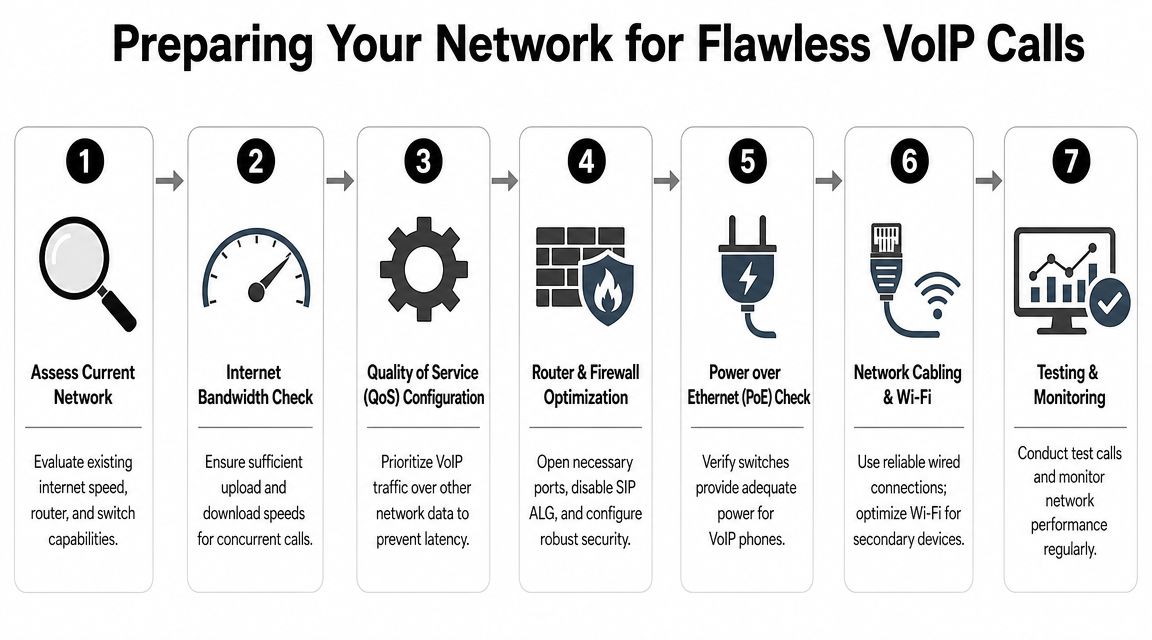
A VoIP system doesn't fail in a vacuum. It fails because the network underneath it was never prepared for real-time traffic. That's why some businesses blame the provider when the actual issue is shared internet congestion, poor firewall behavior, weak switching, or no power protection on the closet equipment.
A practical baseline for capacity planning is to budget 100 Kbps of upload bandwidth per concurrent call and add 20% headroom, which means 10 simultaneous calls need about 1.2 Mbps of dedicated upload capacity, according to this Dallas VoIP infrastructure decision guide. That figure is useful because it gives you a planning rule, not a marketing promise.
Start with the network audit
Before ordering handsets, review these items:
- Internet symmetry: Upload capacity matters as much as download for voice.
- Switching: Confirm switch capacity, PoE support where needed, and closet health.
- Firewall behavior: Review VoIP handling and whether SIP ALG needs to be disabled.
- Traffic prioritization: Voice needs QoS rules so large data transfers don't interfere.
- Wi-Fi expectations: Desk phones should usually be wired. Mobile apps can use Wi-Fi, but don't build your core voice design around weak wireless coverage.
If your office needs physical upgrades before rollout, network cabling services in Dallas often become part of the project, especially in older suites where phones and access points were added piecemeal.
Build for ugly days, not normal days
A lot of systems sound fine when the office is quiet. The real test comes when backups run, video meetings spike, or the primary circuit wobbles. For Dallas businesses, resilience isn't just about the cloud provider. It's about every dependency between the handset and the internet edge.
Focus on these practical safeguards:
- Set QoS intentionally: Voice should be prioritized ahead of non-critical traffic.
- Plan internet redundancy: If phones matter to revenue or customer access, a backup circuit is worth considering.
- Protect power locally: Cloud calling still fails if your switches, firewall, and internet equipment lose power.
- Test failover behavior: Know what happens to inbound calls if the office network goes dark.
- Monitor after cutover: The first week usually exposes routing mistakes and hidden congestion.
Don't accept "reliable" as a claim by itself. Ask what happens when the internet degrades, the firewall reboots, or the power drops in one closet but not the whole office.
What doesn't work
The most common mistakes are predictable:
- Using consumer-grade networking gear in offices that depend on phones all day
- Skipping QoS because the internet speed "looks fast enough"
- Leaving SIP ALG enabled and then chasing random one-way audio or registration issues
- Assuming Wi-Fi is good enough for everything
- Treating a speed test as a full readiness assessment
Voice is unforgiving. File transfers can retry. Email can wait. A live phone conversation can't.
Handling Legacy Hardware in a VoIP World
Many migrations encounter issues at this point. The phones get all the attention, but the business still has devices tied to analog lines. Fax machines. Alarm panels. Elevator phones. Maybe a postage system, gate entry line, or an old conference room device that nobody documented.
A common gap in VoIP planning is accounting for those dependencies. Businesses often still need to support fax lines, alarm panels, or elevator phones, and those devices may require special adapters or analog failover lines during cutover, as noted in Spectrum's Dallas VoIP overview. That's the operational question most sales demos skip.
Inventory first, cut over second
Before you port a single number, build a full telecom inventory. Not just users and DID numbers. Devices, line purpose, physical location, vendor ownership, and whether the device is business-critical.
Use a checklist like this:
- Life-safety and compliance devices: Alarm panels, elevator phones, emergency lines
- Administrative holdovers: Fax, postage, door entry, paging endpoints
- Department-specific lines: Warehouse, reception overflow, break-room courtesy phones
- Failover paths: Analog backup lines, call forwarding destinations, temporary numbers
Your options are rarely all-or-nothing
Some legacy devices can move to adapters. Some should stay analog. Some should be replaced outright.
Here's a practical perspective:
| Legacy item | Usual approach | Main caution |
|---|---|---|
| Fax machine | ATA or move to digital fax workflow | Reliability can vary by device and workflow |
| Alarm panel | Keep analog support or use approved migration path | Never assume standard VoIP is acceptable |
| Elevator phone | Dedicated analog support or approved adapter strategy | Life-safety requirements come first |
| Old analog handset | ATA for temporary retention | Fine for short-term use, rarely ideal long-term |
If a device protects people, secures a building, or satisfies a regulation, don't let a telecom salesperson decide its migration path alone.
Some businesses also uncover a pile of retired phones, PBX cards, and analog telecom gear during the transition. That old equipment shouldn't just sit in storage. Responsible telecom recycling in Dallas becomes part of closing the project cleanly.
What works best during cutover
Run the migration in phases where possible. Keep critical analog dependencies isolated until you've tested replacements in live conditions. Confirm inbound and outbound behavior. Confirm power-loss behavior. Confirm what happens after hours, not just during the middle of a workday.
The safest mindset is simple. Every old line exists for a reason until you've proven otherwise.
Our VoIP Recommendations for Dallas Businesses
There isn't one best provider for every Dallas company. The better question is which operating model fits your business without creating support debt later. That answer changes depending on your staff size, your internal IT capacity, your call volume, your building setup, and how many non-phone dependencies still hang off the old environment.
One point matters across every scenario. Modern business VoIP depends heavily on broadband quality, QoS controls, redundant internet, and power backup, according to Ringover's Dallas business phone system guidance. So any recommendation below assumes the network has been reviewed seriously, not treated as an afterthought.
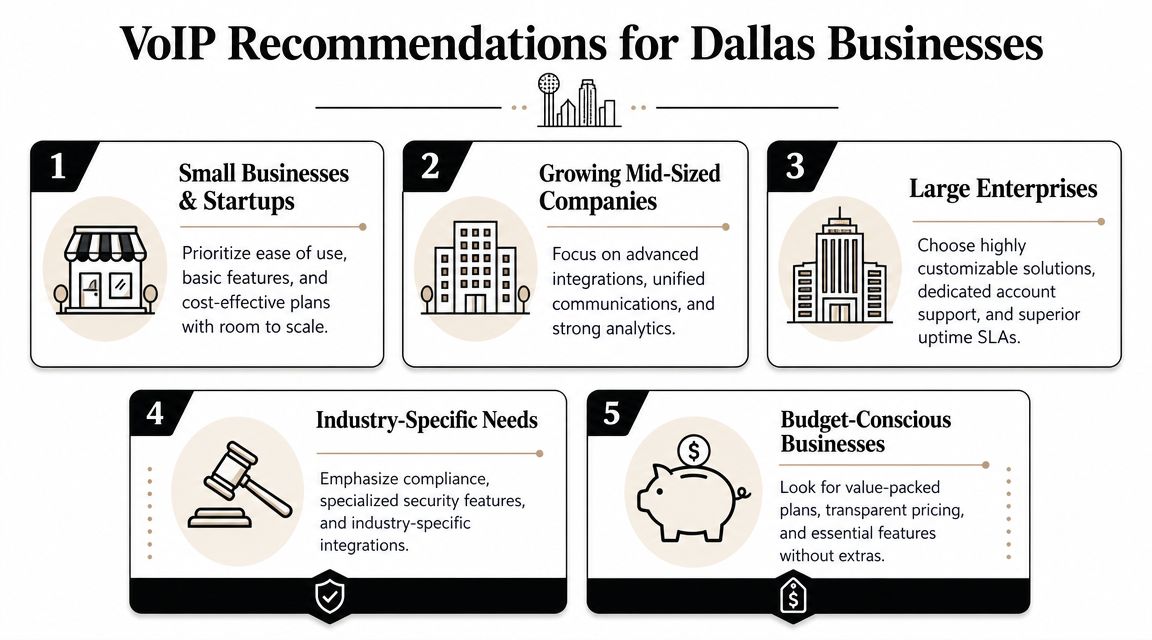
For small businesses and startups
Choose the provider with the cleanest admin experience and the least friction for mobile use. You don't need a telecom science project. You need easy user setup, dependable auto attendant behavior, and apps employees will answer.
A simpler platform often beats a feature-rich one for lean teams. If nobody on staff wants to become the phone-system administrator, simplicity is a strategic advantage.
For growing mid-sized companies
VoIP phone services in Dallas focus less on replacing desk phones and more on connecting departments. Sales wants reporting. Support wants queue visibility. Leadership wants one system across office and mobile users. HR wants quick onboarding for new employees.
In that environment, prioritize:
- Integration depth: CRM and workflow fit matter more than cosmetic features.
- Reporting quality: Supervisors need useful data, not just call logs.
- Scalable routing: Expansion shouldn't require rebuilding the entire call structure.
- Admin delegation: Department leaders should be able to manage limited changes safely.
A platform like RingCentral or 8×8 often fits this profile better than a bare-bones service, especially when collaboration tools and cross-site consistency matter.
For large or multi-location operations
Go with the provider that handles complexity cleanly. That usually means stronger policy controls, broader provisioning options, better vendor coordination, and clearer support escalation.
The wrong enterprise phone platform rarely fails all at once. It fails through small operational annoyances that stack up across locations.
For these organizations, I'd favor platforms that support standardized templates, role-based administration, and formal implementation support. The cheapest option usually becomes the most expensive when each branch solves problems differently.
For industry-specific environments
Healthcare clinics, finance teams, legal offices, and regulated operations should evaluate the provider through a policy lens first. Generic feature comparisons won't tell you enough. You need to know how the platform supports your required controls, retention practices, user management, and support model.
The strongest fit is often the vendor whose implementation team understands your environment, not just their own software. If the provider can't answer detailed workflow questions without circling back repeatedly, that's a warning sign.
For budget-conscious businesses
Keep your scope tight. Don't buy every collaboration feature on day one if the primary need is reliable calling, simple routing, and mobile access. At the same time, don't underbuy on the network side. That's where "cheap VoIP" often becomes disruptive VoIP.
The best budget move is usually this mix:
- A provider with straightforward administration
- Wired phones where stability matters most
- Mobile apps for flexible users
- Limited but intentional handset deployment
- Basic resilience planning for power and internet
For Dallas buyers, the winning decision usually isn't the flashiest brand. It's the provider and design that reduce surprises after launch. Good VoIP feels boring in the best way. Calls route correctly. Reports make sense. Users know what to do. And the business doesn't have to think about the phone system every day.
If your VoIP migration leaves you with retired desk phones, PBX hardware, switches, servers, or other aging telecom equipment, Montclair Crew Recycling can help you decommission and responsibly recycle it without turning the cleanup into another IT project. They handle business IT asset disposition, secure data destruction, logistics, and environmentally compliant electronics recycling so your team can close out the migration cleanly.
