
Before you can tackle your organization's e-waste problem, you have to know exactly what you're dealing with. It all starts with a comprehensive audit of every single piece of electronic gear you own—from the servers humming away in the data center to the tablets your sales team uses on the road. This initial inventory is the foundation for any smart e-waste strategy.
Conducting an E-Waste Audit to See What You Have
You can't manage what you don't measure. It’s a classic business saying for a reason. To build a plan that actually reduces electronic waste, you first need a crystal-clear picture of your current technology. An e-waste audit is simply a systematic process of cataloging all your IT hardware. This is the crucial first step that takes you from vague guesses to solid, data-driven decisions.
The whole point is to create a master list that details not just what the device is, but its age, condition, who uses it, and where it is. This process almost always uncovers forgotten liabilities—like that back closet stuffed with decade-old desktops—and highlights immediate opportunities for reuse or responsible recycling.
Starting Your Asset Inventory
For a smaller business, this could be as simple as a detailed spreadsheet. But for larger organizations, you'll almost certainly need dedicated IT Asset Management (ITAM) software to keep track of thousands of devices without losing your mind. No matter what tool you use, the key information you need to capture is the same:
- Device Type: Laptop, desktop, monitor, server, smartphone, printer, etc.
- Manufacturer & Model: Think Dell Latitude 7420 or HP LaserJet Pro M404n.
- Serial Number/Asset Tag: The unique ID for tracking each specific item.
- Purchase Date & Age: This helps you forecast when a device will hit its end-of-life.
- Current User/Department: This tells you who's responsible for it and where it lives.
- Condition: Be honest. Is it excellent, good, fair, poor, or just plain dead?
This can feel like a massive project, but you don't have to boil the ocean. Break it down by department or physical location to make it manageable. Get your process down with a single team or office, and then roll it out across the entire company.
Classifying Your Assets by Lifecycle Stage
Once you have all that raw data, the real work begins: classifying each asset. This is where your inventory starts to tell a story. By sorting devices based on their current status, you can see exactly where your biggest e-waste challenges—and opportunities—are hiding.
An effective e-waste audit isn't just about counting devices; it's about understanding their potential. Classifying assets helps you decide whether a laptop can be redeployed to a new hire, donated to a local school, or needs to be securely recycled.
This kind of audit is a core component of a much larger strategy. You can learn more by exploring comprehensive IT asset management best practices, which lay out a framework for managing a device's entire journey with your organization.
This simple workflow is the key to an effective audit.
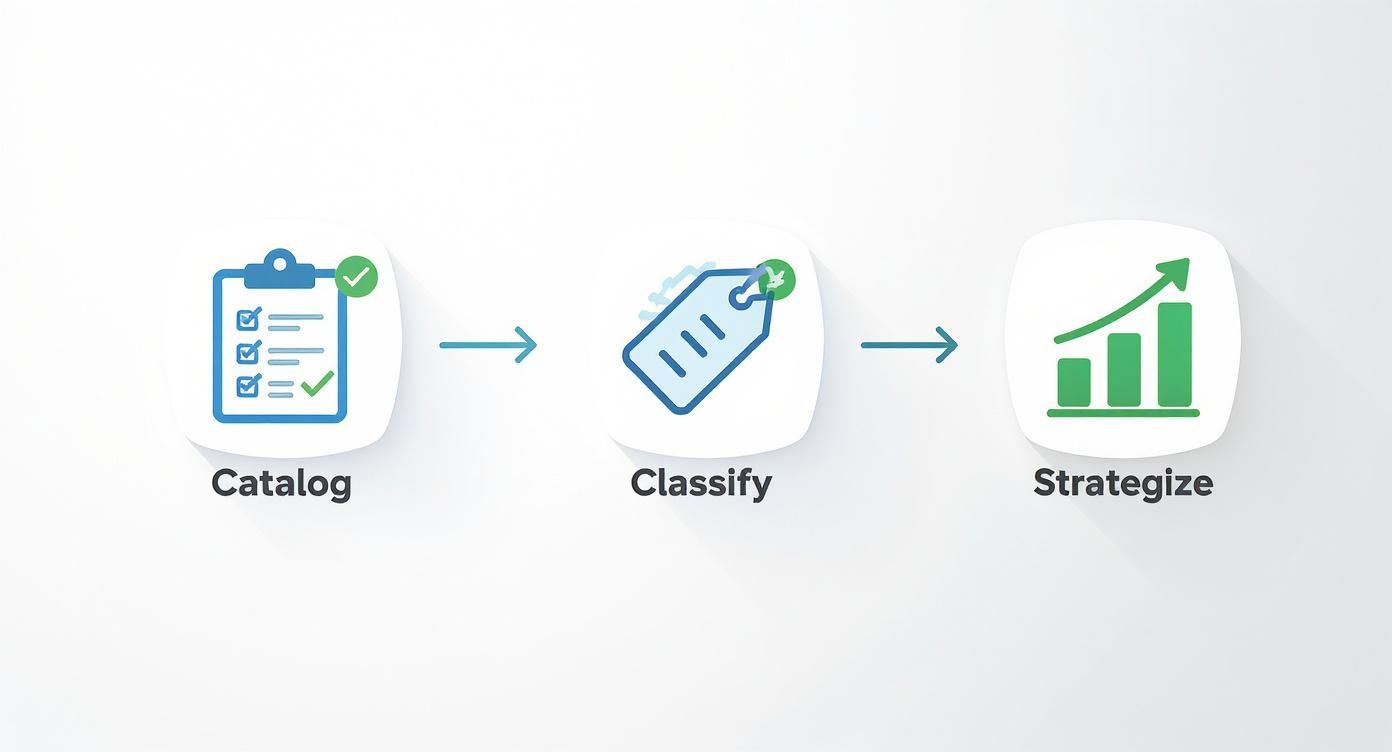
As the visual shows, you move from cataloging what you have, to classifying its condition and potential, and finally to planning the next steps for every single device.
A straightforward classification system might look something like this:
- Active/In-Use: Devices that are currently deployed and doing their job.
- Storage/Spares: Working equipment that's on the shelf, ready for redeployment.
- To Be Repaired: Gear that's broken but can be fixed without breaking the bank.
- End-of-Life (EOL): Devices that are broken beyond repair, totally obsolete, or no longer meet security and performance standards.
That last category—End-of-Life—is your immediate e-waste pile. Having this number is incredibly powerful. Instead of telling your leadership team, "we have some old computers," you can state, "we have 250 laptops and 75 desktops that are officially end-of-life and require secure, certified disposal." That's the kind of specific, actionable insight that builds a business case for a real e-waste reduction program.
Building a Smart and Sustainable Procurement Policy
The best way to cut down on electronic waste is to stop creating it in the first place. This whole process doesn't start when a device is at its end-of-life; it begins the second you decide to buy new equipment. A smart, sustainable procurement policy is your organization’s first line of defense against the wasteful "buy, use, dispose" model.
Instead of just looking at the sticker price, a forward-thinking policy considers the total cost of ownership. This means factoring in maintenance, potential repair costs, and what you'll eventually pay for disposal. Shifting this mindset is absolutely crucial for building a circular IT ecosystem where you squeeze every last drop of value out of your tech.
Prioritizing Repairability and Longevity
When you're shopping for new devices, you have to look past the processing power and price tags. A genuinely sustainable policy puts a premium on hardware that's built to last and designed to be fixed. Before you sign that purchase order, start asking vendors some tough questions about their product design.
Think about these factors when choosing your next batch of equipment:
- Ease of Repair: Can you open the device with standard tools? Are common parts like batteries, screens, and ports easy to swap out, or are they glued in place, making a simple fix impossible?
- Availability of Parts: Does the manufacturer actually sell spare parts to regular users or third-party repair shops? And are they reasonably priced?
- Modular Design: Hunt for devices with modular components. A laptop where you can upgrade the RAM and storage yourself is infinitely more sustainable than a sealed unit that has to be completely replaced just to get more memory.
This isn't just about being green. This approach saves you a ton of money in the long run by helping you avoid costly full-device replacements for what should be minor issues.
Using Certifications to Guide Your Choices
Trying to figure out which tech is actually "green" can feel like navigating a maze of marketing jargon. Thankfully, third-party certifications give you a reliable shortcut to finding products that are genuinely sustainable. The most respected standard in the IT world is the Electronic Product Environmental Assessment Tool (EPEAT).
EPEAT grades products on a tough set of criteria that covers their entire lifecycle—from the materials used to build them to their energy efficiency and how they're managed at their end-of-life. The system makes it simple to compare products and make choices you can stand behind.
By standardizing sustainable criteria, EPEAT allows procurement managers to easily select electronics that meet their organization's environmental goals without needing to become material science experts themselves.
The certification has three levels—Bronze, Silver, and Gold—which show how many optional criteria a product met beyond the basic requirements. Always aim for Silver or Gold-rated products to ensure you're investing in technology with a much smaller environmental footprint.
EPEAT Certification Levels at a Glance
To make sense of what these tiers mean for your purchasing decisions, here's a quick breakdown. This table summarizes the EPEAT levels, helping you align your procurement with your organization's environmental targets.
| Certification Level | Required Criteria Met | Optional Criteria Met | Environmental Impact |
|---|---|---|---|
| Bronze | All 23-28 required | 0-49% | Meets baseline sustainability standards. |
| Silver | All required | 50-74% | Demonstrates a significant commitment to environmental performance beyond the basics. |
| Gold | All required | 75-100% | Represents the highest level of environmental performance in the market. |
Choosing products with a higher EPEAT rating is a direct and measurable way to reduce your organization's environmental impact through smarter purchasing.
Evaluating Vendors on Their Circular Economy Commitment
Your procurement policy has to look beyond the products and scrutinize the vendors you work with. A supplier's commitment to sustainability is just as important as the tech they sell. A truly responsible partner will back up your efforts to reduce e-waste long after the sale is complete.
When you're vetting a potential IT vendor, look for these key signs:
- Take-Back and Recycling Programs: Do they have a clear, responsible program to take back old equipment when you buy new gear from them?
- Use of Recycled Materials: Is the vendor transparent about the percentage of post-consumer recycled materials used in their products and packaging?
- Leasing Options: Leasing can be a game-changer for waste reduction. It keeps the responsibility of end-of-life management with the manufacturer, giving them a real incentive to build durable, repairable, and reusable products.
When you build these criteria into your purchasing process, you're using your organization's buying power to support companies that are serious about the circular economy. This is a foundational step in any real strategy for managing IT assets and recycling them responsibly. To get a better handle on this, you can explore the ins and outs of a professional IT asset recycling program. Choosing the right partners ensures your old electronics become a resource for the future, not just another problem for the planet.
Extending Device Lifecycles with Repair and Maintenance
One of the most effective ways to slash your e-waste output doesn't involve complicated logistics or brand-new policies. It’s much simpler: just keep your existing equipment running longer. Shifting from a knee-jerk "replace" mindset to a "repair-first" culture can seriously shrink your e-waste footprint and unlock some surprising cost savings along the way.
This whole approach is a direct challenge to the cycle of planned obsolescence, where it often feels cheaper to just buy a new device than to fix the one you have. When you make maintenance and repair a priority, you extend the useful life of your assets, keeping them out of the scrap heap and getting the most out of what you already paid for.
Fostering a Culture of Repair
Building a repair-first culture starts with a conscious decision to see value in what’s broken. It means actively looking for ways to fix a cracked screen, swap out an old battery, or upgrade some RAM before you even think about writing off a device for good. It's a practical step that creates a huge ripple effect across your organization’s sustainability efforts.
The scale of the problem we're facing is just staggering. The Global E-waste Monitor reported that the world generated a record 62 million tonnes of e-waste in 2022, but a measly 22.3% of it was actually collected and properly recycled. Think about this: extending the average lifespan of our electronics by just one year could cut the global e-waste generated annually by up to 10 million tonnes. You can dig deeper into these trends by checking out the full UN report on electronic waste.
To make repair a real option, organizations usually go with one of two models:
- In-House Repair Teams: If you're a larger organization, setting up a small, dedicated team to handle common fixes—battery swaps, screen replacements, memory upgrades—can be incredibly efficient. This gives you total control and builds valuable tech skills inside your company.
- Third-Party Partnerships: For most small to mid-sized businesses, partnering with a reliable local repair shop just makes more sense. These specialists have the tools and know-how to tackle a wide range of repairs, which frees up your own IT staff to focus on their main jobs.
The Power of Proactive Maintenance
Waiting for something to break is a recipe for disaster. A much smarter strategy is to get ahead of problems with a proactive maintenance schedule. It’s just like changing the oil in your car to keep the engine from seizing up; your electronics need the same kind of routine care.
This could be as simple as cleaning dust out of laptop fans to prevent overheating or running diagnostic software to spot a failing hard drive before it crashes and takes all your data with it. Setting up a regular schedule for these tasks can prevent those catastrophic failures that turn a perfectly good device into a paperweight. Part of this means knowing how old your equipment is, which helps you plan. Our guide on how to tell how old your computer is can help you get a handle on that.
A maintenance schedule doesn't have to be some complex beast. It could look something like this:
- Annual Battery Health Checks: Test the maximum capacity of all company laptops and smartphones.
- Bi-Annual Physical Cleanings: Clear out dust and debris from desktops and servers to improve cooling and prevent components from frying.
- Quarterly Software Updates: Make sure all operating systems and security patches are up-to-date to keep things running smoothly and securely.
The Right to Repair Movement
The whole idea of empowering companies and individuals to fix their own stuff is the driving force behind the "Right to Repair" movement. This is a massive advocacy effort pushing manufacturers to make spare parts, repair guides, and diagnostic tools available to everyone, not just their authorized dealers.
As highlighted on the Repair.org website, this global coalition is fighting for laws that tear down the barriers manufacturers often put up, making it easier and cheaper for all of us to fix our electronics. Getting behind this movement and choosing to buy from brands that support repairability sends a strong message and gives your organization way more control over its own assets. If you want to really get serious about reducing e-waste, you have to maximize how long your devices are in service. You can find some great, practical strategies by reading up on topics like extending your iPhone's life from repair to refurbishment.
By embracing a repair-first approach, you transform e-waste from an inevitable byproduct of business into a manageable and reducible expense. It's a strategic shift that benefits your bottom line and the planet simultaneously.
Giving Functional Electronics a Second Life Through Redeployment and Donation
When a device is no longer powerful enough for its primary user, its journey within your organization is far from over. Instead of being shoved into a storage closet or tossed in the recycling pile, that hardware represents a massive opportunity to maximize value and slash your e-waste.
Thinking strategically, you can create a formal internal redeployment program. This is the secret to giving your hardware a second, third, or even fourth life right inside your own walls. This simple shift in mindset transforms retired assets into valuable resources.
A laptop that can no longer keep up with a developer’s intensive coding might be the perfect machine for an intern, a temp, or a front-desk computer that only needs to run web apps. It’s all about seeing the device for what it can still do, not just what it can’t.
Creating an Internal Redeployment Pipeline
An effective redeployment program starts with the data you gathered during your e-waste audit. When a device is retired, it should be immediately assessed, graded, and logged into an inventory of available hardware. Think of it as creating an internal "shop" where department managers can grab equipment for less demanding roles before even thinking about buying new.
Here’s a real-world example: a marketing team retires a fleet of three-year-old laptops. Instead of recycling them, the IT team wipes them, gives them a quick clean, and adds them to the redeployment inventory. A month later, the operations department hires two new administrative assistants. They can be equipped with these perfectly capable machines at zero additional cost.
That move just saved thousands of dollars and prevented two functional laptops from becoming premature waste. That’s a win-win.
The Absolute Necessity of Secure Data Wiping
Before any device—whether it’s moving down the hall or out the door—can be given a new life, it must be stripped of its past. Securely wiping all data isn’t just a good idea; it’s a non-negotiable step.
Skipping this turns a smart business move into a massive security liability. Your data destruction process should meet established standards, like the DoD 5220.22-M or NIST 800-88 guidelines, to ensure data is completely unrecoverable. For devices that held extremely sensitive information, physical destruction of the drive might be the answer. But for most redeployment and donation scenarios, a certified software wipe is exactly what you need.
A documented data destruction process is your organization's proof of due diligence. It protects your company, your customers, and the future recipients of your technology from the devastating consequences of a data breach.
Donating Technology to Make a Real Impact
What about equipment that's still functional but no longer meets any of your internal needs? Donation is an incredible option. Local schools, non-profits, and community centers are often desperate for reliable tech but are working with shoestring budgets.
Your company’s retired laptops or monitors could become the backbone of a local after-school program or a community job-training center. But a successful donation requires more than just good intentions. It’s crucial to vet potential recipients to make sure they can actually use what you’re offering. A disorganized "data dump" of old, mismatched equipment can easily become more of a burden than a blessing.
To make sure your donation is truly impactful, follow a few key steps:
- Find Good Partners: Look for local schools or established non-profits whose missions align with your company’s values.
- Ask What They Need: Actually have a conversation with them. Do they need laptops for a computer lab? Tablets for a literacy program? Make sure your gear matches their specific needs.
- Provide Complete Systems: A donated desktop computer is useless without a monitor, keyboard, and mouse. Always include power adapters for laptops.
- Document Everything: Create a simple donation receipt that lists every item and serial number. This gives you a clear record for asset management and helps the recipient with their inventory.
For individuals who want to make a similar impact, resources are available that explain the process in detail; you can learn more about how to donate a laptop to see how these programs work on a smaller scale. By finding a second home for your used electronics, you not only reduce e-waste but also help bridge the digital divide in your own community.
Choosing a Certified and Secure Disposal Partner
When a device has truly run its course, responsible disposal isn't just a good habit—it’s a critical business function. Tossing old electronics in the dumpster is simply not an option. Doing so creates serious environmental hazards and, more pressingly, opens your organization up to major legal, financial, and reputational risks from data breaches.
Working with a certified e-waste recycler is the final, essential step in your IT asset management plan. This isn't about hiring someone to haul away old junk. It's about finding a secure, compliant partner who can guarantee your data is completely destroyed and every last component is handled responsibly. How you get rid of old assets says a lot about your company's commitment to security and sustainability.
Decoding E-Waste Certifications
The world of e-waste recycling can feel a bit murky, but a couple of key certifications cut through the noise and point you toward trustworthy partners. These aren't just logos for a website; they represent a serious commitment to the highest standards of environmental safety and data security.
In North America, the two certifications that matter most are R2 (Responsible Recycling) and e-Stewards.
Looking for these certifications is the quickest way to vet a potential vendor. It's proof that they've passed rigorous, independent audits of their entire operation—from the moment they pick up your equipment to the final disposition of every material inside.
This image from Sustainable Electronics International, the organization behind the R2 Standard, shows just how global and critical these certified practices have become. When you choose a certified partner, you're plugging into a worldwide network dedicated to doing things the right way.
A certified recycler will always provide a documented chain of custody. This gives you a clear, auditable paper trail for every single asset you hand over, which is your ultimate proof of compliance and due diligence.
Comparing R2 and e-Stewards Certifications
Both R2 and e-Stewards are excellent standards, but they have slightly different origins and areas of focus. Understanding these differences can help you choose a partner whose philosophy aligns perfectly with your organization's goals.
| Feature | R2 (Responsible Recycling) | e-Stewards |
|---|---|---|
| Origin | Developed by a multi-stakeholder group including the EPA, electronics manufacturers, and recyclers. | Created by the Basel Action Network (BAN), an environmental group focused on preventing e-waste dumping in developing countries. |
| Core Focus | A balanced approach covering environmental, health, safety, and data security standards throughout the lifecycle. | Strong emphasis on preventing illegal export of hazardous e-waste and upholding the highest environmental justice principles. |
| Export Rules | Allows for the export of tested, working equipment and some materials to vetted, certified facilities abroad. | Prohibits the export of hazardous electronic waste to developing countries. Period. |
| Data Security | Mandates data sanitization according to standards like NIST 800-88. | Also requires strict data destruction protocols, fully aligning with international privacy and security laws. |
| Best For | Organizations seeking a widely recognized, flexible, and comprehensive standard for responsible recycling. | Organizations with a primary focus on environmental and social governance (ESG) and a zero-tolerance policy for hazardous waste exports. |
Ultimately, a vendor certified under either standard is a responsible choice. The key is that they've committed to a high level of accountability that non-certified recyclers simply haven't.
The Critical Importance of Certified Data Destruction
Beyond the environmental rules, your biggest concern has to be data security. A single discarded hard drive with sensitive customer lists, financial records, or employee data can trigger a catastrophic data breach. A professional disposal partner must offer certified data destruction services that match your risk tolerance.
There are really two ways to go about it:
- Software-Based Wiping: This approach uses specialized software to overwrite data on a hard drive again and again, making the original information impossible to recover. Look for vendors who follow standards like NIST 800-88 or DoD 5220.22-M. This is a great option for drives you might want to reuse or resell.
- Physical Destruction: For the highest level of security, nothing beats shredding. This method physically pulverizes hard drives, SSDs, and other storage media into tiny, confetti-like pieces. It's the go-to method for devices that held highly confidential or proprietary information.
Your partner must provide a Certificate of Data Destruction for every single batch of media they process for you. This document is your official, legal record proving that your data was securely and permanently destroyed, protecting you from future liability.
Questions to Ask a Potential Disposal Partner
Even among certified recyclers, not all are created equal. Before you sign any contract, you need to do your homework to make sure they're the right fit for your organization. A good partner will be transparent and welcome your questions. For a deeper look at what separates the best from the rest, you can review this list of qualified e-waste disposal companies.
When you're vetting potential partners, have this checklist ready:
- What certifications do you hold? (Don't just take their word for it—ask for copies of their R2 or e-Stewards certificates).
- Can you provide a full chain-of-custody report? (This should track every asset from your door to its final destination).
- What are your specific data destruction methods and standards? (Do they meet NIST or DoD guidelines? Can you witness the destruction?).
- Do you offer on-site services? (Mobile hard drive shredding at your facility offers maximum peace of mind).
- What happens to the materials after processing? (A responsible recycler should have a zero-landfill policy and be transparent about their downstream vendors).
- Do you offer any value recovery or resale services? (For newer equipment, you may be able to get some money back).
Picking the right partner is the final, and arguably most important, step in a solid e-waste strategy. It ensures your old assets are handled securely, ethically, and in full compliance with all regulations. To see how these principles are applied worldwide, check out a comprehensive guide to mobile phone recycling in Australia, which details how valuable materials are recovered from devices down under.
Common Questions About E-Waste Reduction
When an organization decides to get serious about reducing e-waste, a lot of practical questions pop up. It can feel like a huge undertaking when you start thinking about the logistics, costs, and especially the security requirements.
We get it. Below, we've tackled some of the most common concerns we hear from businesses, schools, and government agencies. Our goal is to give you clear, straightforward answers that cut through the noise so you can build a program that actually works—protecting your data, your budget, and your reputation.
How Much Does an E-Waste Program Cost?
This is almost always the first question, and the honest answer is: it's complicated. While you'll have costs for certified recycling and data destruction, those expenses are often offset—or even eliminated—by the savings you'll find elsewhere.
Think about it this way: extending the life of your devices by just one or two years is a direct cut to your procurement budget. On top of that, you can often resell newer or high-value equipment, recovering a good chunk of its initial cost.
The most successful e-waste reduction programs don't just focus on the disposal cost. They reframe the initiative around the total value recovered from extending asset life, reducing new purchases, and completely avoiding the massive potential fines for non-compliance.
When you factor in all the savings, many organizations discover their e-waste program becomes cost-neutral. Some even turn a profit.
What Is the Biggest Challenge for Small Businesses?
For small and medium-sized businesses (SMBs), the biggest hurdle is usually a lack of dedicated resources. Without a full-time IT asset manager, the whole process can seem completely overwhelming.
The trick for SMBs is to start simple and aim for high-impact wins first. Don't try to roll out a massive, enterprise-level plan overnight. Instead:
- Start with a basic spreadsheet. You don't need fancy software to create an initial inventory. Just get it down on paper.
- Focus on one high-impact area. A great place to start is creating a simple policy to extend the life of all company laptops by one year.
- Partner with a local expert. A certified ITAD vendor provides the boots on the ground and expertise that most SMBs lack, handling everything from pickup to certified data destruction.
This focused approach helps smaller teams make real progress without burning through their limited time and money.
How Do We Keep Our Data Secure?
Data security isn't just a part of the plan—it's the most critical part. One mistake here can have absolutely devastating consequences for your business and your customers. The process for securing data on retired assets has to be handled with military precision.
Before you even think about donating equipment, all data needs to be wiped using software that meets NIST 800-88 standards. This ensures the information is gone for good and can't be recovered, even with forensic tools.
For any devices headed for recycling, your certified partner (R2 or e-Stewards) must provide a Certificate of Data Destruction. This is your legal proof that your data was destroyed properly. If the devices held highly sensitive IP or customer data, physical shredding of the hard drives is the only truly risk-free option.
Are There Legal Risks for Improper Disposal?
Absolutely. The legal and financial risks are significant, and they're only getting bigger. Federal and state regulations like the Resource Conservation and Recovery Act (RCRA) have strict rules for handling the hazardous materials found in all electronics.
Dumping e-waste can lead to huge fines, liability for cleanup costs, and a public relations nightmare that can cripple your brand. This is why working with a certified recycler who gives you a transparent chain of custody isn't just a good idea—it's essential risk management.
Managing your organization's IT assets from deployment to disposal requires a trusted, local partner. Montclair Crew Recycling provides certified, secure, and environmentally compliant e-waste recycling and ITAD services for businesses, schools, and government agencies across Metro Atlanta. We make it easy to protect your data and meet your sustainability goals. Learn more at https://www.montclaircrew.com.
