
Getting rid of old business computers in Georgia is more than just spring cleaning for your server room. It's a serious task that involves protecting sensitive data, staying on the right side of the law, and being environmentally responsible. The smartest and safest way to handle it is by working with a certified IT Asset Disposition (ITAD) provider. This is how you protect your business from the massive risks of data breaches and hefty fines.

Your Guide to Business Computer Disposal in Georgia
When those old office computers, servers, and laptops are finally past their prime, you can't just toss them in the dumpster. Not only is that a huge data security gamble for your company, but it also runs afoul of environmental regulations.
For any business in Georgia—whether you're a small law firm in Marietta or a sprawling data center in Alpharetta—having a solid disposal plan isn't optional. It's essential. This guide is your playbook. We'll walk you through everything you need to know to retire your old IT gear with total confidence.
Why a Professional Disposal Strategy Is Non-Negotiable
Trying to cut corners on proper disposal is a recipe for disaster. The U.S. is drowning in e-waste, and businesses are a big part of the problem. A staggering 30 to 40 million personal computers are retired every year, but only about 15% of all electronics get properly recycled. The rest just sits in landfills, creating a toxic mess. You can get a better sense of the e-waste problem by exploring the latest comprehensive recycling statistics.
This is exactly where a professional partner proves their worth.
A certified ITAD service isn't just another vendor—they're your partner in risk management. They shield your business from legal trouble, protect your brand, and make sure you're meeting your environmental commitments.
Thinking about handling it yourself might seem like a way to save a few bucks, but the hidden dangers and costs are very real. A quick look at the differences makes the choice pretty clear.
Professional ITAD vs DIY Computer Disposal
Here's a quick comparison of using a certified service versus trying to manage computer disposal in-house. It really highlights the business risks you take on with a DIY approach.
| Consideration | Professional ITAD Service | DIY In-House Disposal |
|---|---|---|
| Data Security | Guaranteed data destruction with certification | High risk of leftover data and potential breaches |
| Legal Compliance | Adheres to HIPAA, FACTA, and GLBA rules | Huge potential for non-compliance and heavy fines |
| Environmental Impact | Certified, eco-friendly recycling of hazardous materials | Improper disposal that harms the environment |
| Efficiency | Smooth logistics, pickup, and inventory tracking | A time-suck for your internal teams |
| Documentation | Provides a full chain-of-custody and a Certificate of Destruction | No official paperwork to prove you did it right |
At the end of the day, a DIY approach leaves you exposed. Choosing a professional service like Montclair Crew Recycling turns a complicated compliance headache into a simple, secure, and straightforward process. It’s the definitive answer for how businesses dispose of old computers in Georgia the right way.
Navigating Georgia’s E-Waste Laws and Your Legal Duties
When we talk to Georgia business owners about disposing of old computers, many are surprised to hear there isn't one big, statewide e-waste law telling them what to do. But don't mistake that for a free pass. The reality is, your legal duties are actually much more serious because they fall under powerful federal data privacy laws.
For any business, this shifts the entire conversation. It’s not just about being green—it's about preventing a catastrophic data breach and the crippling fines that come with it. Your true legal responsibilities are tied to the data you handle, not your zip code.
Federal Laws Are Your True North Star
Three major federal laws set the rules for data security, and they have a direct say in how you get rid of old computer equipment. These regulations aren't suggestions; they carry penalties that can put a company out of business.
- HIPAA (Health Insurance Portability and Accountability Act): This is for any healthcare provider, insurer, or company that touches Protected Health Information (PHI). If you're a clinic in Marietta, those old PCs are full of patient records. Dumping them without proper data destruction is a clear HIPAA violation.
- GLBA (Gramm-Leach-Bliley Act): This one targets financial institutions. Banks, credit unions, and financial advisors in Alpharetta must protect their clients' private financial info. Tossing a server without certified data destruction directly violates the GLBA Safeguards Rule.
- FACTA (Fair and Accurate Credit Transactions Act): This law applies to almost every business. If you handle any consumer information—like credit reports or job applications—FACTA's Disposal Rule demands that you properly destroy it before disposal.
Just think about it this way: that old hard drive sitting in a retired office computer is legally the same as a locked filing cabinet stuffed with confidential files. You'd never leave that cabinet by the curb, and the same standard applies to your digital records.
The biggest legal threat for a Georgia business isn’t an environmental fine from the state. It's a massive federal penalty for a data breach that happened because of sloppy computer disposal. Your primary job is to stay compliant with federal law.
Georgia’s Data Center Boom Ups the Ante
The whole situation has become even more urgent because of Georgia’s booming tech scene. The state's incredible data center growth has brought both opportunities and a serious e-waste problem. In fact, Georgia recently locked in the second-largest amount of data center investment in the entire country. This explosion in growth creates huge sustainability challenges, especially with faster hardware refresh cycles and no clear statewide recycling mandate to handle it all. You can get more insights on Georgia's data center surge and its e-waste impact on Inteleca.com.
This boom means more high-end servers, networking gear, and storage arrays are being retired, and faster than ever. For the data centers themselves and all the companies that support them, this makes professional ITAD services an absolute operational need, not just a "nice-to-have." For a deeper dive into this, you might be interested in our Georgia guide to responsible e-waste recycling.
Real-World Scenarios and Your Legal Responsibility
Let's make this real. Say you run a small manufacturing business in Kennesaw. Your sales team’s old laptops have customer lists, pricing sheets, and business plans—all highly sensitive information.
Scenario One: The Wrong Way
You call a local scrap guy who says he'll "take care of it." He offers you cash, but he has no real process for destroying data. A few months down the road, your biggest competitor suddenly has your client list, which they pulled from one of those hard drives. Now you’re facing lawsuits from angry customers and your brand's reputation is in the gutter.
Scenario Two: The Right Way
You work with a certified ITAD partner like Montclair Crew. We give you a full inventory of the assets, securely transport the laptops to our facility, and perform a DoD-standard data wipe on every single drive. Afterwards, we hand you a Certificate of Data Destruction. This is your legal proof that you fulfilled your compliance duties under FACTA. Your data is gone for good, and you have the paperwork to prove it.
Getting a handle on these legal duties is the first, most important step. It changes your goal from just "getting rid of old computers" to actively protecting your business from very real, and very expensive, risks.
Mastering Data Destruction Before Computers Leave Your Office
Alright, so you know the rules and the risks. The next big question is a practical one: how do you actually get the data off those old machines for good? This is where the rubber meets the road. When it comes to how businesses dispose of old computers in Georgia, just dragging files to the trash bin is a recipe for disaster.
Let's be clear: your data is your most critical asset, and protecting it before any computer leaves your control is non-negotiable.
We're going to get into the specific, real-world methods that will protect your business. You really have two main paths to choose from: software-based wiping or old-fashioned physical destruction. The right choice depends entirely on how sensitive your data is and what compliance standards you have to meet. A solid plan for data security management is the crucial first step before you even think about recycling or resale.
This simple decision tree can help you map out your first moves.
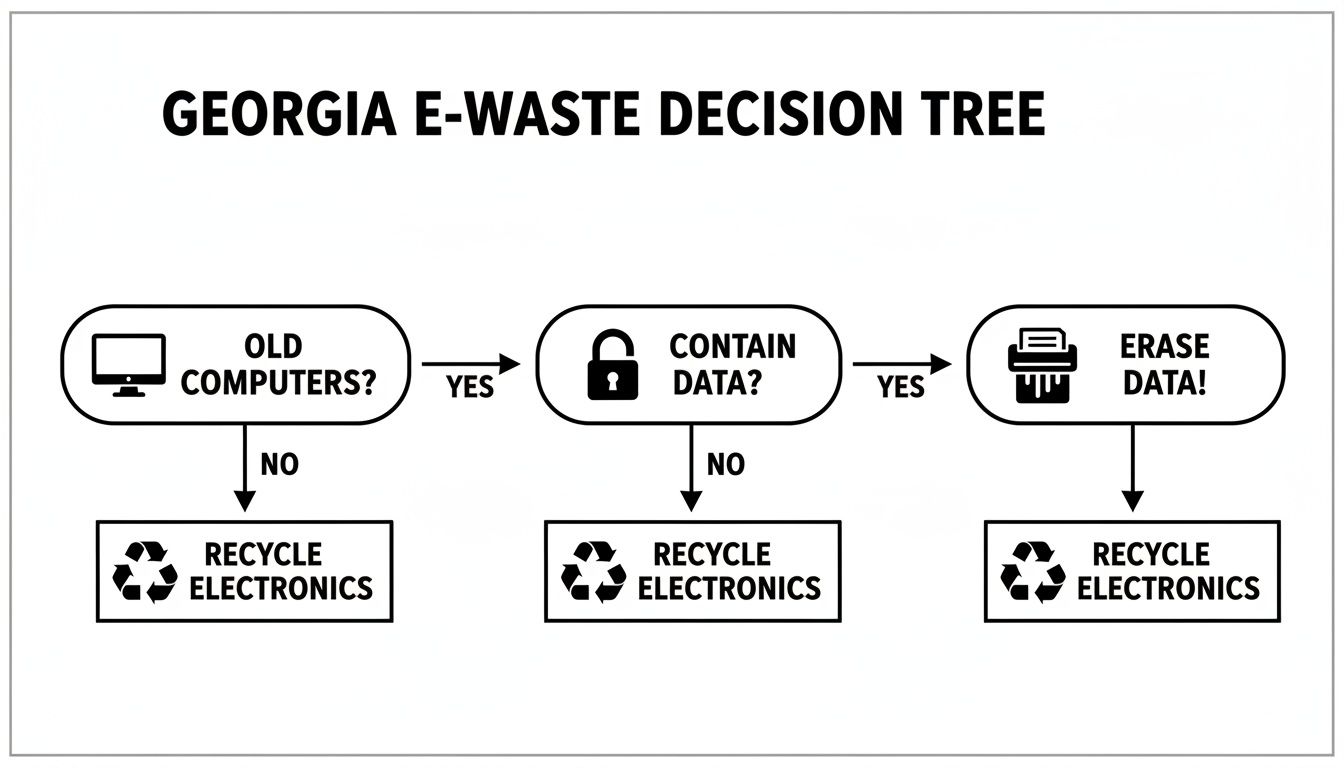
The takeaway here is simple. If a computer has data on it, that data has to be professionally wiped before it moves an inch.
Software Wiping: The Corporate Standard
For most businesses we work with, software-based data wiping hits the sweet spot. This isn't just deleting files. We use specialized software to overwrite the entire hard drive with random, meaningless data, making it impossible to recover what was there before.
The benchmark for this is the DoD 5220.22-M three-pass method. This protocol, first established by the Department of Defense, writes over the data three separate times, which is more than enough security for most situations.
When a certified ITAD partner like Montclair Crew talks about "free data wiping," this is the level of security you should expect. It's a rock-solid, auditable process that satisfies compliance for most industries, from manufacturing firms to marketing agencies.
This approach is perfect for computers that still have some life in them and could be resold or refurbished. The hard drive stays intact, but the data is completely gone.
Physical Destruction: For Ultimate Security
Then there are times when the data is so sensitive you can't leave even a 0.01% chance of it being recovered. We're talking about proprietary R&D from a tech firm in Roswell, classified government contractor info, or maybe even the secret formula for that famous beverage company headquartered right here in Atlanta.
In those cases, physical destruction is the only way to go. And no, this doesn't mean taking a hammer to it in the parking lot. Professional destruction is serious business.
- Shredding: The hard drive is fed into a massive, industrial-grade shredder that turns it into a pile of tiny metal fragments. This is the most secure and common method.
- Crushing/Punching: A hydraulic press drives a steel punch straight through the drive's platters, making them physically impossible to read.
For maximum peace of mind, we always recommend on-site shredding. A specialized truck comes right to your office, and you can literally watch your hard drives get destroyed before they're hauled away. This gives you an unbroken chain of custody and is the go-to for high-security environments like banks and healthcare providers. For a deeper look at the options, check out our guide on secure data destruction.
The Certificate of Data Destruction: Your Legal Shield
No matter which route you take—wiping or shredding—the job isn't done until you get the paperwork. A Certificate of Data Destruction is probably the single most important document you’ll receive from your IT partner.
This isn't just a receipt; it's a legal document that proves you did your due diligence. It's your shield against liability if you ever face an audit or legal challenge down the road. To be worth the paper it's printed on, that certificate needs to include:
- Unique Serial Numbers: A complete list of every single hard drive or device that was sanitized.
- Method of Destruction: A clear statement on whether the drives were wiped (e.g., DoD 5220.22-M) or physically shredded.
- Date of Destruction: The exact date the service was performed.
- Transfer of Custody: A statement confirming your ITAD partner has taken legal ownership and responsibility for the equipment.
Without this certificate, you have zero proof that you met your legal obligations. It’s what turns a security promise into a documented fact you can take to the bank.
Managing The Logistics Of Computer Pickup And Documentation
So, you’ve sorted out the data destruction. Now for the physical part. How do you actually get dozens—or even hundreds—of old computers out of your Georgia office and into the right hands? This is where the logistics and paperwork come in, turning what seems like a massive headache into a smooth, documented process.
Getting the physical pickup and paper trail right is just as critical as wiping the drives. It's the only way you can prove every single device was handled securely from your office in Norcross all the way to its final destination. And it all begins with a solid inventory.

Creating Your Asset Inventory
Before you even think about scheduling a pickup, you need to know exactly what you're getting rid of. This isn't just about counting boxes; it’s about building a detailed asset inventory. This list is the backbone of all your documentation.
For a typical office in Sandy Springs, this list needs to capture the essentials for each device:
- Asset Tag or Serial Number: The unique ID for every computer, server, or laptop.
- Device Type: Is it a desktop, a laptop, a server, or a network switch?
- Brand and Model: Get specific, like "Dell Latitude 5420" or "HP ProDesk 600."
- Condition: Make a quick note if a device is working, dead, or has physical damage.
This inventory becomes your internal manifest. When a disposal partner shows up, they’ll use this very list to check in every asset they collect. If something doesn't match, you need to flag it right then and there.
Your asset inventory is the starting point for your entire chain of custody. It's the master list that proves which specific devices left your facility and entered the secure disposal process. Without it, you're flying blind.
Scheduling And Preparing For Pickup
With your inventory list in hand, it's time to coordinate the actual pickup. A professional ITAD provider like Montclair Crew makes this part easy. You’ll just contact them with your asset list and find a time that doesn't disrupt your business.
To make pickup day go off without a hitch, a little prep work from your team goes a long way.
Your Pre-Pickup Checklist:
- Consolidate Equipment: Get all the inventoried gear into one spot. A spare conference room or a corner of your warehouse works perfectly.
- Remove Peripherals: Unplug and separate keyboards, mice, and power cords unless your recycler tells you otherwise.
- Label Everything: If you can, stick a label on each machine that matches your inventory list. This makes the verification process lightning-fast.
Trust us, this prep work minimizes disruption and helps the ITAD team work quickly and securely. While many providers are flexible, it’s always smart to book in advance, especially for a big office cleanout. You can learn more about arranging a free business electronics pickup in Georgia to see how straightforward it can be.
The Importance Of Chain-Of-Custody Documentation
The moment the ITAD team arrives, the chain of custody officially kicks off. This is simply the chronological paper trail that documents the entire journey of your assets. From a legal standpoint, it's the most critical piece of documentation you'll have, proving you kept everything secure.
A representative from your company and the ITAD technician will both sign the chain-of-custody form during collection. This signature is what formally transfers liability from your business to the disposal partner. The form should reference your asset inventory, creating an unbreakable link between what you gave them and what they received.
What About Small Batches Or Drop-Offs?
Not every business has a truckload of computers. If you're a small business in Kennesaw with just a handful of old laptops, a full-scale pickup might feel like overkill.
For smaller jobs, most certified recyclers, including Montclair Crew, have convenient drop-off options. This lets you bring your equipment directly to a secure facility on your own time. You'll still get the same professional service, including a documented transfer of custody and, later, a Certificate of Data Destruction. Just be sure to call ahead to confirm their hours and any specific drop-off procedures. It’s a great way to ensure even small businesses can access secure, compliant disposal.
Recycle, Resell, or Donate: Choosing Your Disposal Path
Once your old computers are wiped clean of all data, their journey is far from over. What happens next directly impacts your bottom line and your company's environmental reputation. Not every machine is scrap; some might have real value just waiting to be tapped.
This is a strategic choice every Georgia business has to make. Deciding whether to resell, recycle, or donate your old IT assets is about balancing financial returns with social responsibility and plain old logistics. The right path really depends on the age, condition, and specs of the equipment you're retiring.
Evaluating Your IT Assets For Resale Value
The first question you should always ask is, "Can we make some money back on this?" Many businesses, especially those with higher-end gear, can turn retired assets into a new revenue stream. This is common for data centers retiring enterprise servers or companies that refresh employee laptops every couple of years.
So how do you know if your equipment has resale potential? Look for these signs:
- Age and Model: Laptops and servers less than five years old, particularly from brands like Dell, HP, and Apple, usually hold their value well.
- Specifications: Gear with solid processors (think Intel Core i7 or Xeon), plenty of RAM (16GB or more), and large solid-state drives (SSDs) is always in demand.
- Condition: It’s simple—functional devices that look clean will always sell for more than ones that are beat up or broken.
- Bulk Quantity: Selling a large lot of identical models is often much more attractive to buyers than a mixed bag of random machines.
If your assets check these boxes, working with an ITAD provider that offers profit-sharing is a no-brainer. They take care of the data destruction, testing, and finding a buyer, then you get a cut of the final sale.
Expert Tip: Don't overlook the value of individual components. Even if an old server can't be sold whole, its parts—CPUs, RAM sticks, and power supplies—can often be sold separately for a surprising return.
Certified Recycling: The Only Choice For End-of-Life Equipment
What about the rest? For the computers that are genuinely at the end of their life—too old, broken, or obsolete to sell—responsible recycling is the only compliant way forward. And I don't mean just dropping them at a local scrap yard.
Computers are full of hazardous materials like lead, mercury, and cadmium. Tossing them in a landfill is an environmental nightmare and can open your business up to serious legal trouble. This is exactly why you must work with a certified e-waste recycler.
The global e-waste problem is spiraling out of control. The UN reported that the world generated a staggering 62 million tonnes of e-waste in 2022, which is an 82% increase from 2010. What's worse is that e-waste is growing five times faster than our ability to properly recycle it. You can see the full UN report on how e-waste is outpacing recycling efforts on ewastemonitor.info.
A certified recycler, like Montclair Crew, is held to strict R2 (Responsible Recycling) standards. This certification is your guarantee that:
- Hazardous materials are handled safely.
- Electronics are not illegally shipped overseas.
- Worker safety is a top priority.
- All data is completely destroyed before any recycling begins.
This formal, certified process is your shield. It ensures you meet your environmental duties and sidesteps the risks of dealing with uncertified scrap dealers. For a full breakdown, check out our guide on where to recycle computers in Georgia safely.
Considering Donation As A Community-Focused Choice
There is a third option, too: donation. If your equipment is still working but not valuable enough to bother with a resale program, donating it to a local school, nonprofit, or charity can be a fantastic move. You support your community, boost your company's image, and keep perfectly good electronics from becoming waste.
Before you donate, just make sure of two things. First, get the data professionally wiped to the same high standard you'd use for any other disposal path. Second, call the organization and confirm they can actually use what you're offering. Gifting them obsolete or broken equipment can quickly turn your good deed into a burden for them. A quick conversation ensures your donation truly makes a difference.
Common Questions About Business Computer Disposal in Georgia
Even when you have a plan for retiring old IT gear, questions always pop up. Here are the most common ones we hear from businesses across Georgia, with straight answers to help you get it done right.
What Does It Cost for a Business in Atlanta to Recycle Old Computers?
You might be surprised. For most businesses in the Atlanta metro area, it can be very low-cost or even free. Certified IT Asset Disposition (ITAD) providers like Montclair Crew often have free pickups for qualifying businesses. This usually covers the pickup, transport, and certified data wiping with no charge to you.
Of course, some specialized services will come with a fee. If you need on-site hard drive shredding for the highest level of security, there’s a charge for bringing the shred truck and our team to your office.
The whole thing can even turn into a revenue stream. If your old equipment—like enterprise servers or newer laptops—still has market value, you can actually get paid. Many ITAD partners, including us, offer profit-sharing deals. The best way to know for sure is to just ask for a custom quote.
How Can I Be Certain Our Sensitive Company Data Is Destroyed?
The proof is in the paperwork. Any reputable ITAD partner will give you a formal Certificate of Data Destruction. This isn't just a simple receipt; it's a legal document that proves you did your due diligence.
A Certificate of Data Destruction is your legal shield. It proves you took the necessary steps to protect your data, and it's your best defense in the event of an audit or legal challenge. Never settle for a verbal confirmation; always demand certified, auditable proof.
This document lists the unique serial numbers of every device we handled and spells out the exact sanitization method used, whether it was a DoD 5220.22-M wipe or physical shredding.
For businesses like law firms or healthcare clinics with extremely sensitive information, nothing beats seeing it for yourself. You can always opt for on-site services. We'll bring a mobile shredding truck right to your parking lot so you can watch your hard drives get turned into tiny metal fragments before they ever leave your property.
We Only Have a Few Old Laptops. Can We Use a Professional Service?
Absolutely. While free pickups are usually for larger quantities of equipment, we absolutely help small businesses. The easiest solution is often a simple drop-off at a designated location.
This gives startups and small offices access to the same secure, certified recycling and data destruction that the big corporations get. It’s a much smarter move than letting old tech pile up in a closet or risking a data breach by throwing it in a dumpster.
Just give us a call ahead of time to confirm drop-off hours and what to do when you arrive. It makes the whole process quick and painless.
What Is the Difference Between an E-Waste Recycler and a Scrap Metal Dealer?
This is a huge distinction, and getting it wrong can expose your business to major legal, security, and environmental risks.
- A Certified E-Waste Recycler: These are specialists who only deal with electronics. They follow strict, audited protocols for data destruction and responsibly manage hazardous materials like lead and mercury. They are held to standards like R2 (Responsible Recycling).
- A Scrap Metal Dealer: Their business is recovering raw commodities like steel and copper. They don't have the tools, expertise, or certifications for secure data handling or managing the toxic elements inside a computer.
For any business computer with data on it, working with a certified e-waste recycler is non-negotiable. Taking your old tech to a scrap yard is a recipe for a data breach and environmental trouble. You can learn more about what to look for in a reputable computer disposal company and the standards they should follow.
Ready to take the next step in securely and responsibly disposing of your old IT equipment? The team at Montclair Crew Recycling is here to make it simple. From certified data destruction to convenient pickups across Metro Atlanta, we provide a complete solution tailored to your business needs. Contact us today to schedule your pickup or get a free quote!
