

Handling your old electronics the right way is about more than just being green—it's a core part of a smart risk-management strategy for any business in Tucker. A solid plan for e-waste recycling in Tucker protects your sensitive data, keeps you compliant, and can even put some money back in your pocket from retired IT gear. Honestly, it's just fundamental to modern operational security.
Why E-Waste Recycling Is a Smart Business Move in Tucker
When people talk about electronic waste, the conversation usually leans toward environmental concerns. But for businesses right here in Tucker and across Metro Atlanta, the immediate risks are much more concrete. Improperly disposing of IT assets isn't just a missed chance to do good; it's a direct threat to your bottom line and your reputation.
Think about it. Old hard drives, servers, and company phones are packed with sensitive information. Just tossing them in a dumpster is practically an invitation for a data breach. That single mistake can lead to massive fines, messy legal fights, and a loss of customer trust that's nearly impossible to win back.
The Growing Global Challenge
This isn't just a local problem; it's part of a massive global trend. In 2022, the world generated an incredible 62 million tonnes of e-waste, which is an 82% jump from 2010. Experts predict that number will climb to 82 million tonnes by 2030, growing five times faster than our documented recycling efforts can keep up.
With only 22.3% of this waste being properly recycled, we're losing an estimated $62 billion in recoverable resources like gold and copper every single year. For any organization in Tucker, these numbers underscore just how critical a compliant IT asset disposal strategy really is.
A proactive e-waste strategy stops being a compliance headache and becomes a key part of smart financial and operational planning. It's about protecting all your assets—both digital and physical.
Beyond Compliance: Financial and Operational Benefits
A well-managed recycling program brings real advantages that go way beyond just avoiding penalties. It gives you a clear, auditable trail for decommissioning assets, which is a huge help for accurate accounting and inventory control. This kind of operational discipline stops expensive equipment from just "walking away."
Plus, responsible recycling can actually create value. Newer or in-demand equipment often has resale value. When you partner with a certified recycler who knows the secondary market, you can turn those old assets into a new revenue stream through profit-sharing. Suddenly, an operational cost becomes a financial gain, making e-waste recycling in Tucker a clear win for your business. You can learn more about what happens to your old equipment in our detailed guide on the lifecycle of recycled electronics.
When it's time to retire your company's old electronics, a little prep work goes a long way. This isn't just about making space in a storage closet; it's a critical step for protecting your company's data, ensuring the whole process runs smoothly, and even recovering some value from your old gear. Winging it can lead to major security holes and logistical headaches nobody wants to deal with.
Your first move, before anything else, is to take inventory. Don't just create a pile of "old computers." You need to document every single server, laptop, monitor, printer, and switch you plan to decommission. This list becomes your master key for accountability and auditing down the line.
Catalog and Consolidate Your Equipment
Building out this inventory doesn't have to be some monumental task. Honestly, a simple spreadsheet is usually all you need to get the ball rolling. The real goal here is to establish a clear chain of custody from the moment a machine is unplugged.
Make sure your inventory tracks a few key things:
- Asset Type: What is it? A Dell server, a Lenovo laptop, a Cisco switch?
- Serial Number: This is the unique ID you'll use to track each individual piece of hardware.
- Original Department: Tagging assets by their department (like "Marketing Laptops" or "Finance Servers") makes the internal accounting process much simpler.
- Condition: Make a quick note if an item is still functional. This is super important for figuring out any potential resale value.
Once everything is documented, gather all the equipment into one secure, designated spot. This simple action keeps things from "walking away" and makes the pickup for your e-waste recycling Tucker partner incredibly efficient. It also gives you a chance to separate the high-value items—like newer servers or enterprise-grade laptops—that might qualify for a value recovery program.
Takeaway Tip: Treat this as a full-on spring cleaning opportunity. It's the perfect time to finally get rid of all those forgotten keyboards, mice, and tangled cables that have been cluttering up your storage closets for years.
To make this process foolproof, here’s a quick checklist you can follow. It breaks down the decommissioning process into manageable phases, ensuring nothing gets missed.
IT Asset Decommissioning Checklist for Tucker Businesses
| Phase | Action Item | Key Consideration |
|---|---|---|
| 1. Planning & Inventory | Create a master asset list with type, serial number, and department. | A detailed inventory is non-negotiable for audit trails and chain of custody. |
| 1. Planning & Inventory | Designate a secure, central location for all decommissioned assets. | Consolidation prevents loss and streamlines the pickup process. |
| 2. Internal Security | Log all devices out of company accounts and disconnect from the network. | This is your first line of defense against data breaches. |
| 2. Internal Security | Consult with your IT team about internal data wiping policies. | Some organizations require an internal wipe before the equipment leaves the premises. |
| 3. Physical Prep | Separate high-value assets from standard e-waste. | Helps identify items eligible for value recovery or resale. |
| 3. Physical Prep | Bundle loose items like cables, keyboards, and mice. | Keeps smaller peripherals organized and easy to handle. |
| 4. Final Handoff | Schedule a pickup or drop-off with your certified recycling partner. | Ensure the vendor provides a Certificate of Destruction and Recycling. |
| 4. Final Handoff | Reconcile the vendor's report with your original inventory list. | This final check closes the loop on your chain-of-custody documentation. |
Following these steps ensures every piece of equipment is accounted for, secured, and handled responsibly from your door to its final destination.
Data Security and Physical Handling
While your recycling partner will handle the heavy lifting of certified data destruction, your own internal policies are the first line of defense. Make sure every device is logged out of company accounts and completely disconnected from your network. For any business with compliance requirements (think healthcare or finance), this is an absolutely crucial internal checkpoint. For a deeper dive, you can check out our guide on how to wipe a computer before recycling.
Also, give a little thought to the physical condition of the equipment. Most modern IT assets are pretty straightforward, but older electronics can sometimes contain hazardous materials. When you're getting things ready, it's smart to be aware of any potential for corrosive or toxic substances. Looking into the protocols for shipping dangerous goods Class 8 can offer some good insights into safe handling, even if you aren't the one shipping them. Proper prep just makes sure every step of the journey is safe and secure.
Choosing the Right Data Destruction Method
When your IT assets hit the end of their useful life, the single most critical step is making sure the data on them is gone for good. And I don't just mean dragging files to the trash bin. We're talking about making sensitive company and client information completely, utterly unrecoverable. For any business handling e-waste recycling in Tucker, this is the heart and soul of responsible IT asset disposition.
Your decision really boils down to two industry-standard methods: certified software wiping or physical hard drive shredding. Each has its place. The right choice for you will depend entirely on your company's risk tolerance, compliance needs, and whether the old equipment has any resale value.
This flowchart maps out the key choices you'll face, from taking inventory to the final data destruction step.
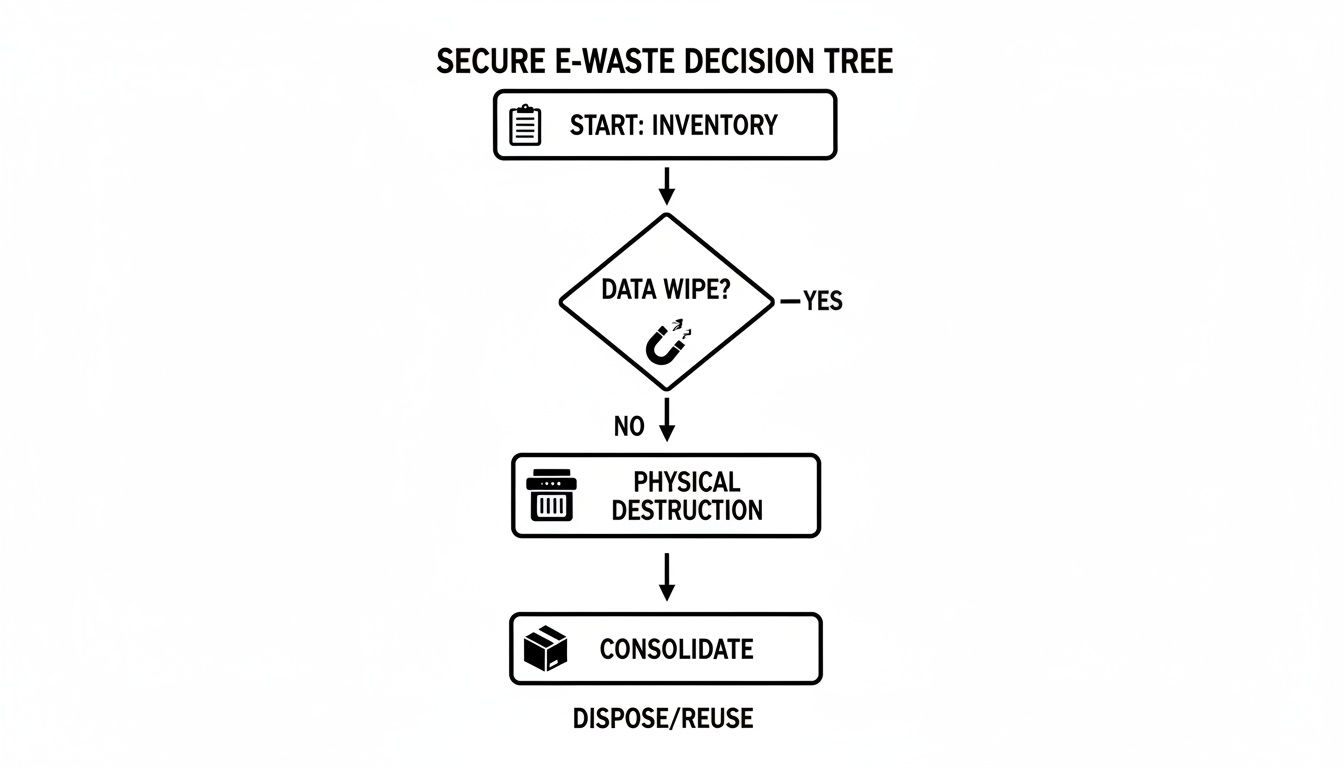
As you can see, there's a major fork in the road: wipe the data to preserve the hardware, or physically destroy the drive. That one decision shapes your entire asset disposition strategy.
The Gold Standard of Data Wiping
For most situations, professional data wiping is the way to go. It completely erases all information while leaving the hard drive intact, which is a huge plus if you want to resell the equipment. This process is worlds away from a standard format.
We use a method that follows the DoD 5220.22-M three-pass standard. Think of it as digitally sanding the drive down to a clean slate. This protocol overwrites every single sector of the drive with new data three separate times, making the original information practically impossible to retrieve.
Here's how it works:
- Pass 1: Writes a character (like a zero) across the entire drive.
- Pass 2: Writes the opposite character (a one) over everything again.
- Pass 3: Writes a final random character and then verifies the whole process was successful.
This is an incredibly effective technique that satisfies the strict data security rules for regulations like HIPAA and GLBA. Once we’re done, you get a serialized Certificate of Data Destruction. It's a clear, auditable paper trail proving that every drive was properly sanitized. Thinking about data security and privacy in phone repair and other contexts shows just how important these certified processes are across the board.
When to Physically Shred Your Hard Drives
Sometimes, wiping just isn't enough. For certain organizations or for hardware containing top-secret data, the only acceptable route is complete physical destruction. On-site hard drive shredding gives you the ultimate peace of mind because you can literally watch your sensitive devices get turned into a pile of mangled metal.
You should lean toward shredding in these scenarios:
- Maximum Security: If the drives hold invaluable intellectual property, classified information, or critical patient data, physical destruction leaves zero room for doubt.
- Strict Internal Policies: We work with companies whose internal governance policies demand physical destruction for all retired media, no matter what. It's just their rule.
- Non-Functional Drives: If a hard drive is dead, damaged, or simply won't power on, software wiping is off the table. Shredding is the only surefire way to destroy the data on these failed assets.
Choosing between wiping and shredding is a strategic risk management decision. Wiping preserves asset value and is highly secure, while shredding provides an irrefutable, visual confirmation that your data is gone forever.
At the end of the day, the best method is the one that aligns with your security protocols and asset management goals. To get a better feel for how these services work in practice, check out our full overview of IT asset destruction options.
Navigating Pickup and Drop-Off Logistics
Once you've got your IT assets inventoried and ready to go, the final piece of the puzzle is getting them from your office to the recycling facility. Really, your decision comes down to two things: how much gear you have and how much time your team can spare. Getting this right is what makes the final step of e-waste recycling in Tucker completely painless.
For smaller businesses with just a handful of items, dropping them off yourself is usually the simplest path forward. If you're a small law firm in Tucker retiring three old desktops and a printer, just swinging by a designated drop-off center is fast and efficient. You keep total control over the timing and don't have to coordinate with anyone else's schedule.
This DIY approach works best for organizations that have:
- A small volume of e-waste, usually less than 20 items.
- A vehicle and a way to safely transport the equipment.
- Staff who can handle the loading and unloading.
The Full-Service On-Site Removal Option
Now, for larger organizations or anyone dealing with bulky, heavy equipment, a full-service on-site removal is the only way to go. Think about a school system in Metro Atlanta decommissioning hundreds of computers over the summer—a professional pickup isn't just a nice-to-have, it's a must.
When you schedule an on-site pickup, a trained crew shows up at your location ready to handle everything. They do all the heavy lifting, safely packing and loading everything from massive server racks to pallets of old laptops onto their truck. This completely takes the risk of employee injury off the table and lets your staff get back to their real jobs instead of wrestling with old hardware.
A professional pickup service turns what could be a massive logistical headache into a simple, scheduled event. Your recycling partner takes full responsibility for the chain of custody from the moment the equipment leaves your door.
What to Expect During a Professional Pickup
A quality on-site removal is more than just a moving service. The crew will arrive prepared to audit and verify your equipment against the inventory list you created. This ensures every single item is accounted for before it leaves your property. This careful process establishes a secure chain of custody and is the first step in getting the certified documentation you'll need later.
This professional approach is a lifesaver for businesses with limited staff or those getting rid of a large volume of equipment at once. It saves you time, cuts down on physical and logistical risks, and guarantees your e-waste is handled securely from start to finish. If this sounds like the right path for your business, you can get all the details in our guide on arranging a free electronics recycling pickup.
Understanding the Financials of E-Waste Recycling

Many businesses look at their old IT equipment and just see a liability—a pile of junk that’s going to cost money to haul away. This mindset frames e-waste recycling in Tucker as another line item on a long list of expenses. But honestly, that’s a limited view that can leave real money on the table.
The truth is, responsible IT asset disposition (ITAD) has its own financial ecosystem. Some of your old gear really is just a recycling cost, but other pieces are genuine assets waiting to be monetized. Figuring out the difference is how you turn a potential expense into a check coming back to your company.
Unlocking Value from Your Retired IT Assets
Not all electronics are created equal, especially when it comes to resale value. A ten-year-old office printer? Probably not worth much. But newer, high-performance equipment can hold significant value on the secondary market. We see this all the time with enterprise-grade gear.
This often includes things like:
- Servers and Networking Gear: Components like RAM, CPUs, and enterprise-grade switches are consistently in demand.
- Newer Laptops and Desktops: Models just a few years old can almost always be refurbished and find a new home.
- Telecom Equipment: Business phone systems and related hardware are often snapped up by other organizations.
A smart recycling partner doesn’t just toss this equipment into a shredder. They test it, refurbish it, and find new buyers, offering you a cut of the profits. This process turns your decommissioned hardware into a revenue stream that can directly offset—or even exceed—any recycling costs you have. The entire process is about maximizing value, which we cover in our overview of IT asset disposition in Tucker, GA.
This isn't a small niche, either. The global market for e-waste recycling was valued at $70.1 billion in 2024 and is projected to hit a staggering $251.9 billion by 2034. That growth is fueled by the high demand for recovered materials and functional used parts, creating a huge opportunity for businesses like yours.
When Recycling Comes with a Cost
Of course, not every single item is going to generate a return. Older, broken, or obsolete electronics require careful, hands-on processing to be disposed of in an environmentally sound way. The fees tied to recycling these items cover the real-world costs of that labor-intensive work.
These costs typically come from:
- Labor: The manual effort it takes to dismantle equipment and separate plastics, metals, and circuit boards.
- Hazardous Material Handling: Safely removing and disposing of things like mercury from old monitors and lead from circuit boards.
- Logistics and Transportation: The expense of safely moving assets from your location to the processing facility.
Think of it like this: your high-value assets can effectively pay for the responsible disposal of the low-value ones. A transparent partner will give you a detailed report showing exactly what was sold, what was recycled, and the final net cost or payment to you.
Let's imagine a data center in Tucker is decommissioning a row of servers. The servers themselves are packed with valuable components and can be sold. At the same time, they've got a storage closet full of old keyboards, CRT monitors, and a rat's nest of cables. That stuff will have a recycling fee.
With a good value recovery program, the money from selling the servers can easily cover the disposal costs for the other items and still result in a net payment back to the data center. That’s how strategic e-waste recycling turns a headache into an asset.
Common Questions About E-Waste Recycling in Tucker
Even with a clear game plan, a few questions always pop up. It's only natural. Let's tackle some of the most common things we hear from businesses right here in Tucker, so you can move forward feeling completely confident.
What Types of Electronic Equipment Can My Business Recycle?
If it plugs into a wall and was part of your IT setup, there's a very good chance we can take it. Most professional IT recyclers are set up to handle the entire spectrum of business hardware.
Think about everything in your server room and on your employees' desks:
- The core stuff: Desktops, laptops, servers, and monitors (yes, even the old heavy CRT ones).
- Networking gear: Switches, routers, firewalls, and the server racks they live in.
- Office peripherals: Printers, scanners, keyboards, mice, and all those tangled cables.
- Communication equipment: Business phone systems, VoIP phones, and video conferencing units.
Now, things like the office microwave, refrigerators, loose batteries, or very specific medical devices usually fall outside the scope of what we do. But don't worry—a good recycling partner won't leave you hanging. We can almost always point you to a trusted specialist who handles those items.
How Can I Be Sure My Company Data Is Actually Destroyed?
This is the big one, and it should be. A reputable recycler will never make you guess. We provide certified, legally defensible proof that your data has been wiped clean, giving you a solid paper trail for any compliance audits down the road.
Your documentation is your proof of due diligence. A Certificate of Destruction isn't just a piece of paper; it's your official record demonstrating that you met your legal and ethical obligations to protect sensitive information.
For software-based data wiping, you should expect a serialized report. This document lists every single hard drive by its unique serial number and confirms that the multi-pass, DoD-standard erasure was a success.
If you choose physical destruction, you'll get a Certificate of Destruction. This is our formal attestation that your hard drives were physically shredded into tiny pieces, making the data on them permanently unrecoverable. No ifs, ands, or buts.
Are There Specific E-Waste Regulations in Georgia?
While Georgia doesn't have a statewide ban on businesses sending electronics to the landfill, that definitely doesn't mean you're in the clear. Federal laws are still very much in play, especially the Resource Conservation and Recovery Act (RCRA), which dictates how you handle hazardous materials—and e-waste is full of them.
For most businesses, though, the real teeth are in the data privacy laws. Regulations like HIPAA for healthcare and the Gramm-Leach-Bliley Act (GLBA) for finance have incredibly strict rules for protecting data on retired equipment. Honestly, partnering with a certified e-waste recycler is the simplest, most effective way to make sure you're ticking all the right boxes for both environmental and data security laws.
My Business Only Has a Few Items. Is It Still Worth It?
Absolutely. 100%. The security risk isn't about how many devices you have; it's about what's on them. A single old company laptop could be a goldmine of confidential client lists, financial records, or internal strategy documents.
Professional e-waste recycling in Tucker gives you access to certified data destruction for any number of items. That's a critical security measure you just don't get at a local municipal collection day. Many recyclers, including us, have easy drop-off options, making it simple and affordable for small businesses to handle their e-waste the right way, no matter the size of the pile.
Ready to put a secure and compliant e-waste strategy in place for your Tucker business? The team at Montclair Crew Recycling is here to help with certified data destruction, on-site pickups, and value recovery services. Contact us today to get started.
