
Before you can even think about selling or recycling a fleet of old computers, you’ve got to do a little homework. This isn't just about making a quick buck or clearing out a storage closet; it's a strategic move that involves company assets, sensitive data, and a surprising amount of logistics. For any business in the Metro Atlanta area, getting this first part right is the difference between a smooth process and a costly headache.
Laying the Groundwork for a Smart Sale
So, where do you start? The first and most critical step is figuring out what you actually want to achieve. It sounds obvious, but different organizations have wildly different priorities.
Are you laser-focused on squeezing every last dollar of resale value out of the equipment? Or, is your main concern making sure that every gigabyte of sensitive client data is wiped clean, no questions asked? Maybe your company has a strong ESG (environmental, social, and governance) policy, and your top priority is ensuring every component is ethically and sustainably recycled by a certified partner.
There's no wrong answer, but you need to have an answer. Deciding on your primary goal will shape every other decision you make down the line.
Create a Comprehensive IT Asset Inventory
You can't sell what you don't know you have. This means rolling up your sleeves and creating a detailed inventory list. A simple headcount of "50 old laptops" won't cut it. To get an accurate valuation and plan the logistics, you need specifics.
- Device Type: Is it a desktop, laptop, server, or maybe a networking switch?
- Brand and Model: Think a Dell Latitude 7420 or an Apple MacBook Pro (16-inch, M1 Pro). The details matter.
- Core Specifications: You'll want to note the CPU, the amount of RAM, and the storage size and type (e.g., 512GB SSD vs. a spinning hard drive).
- Age and Condition: When was it purchased? Are there cracked screens, missing keys, or other functional problems? If you're not sure about the age, our guide can show you how to find out how old your computer is.
To make this initial stage a bit easier, here’s a quick checklist to get you and your team on the same page.
Initial IT Asset Disposition Checklist
| Planning Step | Key Objective | Why It Matters for Your Business |
|---|---|---|
| Inventory Creation | Compile a detailed list of all assets, including specs, age, and condition. | This is the foundation for accurate valuation and helps determine the best disposition channel (resale vs. recycling). |
| Goal Definition | Decide if the priority is maximum financial return, data security, or environmental compliance. | This key decision guides your choice of partners and services, ensuring the outcome aligns with company policy. |
| Stakeholder Alignment | Identify and involve key decision-makers from IT, Finance, and Compliance. | Getting everyone on board early prevents delays and ensures all departmental requirements (e.g., security, financial reporting) are met. |
Following these simple planning steps sets you up for a much smoother and more successful project.
Identify Key Decision-Makers and Goals
With a solid inventory in hand, it's time to get the right people in a room (or on a video call). Who needs to sign off on this? Typically, it’s a team effort involving IT managers, the finance department, and maybe even your compliance officer.
A successful IT asset disposition (ITAD) project requires a unified vision. Establishing clear goals from the start—whether financial, security-focused, or environmental—prevents confusion and ensures the entire process aligns with your company's core objectives.
Getting everyone aligned avoids a situation where the IT team wants to use one vendor for security reasons while the finance team is pushing for another to maximize profit.
This simple flow chart really breaks it down.
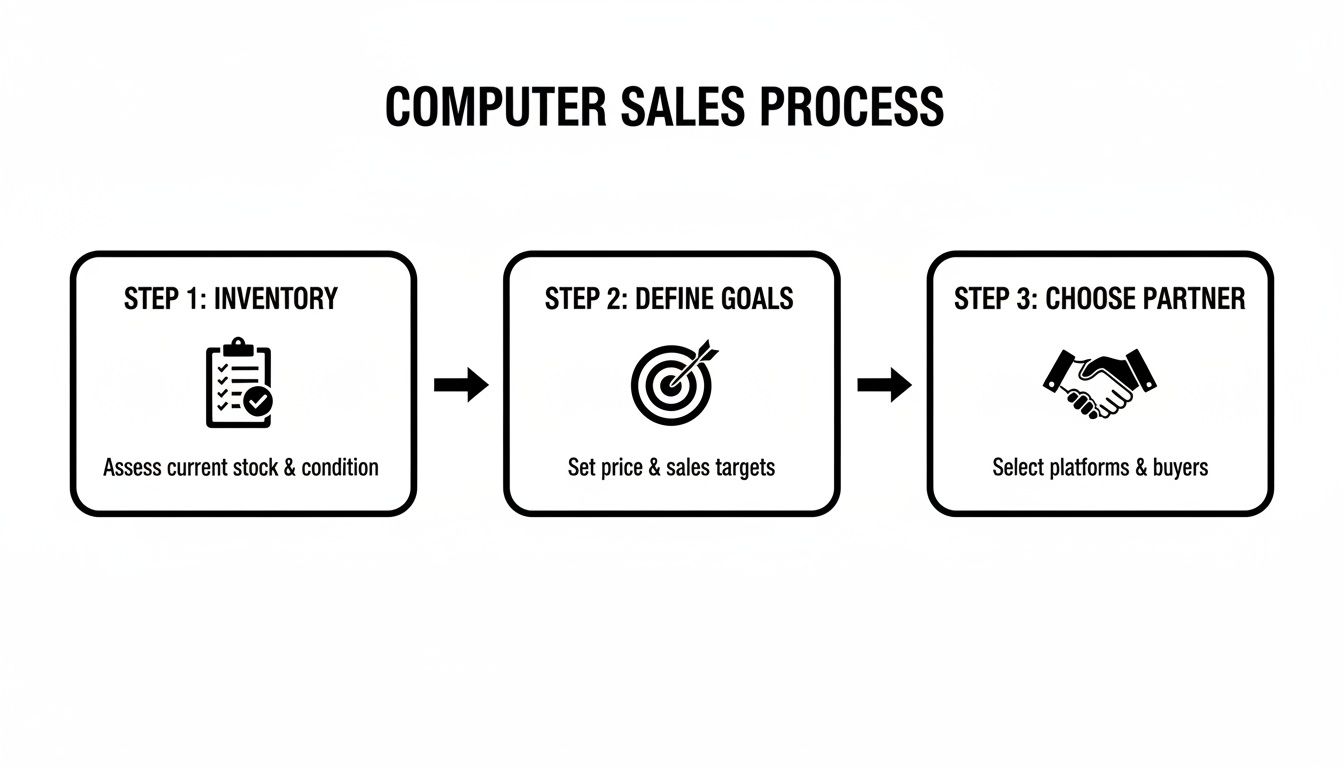
As you can see, these foundational steps have to happen in order. If you try to jump straight to choosing a partner without a clear inventory or agreed-upon goals, you’re basically flying blind. It’s nearly impossible to find the right fit if you haven't defined what you're looking for.
Securing Your Data Before It Leaves the Building
Before any computer walks out your door, there's one task that trumps all others: destroying the data on it. Permanently. And I don't mean just dragging a folder to the trash can. Even a standard hard drive "format" is nowhere near good enough.
Those simple actions just remove the signposts pointing to your data. The actual information—every last bit and byte—is still sitting right there, and it’s surprisingly easy to get back with basic recovery tools.
For a business, this isn't just a minor privacy concern; it's a massive liability. Just picture an old office PC showing up on a resale market with your customer lists, financial records, or internal strategy documents still on the drive. The damage from a breach like that could be catastrophic, easily wiping out any cash you'd make when you sell an old computer.
Understanding Data Wiping Methods
Real data security means overwriting every single piece of existing information with random characters, making the original files impossible to ever retrieve. It's a far more aggressive and thorough process than a simple delete.
- Standard Formatting: This is a quick process that basically tells the computer the drive is empty and ready for a new operating system. Think of it like ripping the table of contents out of a book but leaving all the pages behind.
- Secure Data Wiping: This is the real deal. Specialized software is used to write over every sector of the drive multiple times. A well-known benchmark is the DoD 5220.22-M standard, which uses a three-pass overwrite to make sure data is completely sanitized.
- Physical Destruction: When you need the highest level of security, or if a drive is dead and can't be wiped, nothing beats physical destruction. This means shredding the hard drive into tiny pieces that can never be reassembled.
The right method really depends on your industry's regulations and your own internal security standards. A design agency might be perfectly fine with a certified software wipe. A healthcare provider bound by HIPAA, on the other hand, should seriously consider physical destruction to guarantee compliance.
If you want to get into the nitty-gritty, we've put together a detailed guide on how to properly wipe a computer before recycling.
For businesses in regulated fields like finance or healthcare, a Certificate of Data Destruction isn't just a piece of paper—it's your legal proof of due diligence. Always insist on this from any ITAD partner you work with.
Verification and Peace of Mind
So, how do you actually know the job was done right? It all comes down to verification. A professional ITAD service, like what we provide here at Montclair Crew in Atlanta, gives you certified documentation. This paperwork lists the serial number of every single drive and confirms the exact method used for its destruction.
While your data is the top priority, it's also smart to think about physical security for the equipment itself. For a wider perspective, you can check out this ultimate guide to securing assets. Adopting this kind of security mindset is crucial when you're managing valuable equipment.
This diligence pays off for the environment, too. By 2025, global e-waste is expected to blow past 60 million metric tons, and old computers are a huge part of that mountain. What’s worse is that over 75% of this old equipment is handled improperly, polluting our environment. Responsible data destruction ensures that even if a device gets a second life through refurbishment, your sensitive information never will.
Getting an Accurate Value for Your Used IT Equipment
Figuring out what your old computers are actually worth is the first real step toward getting a good return. It's a bit of an art and a science, honestly. A few key details can swing the final price you get pretty dramatically, and setting realistic expectations from the start helps you negotiate better and avoid leaving cash on the table.
The value isn't just about how old a machine is; it's a specific formula based on its components, physical condition, and what the current market is demanding. While a five-year-old, entry-level desktop might not have much resale value, a three-year-old high-performance workstation or server could still be worth a good chunk of change.
The Key Factors Driving Resale Value
When we or any other partner assesses a device, several core attributes always come into play. Understanding these will give you a much clearer picture of why certain pieces of equipment hold their value so much better than others.
- Brand and Model: This is a big one. Well-known brands like Apple, Dell, and HP generally fetch higher prices because they have a reputation for reliability and parts are easy to find. A MacBook Pro, for instance, will hold its value far better than a lesser-known consumer brand laptop.
- Processor (CPU): The "brain" of the computer is a major value driver. A machine with a decent Intel Core i7 or an Apple M1 chip is going to be worth a lot more than something with an older Celeron or i3 processor.
- Memory (RAM): For most business uses, 16GB of RAM is the sweet spot right now. Computers with less might see their value dip, while those with 32GB or more are especially attractive to power users and developers.
- Storage Type and Size: A Solid State Drive (SSD) is the current standard, period. A computer with an SSD will always be valued higher than one with an old, slow Hard Disk Drive (HDD). The size—like 512GB or 1TB—also plays a huge role in the final number.
- Overall Condition: This covers both how it looks and how it works. Scratches, dents, broken keys, or a screen that's getting dim will all bring down the final offer.
If you're just looking to offload a single device, like a personal laptop, our guide on where to sell your laptop has more specific tips geared toward individual sellers.
A Real-World Valuation Example
Let's walk through a common scenario. Imagine your Atlanta office is upgrading a fleet of 50 Dell Latitude laptops. They're all three years old and have Intel Core i5 processors, 16GB of RAM, and 256GB SSDs. Cosmetically, they're in good shape with no major damage.
An ITAD specialist would immediately check the current secondary market prices for that exact model and configuration. Based on today's demand, they might find each unit has a fair market value of around $175. After they factor in their costs for secure data wiping, testing, and logistics, you'd likely get a bulk offer that reflects that per-unit value.
It's crucial to remember that some equipment holds surprising value. High-end servers, networking gear from brands like Cisco, or specialized workstations often have valuable components that can be resold, making profit-sharing arrangements with an ITAD vendor highly beneficial.
Don't just assume older means worthless. A proper, detailed assessment is the only way to know for sure what kind of financial return you can expect when you sell an old computer.
Alright, you've wiped your old computers and have a solid idea of what they're worth. Now for the big question: where do they go next?
This is a major fork in the road. The path you pick directly impacts how much cash you get back, how much time your team sinks into the project, and how well you're protected from compliance headaches.
For a business, this isn't as simple as posting an ad on Craigslist. You've really got three main routes to consider. The right choice depends entirely on what your company values most—squeezing every last dollar out of the hardware, guaranteeing total security, or just getting it done quickly and moving on.
The Direct Resale Route
Selling gear yourself on platforms like eBay or Facebook Marketplace can look pretty tempting. You cut out the middleman and set your own price, which seems like the best way to maximize profit. This can actually work if you only have a couple of high-value machines, maybe a newer MacBook Pro or a powerful workstation.
But this road is full of potholes, mostly in the form of time and risk. Suddenly, you're on the hook for everything:
- Crafting detailed listings with good photos for every single machine.
- Fielding a firehose of questions from potential buyers (and tire-kickers).
- Wading through lowball offers and spotting potential scammers.
- Packing and shipping each computer securely, one by one.
- Dealing with the inevitable returns or disputes when something goes wrong.
When you're trying to offload dozens—or hundreds—of computers, this DIY approach spirals into a logistical nightmare. It becomes a massive time-suck for your IT staff, pulling them away from their real jobs.
Working with a Professional ITAD Vendor
Here’s the alternative: partnering with an IT Asset Disposition (ITAD) expert like Montclair Crew. This is a completely different ballgame. It’s a secure, buttoned-up, and fully managed process designed specifically for businesses. Instead of juggling countless individual sales, the vendor takes the entire project off your plate in one clean transaction.
The biggest win with an ITAD partner is risk mitigation. A pro provides a documented chain of custody, certified data destruction, and compliant recycling. This shields your business from the very real threats of data breaches and environmental fines.
This is, hands down, the most efficient route for any significant volume of equipment. We handle the on-site pickup from your Atlanta-area office, give you certified data destruction reports for every single drive, and manage the resale or recycling of the whole lot. If you want to dig deeper into what makes a good partner, check out our guide on how to evaluate IT asset disposition companies.
The Profit-Sharing and Recycling Options
Have some high-value enterprise gear, like servers, storage arrays, or networking switches? A profit-sharing model can offer the best of both worlds. We tap into our established, high-end resale channels to get the best possible price for your equipment. Once it sells, we share the revenue with you. You get the financial upside of a direct sale combined with the security and sheer convenience of a professional service.
But what about the old stuff? The broken laptops, the obsolete desktops, the gear with zero resale value? That’s where certified, eco-friendly recycling is non-negotiable. The global electronics recycling market is on a tear, projected to hit USD 147.9 billion by 2035, but a shocking amount of e-waste still gets dumped in landfills.
Proper recycling ensures valuable materials are recovered and keeps you clear of hefty fines for improper disposal. It’s also a powerful way to boost your company’s green credentials. You can get more insights on the growing e-waste market from Fact.MR.
Comparing Disposal Options for Old Computers
Choosing the right path can be tough. This table breaks down the key differences between the three main approaches to help you decide what's best for your organization's specific needs.
| Disposal Method | Potential Return | Effort Required | Data Security | Best For |
|---|---|---|---|---|
| Direct Resale | Highest (in theory) | Very High | DIY – High Risk | Businesses with only 1-2 high-value, easy-to-sell items. |
| Trade-In Programs | Low (credit only) | Low | Varies – Moderate Risk | Quick credit toward new purchases from the same manufacturer. |
| Professional ITAD | Good to High | Very Low | Certified & Insured | Businesses with 10+ assets needing secure, compliant, and efficient disposal. |
Ultimately, the best choice balances your desired financial return against the labor and risk you're willing to take on. For most businesses, the security and efficiency of a professional ITAD service provide the most practical and responsible solution.
Finalizing the Logistics and Documentation
You’ve sorted, wiped, and valued your old computers, and you've picked the best way to get rid of them. Now it's time to handle the final—and arguably most critical—phase: getting the equipment out the door and getting the paperwork to prove you did it right. This is where your careful planning pays off.
For most businesses we work with in Metro Atlanta, this step involves scheduling an on-site pickup. A professional ITAD team doesn't just pull up a truck and start grabbing boxes. They'll come prepared to inventory every single asset against the list you’ve created, methodically packing everything onto pallets and loading it securely for the trip. It’s not just about moving hardware; it’s about maintaining a secure chain of custody from your facility to theirs.

The Paper Trail Is Non-Negotiable
Proper documentation is your best friend in this process. It’s your ultimate safeguard. Any reputable partner should provide a detailed chain of custody form, which is just a formal document that tracks who has your hardware from the moment it leaves your building. This paper trail is absolutely essential for internal audits and proves you’ve been diligent.
Just as critical is the Certificate of Data Destruction. This is the official proof that confirms every last hard drive was either wiped clean or physically shredded according to industry standards.
Don’t think of a Certificate of Data Destruction as a simple receipt. If your organization handles sensitive information under regulations like HIPAA or GDPR, this document is your verifiable proof of compliance. It can protect you from huge fines if an auditor ever comes knocking.
This paperwork gives you the peace of mind that your data security responsibilities have been fully met. You can dive deeper into what these certificates involve in our detailed guide on the Certificate of Destruction.
Closing the Loop on Payment and Shipping
If your old equipment still has some value, the final step is getting a settlement report. This report should clearly break down how much you received for each asset, list out any service fees, and show your final payment. Always take a few minutes to review it and make sure it matches up with the initial quote and your inventory list.
What if you're handling smaller sales directly? Shipping is now on your plate. After you've made a sale, you need to get the computer to its new home. It pays to look into the cheapest way to send a parcel to make sure shipping costs don't eat into your profit.
Nailing the logistics and documentation ensures the whole process ends on a professional, secure note. And it’s not just about protecting your business—it’s about protecting the planet. There’s an estimated $62.5 billion in recoverable metals locked away in global e-waste each year, but formal recycling rates are projected to fall to just 20% by 2030. Your responsible choices help capture that value and keep toxic materials out of landfills.
Common Questions About Selling Business Computers
Even with a solid plan, a few questions always pop up when it's time to sell old office computers. I've heard just about all of them from businesses across Atlanta. Let's tackle some of the most common ones to clear up any lingering doubts.
"Can I sell computers that are broken or really old?"
This is probably the number one question we get. The short answer is yes, but you have to shift your expectations. A five-year-old laptop with a cracked screen or a dead battery isn't going to fetch much on the resale market—its value as a working unit is likely zero.
But that doesn't mean it's worthless. Those devices are packed with components and raw materials that certified e-waste recyclers can recover. The "value" here isn't a cash payout. It's the peace of mind that comes from responsible, compliant disposal, which keeps hazardous e-waste out of landfills and protects your company from hefty fines.
"How long is this whole process going to take?"
From the initial phone call to the final check, the timeline can really vary. For something straightforward, like picking up 50 standard office laptops from a business in Marietta, it can be surprisingly quick. Once you give the green light on a quote, we can often schedule the on-site removal within a couple of business days.
After that, the back-end work—secure transport, certified data destruction, and auditing every asset—usually takes about one to two weeks. Now, if you're in a profit-sharing deal for high-value servers or specialized equipment, the final settlement might take a bit longer because it hinges on when that specific gear gets sold.
The biggest variable, honestly, is your own internal process. If you have your inventory list ready and the key decision-makers are all on the same page, you can easily cut the total project time in half.
"What paperwork do I absolutely need to have?"
When it's all said and done, there are two documents that are non-negotiable for protecting your business. Don't work with any vendor who can't provide them.
- Chain of Custody Record: This is the paper trail that tracks your equipment from the second it leaves your door. Think of it as a logbook proving you handed everything over to a specific vendor at a specific time. It’s crucial for your own internal audits and proves you did your due diligence.
- Certificate of Data Destruction: This is your golden ticket. It's the official, legally defensible proof that the data on every single drive was permanently wiped or destroyed according to industry standards. It should list each drive by serial number and detail the method used, whether it was a multi-pass software wipe or physical shredding.
Without these two pieces of paper, you’re leaving your organization wide open to some serious compliance risks.
"Can't we just wipe the drives ourselves?"
Technically, sure, your IT team could wipe the drives in-house. But for a business, this creates a couple of big problems. First, it’s incredibly time-consuming and pulls your best technical people away from their real jobs—the stuff that actually makes your company money.
More importantly, using a professional ITAD service gives you third-party validation and transfers the liability. The certified reports we issue are what hold up under the scrutiny of a HIPAA or GDPR audit. If you do it yourself, all the liability stays with you. If a single drive gets missed or the process isn't documented perfectly, the fallout lands squarely on your shoulders. When you need to sell an old computer, think of certified data destruction as your best insurance policy.
Ready to turn your old IT assets into a secure, streamlined, and profitable process? Montclair Crew Recycling offers end-to-end ITAD solutions for businesses across Metro Atlanta, from secure on-site removal to certified data destruction. Contact us today for a hassle-free quote.
