
When you're searching for a local solution to "disposing of computers near me," a couple of things probably jump to mind right away: data security and responsible handling. For any business in Atlanta, that means starting with a full data backup and then moving on to certified data sanitization. It's the only way to completely remove the risk of a data breach.
Your First Steps For Computer Disposal In Atlanta
So, your Atlanta business needs to get rid of a pile of old computers. The big question is, "Where do I even start?" Let's ditch the confusion and lay out a clear, actionable plan that puts your security front and center. Before a single piece of hardware leaves your office, the absolute priority is protecting your company's most valuable asset: its data.
The very first, non-negotiable step is to perform a complete and verified backup of all essential information. This is your safety net, ensuring business continuity and preventing the accidental loss of critical client records, financial data, or internal files. Once you're confident those backups are secure, the focus shifts to making sure the old data is gone for good.
Prioritizing Secure Data Sanitization
Heads up: just deleting files or reformatting a hard drive is a massive security risk. Those methods leave your data wide open to being recovered with simple, widely available software tools. For a healthcare provider in Marietta or a financial firm in Buckhead, that kind of exposure is a non-starter.
This is precisely why certified data sanitization is so important. Methods like the DoD 5220.22-M three-pass wipe are specifically designed to overwrite every single sector of a hard drive multiple times. It makes the original data completely unrecoverable. Think of it as the gold standard for protecting your business from a breach and staying on the right side of privacy laws.
For any organization handling sensitive information—from customer lists to patient records—certified data destruction isn't just a best practice; it's a fundamental requirement for risk management. Failing to properly sanitize drives before disposal can lead to severe financial penalties and irreparable brand damage.
Before you start disposing of old computers, it's crucial to have a clear plan. This checklist breaks down the essential first steps for any Atlanta business.
Initial Computer Disposal Checklist for Atlanta Businesses
| Action Item | Why It Matters | Local Solution (Montclair Crew) |
|---|---|---|
| Inventory All Assets | You can't secure what you don't know you have. An accurate list is key for tracking and auditing. | We provide detailed asset audits and inventory reports for complete transparency. |
| Complete & Verify Backups | This is your safety net. Ensures no critical company or client data is lost in the transition. | While you handle backups, we prepare for the secure transition of the physical assets. |
| Schedule Data Destruction | Prevents sensitive data from being recovered off discarded drives, protecting you from breaches. | Our on-site or off-site services include DoD 5220.22-M wiping and physical shredding. |
| Confirm Compliance Needs | Industries like healthcare (HIPAA) and finance have strict data disposal requirements. | We provide Certificates of Data Destruction to help you meet and document compliance. |
Following these initial steps sets you up for a smooth, secure, and compliant disposal process from start to finish.
Setting The Stage For A Compliant Process
A secure, compliant disposal project begins long before any equipment is wheeled out your door. By prioritizing backups and insisting on certified data wiping, you're building a strong foundation for the entire process. This is what sets the stage for a smooth handover to a trusted partner.
For businesses all across the metro area, understanding the rules of electronics recycling in Georgia is the key to a responsible and legally sound approach. The right local Atlanta services make this critical first phase totally manageable, ensuring your data is protected from the get-go.
Getting Your Computers Ready for a Secure and Responsible Hand-Off
Once you’ve got your critical data backed up, the next stage is all about security and having a solid inventory. Before a single computer leaves your building, you need to know exactly what you have and be 100% certain its data is gone for good. Think of this prep work as the foundation of any smart IT asset disposition (ITAD) plan.
It all kicks off with a detailed asset list. This isn't just about ticking boxes; it's essential for your internal audits, getting an accurate quote for disposal, and keeping a clean chain of custody.
Picture a healthcare provider in Marietta getting rid of old PCs without tracking them by serial number. If just one device with patient records gets lost, the HIPAA compliance nightmare could be devastating.
Just Hitting ‘Delete’ Isn’t Enough—Not Even Close
One of the most dangerous myths in IT is that deleting files or formatting a hard drive actually erases the data. It doesn't. All you're doing is removing the pointers to the data, leaving the information itself behind and easily recoverable with off-the-shelf software. For any business handling sensitive info—from client lists to financial records—that’s a risk you just can't take.
This is where professional data sanitization comes in. It’s a systematic process of overwriting every last bit of data on a drive so it can never be recovered.
- DoD 5220.22-M Wipe: This is the Department of Defense standard. It uses a three-pass overwrite method that makes data completely unrecoverable. It's the go-to for securing sensitive, non-classified information.
- Physical Destruction: For the absolute highest level of security, or for drives that are too old or damaged to be wiped, physical destruction is the only solution. When you're prepping computers, you have to be sure the data is destroyed. Using industrial physical shredders guarantees nothing can ever be pieced back together.
If you’re in a regulated field like finance or healthcare, using certified data wiping methods isn't just a good practice—it’s a non-negotiable requirement to protect your reputation and sidestep massive fines.
Building a Disposal Process That’s Secure and Compliant
The infographic below breaks down the simple but vital workflow for getting rid of computers the right way.
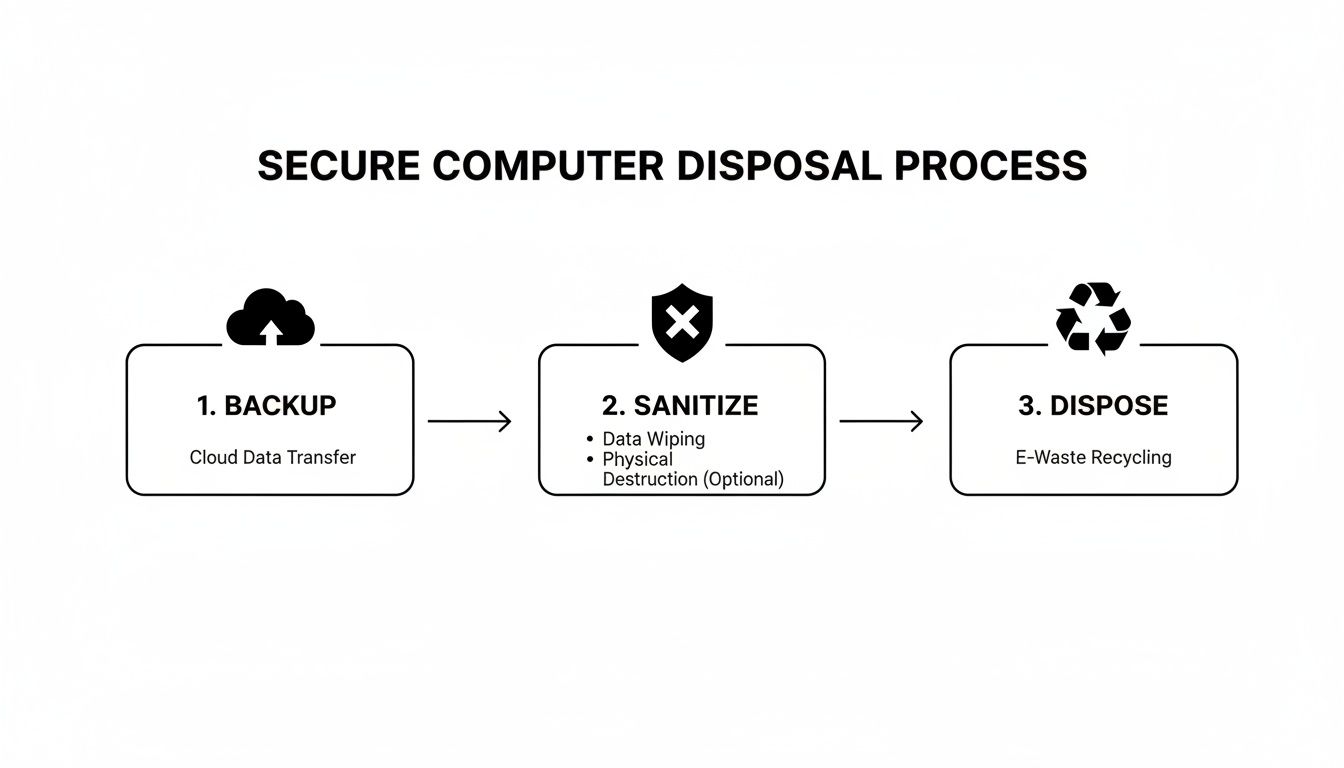
As you can see, secure sanitization is the critical step connecting your data protection efforts to environmentally sound recycling. Here at Montclair Crew, our services are designed around this exact process, which is why we offer free DoD-compliant wiping for every single asset we process. For a deeper look at the technical side of things, check out our guide on how to wipe a computer before recycling.
Your responsibility for the data doesn’t end when the truck pulls away from your loading dock. It ends when you have a Certificate of Data Destruction in hand, proving every drive was verifiably sanitized or destroyed according to industry best practices.
Getting your equipment ready is also about being a good environmental steward. We’re dealing with a massive e-waste problem, with global generation expected to top 60 million metric tons a year. What’s worse, only 22.3% of that e-waste is properly collected and recycled. The rest is often mishandled, releasing toxic materials into our soil and water. Proper preparation ensures your old tech enters a certified recycling stream instead of ending up in a landfill.
Choosing Drop-Off vs. On-Site Pickup Services

Alright, so your equipment is backed up, wiped clean, and ready for its next chapter. Now you've hit a fork in the road: how do you physically get everything from your office to the recycling facility?
You're basically choosing between dropping it off yourself or scheduling a professional pickup. This decision really boils down to convenience versus cost, and what makes sense for you depends entirely on the scale of your project.
When a Quick Drop-Off Makes Sense
For many smaller businesses, the choice is pretty clear. If you’re a small CPA firm in Smyrna with a handful of old desktops to retire, loading them into a car and swinging by a drop-off center is easily the most practical route.
You get it done on your own time, avoid any service fees, and it’s a straightforward solution for a low volume of equipment. No need to overcomplicate things.
Why On-Site Pickup Is a Game-Changer for Bigger Jobs
But what if you're not dealing with just a few desktops? Picture a data center in Alpharetta decommissioning two full racks of servers. The sheer weight and volume make trying to haul it yourself a non-starter.
In scenarios like that, on-site removal isn't a luxury; it's a necessity. This is where having a professional crew comes in clutch. They’ll handle the heavy lifting, bring the right tools like pallet jacks and wrap, and get dozens of bulky assets out of your way without disrupting your team.
A professional pickup service also establishes a secure chain of custody right from your doorstep. This is huge for companies with sensitive equipment or those that just don't have the staff to manage a big move.
Comparing Drop-Off vs. On-Site Computer Disposal Services
To make the decision easier, we've broken down the key factors that Atlanta businesses should consider when choosing between a DIY drop-off and a full-service pickup.
| Factor | Best for Drop-Off | Best for On-Site Pickup |
|---|---|---|
| Volume of Equipment | A few items (1-15 PCs, laptops, monitors) | Large quantities (20+ assets), server racks, bulky items |
| Budget | No service fees; only cost is your time and fuel | Service fees may apply, but saves significant staff time |
| Convenience | Works on your schedule, but requires your labor | Completely hands-off; crew handles all lifting and logistics |
| Security & Compliance | You are responsible for chain of custody until drop-off | Secure, documented chain of custody from your door |
| Staff Resources | You have the staff and vehicles to transport items safely | Limited staff, or you want your team focused on core tasks |
| Special Services | Not applicable | Asset tagging, on-site shredding, and detailed audits available |
Ultimately, the right choice isn’t about which option is universally "better," but which one fits your organization’s volume, budget, and security needs.
More Than Just a Truck: The Perks of Professional On-Site Service
For larger projects, a good on-site service is about more than just transportation. It’s an extension of your IT and compliance team, offering critical services that protect your business.
- Serialized Asset Auditing: Before anything is loaded, technicians can inventory every single device by serial number. This gives you a rock-solid audit trail for your records.
- Secure Transport: Your assets travel in locked, GPS-tracked vehicles, maintaining that crucial chain of custody that regulators and clients expect.
- On-Site Data Destruction: For ultimate peace of mind, we can bring a mobile shredder to you. You can literally watch your hard drives get physically destroyed before they even leave your property.
Whether you have a carload or a truckload, the goal is to make the process simple and secure. We offer a convenient drop-off location in Smyrna for smaller jobs. For everything else, our on-site electronics recycling pickup services cover the entire Atlanta metro area, giving you a flexible solution that fits your exact situation.
Verifying Data Destruction and Environmental Compliance
Handing over your old computers isn't the end of the line—it's just the beginning of your vendor's responsibility. Your liability for that equipment doesn't just vanish. It stays with you until you have solid proof that every last bit of data has been destroyed and the hardware was recycled according to state and federal laws.
This is the verification stage, and it’s what separates a professional IT asset disposition (ITAD) service from a simple e-waste drop-off.
Without that official documentation, you're just operating on trust. That’s a massive gamble when you’re dealing with sensitive client information, financial records, or your own company’s private data.
The Role of a Certificate of Data Destruction
The single most important piece of paper you’ll get in this entire process is a Certificate of Data Destruction. Think of it as more than just a receipt. It’s a legally binding record confirming your data was permanently wiped clean, often following specific industry standards like the DoD 5220.22-M method.
This certificate is your official proof of due diligence. It’s what protects your business from liability if you ever face an audit or legal questions, proving you took all the necessary steps to secure your information. You can learn more about the Certificate of Destruction to see why it's the foundation of any compliant disposal program.
A Certificate of Data Destruction is more than paperwork. It’s your legal shield, transferring the liability for data security from your organization to your certified ITAD partner.
For companies that need the highest level of assurance, seeing is believing. This is where a service like on-site hard drive shredding becomes invaluable. We can bring a mobile shredding truck right to your facility, letting you watch your hard drives and other media get physically destroyed before they ever leave your property. It provides undeniable peace of mind.
Ensuring True Environmental Compliance
Verification isn’t just about data—it's also about making sure your old equipment doesn't end up poisoning the environment. Computers and other IT gear are a massive part of the global e-waste problem, which is growing faster than anyone can keep up with.
Small IT and telecom devices, including the laptops and servers you're getting rid of, add millions of metric tons to this problem. Shockingly, they have a documented recycling rate of just 22%.
Making matters worse, in 2022, an estimated 5.1 million tons of e-waste were illegally shipped from high-income to low-income countries, creating toxic dumpsites. Businesses that don't use proper recycling channels are part of this problem and face growing risks of fines under new environmental laws.
A partner who is truly compliant will give you transparent reporting that shows where every single component goes. This process ensures hazardous materials like lead and mercury are handled safely while valuable materials are recovered and put back into the supply chain. A great way to ensure this is by working with partners who adhere to established frameworks like environmental management systems (EMS). A commitment to a zero-landfill policy isn't just a talking point; it's the mark of a truly responsible recycler.
Unlocking Hidden Value from Your Old IT Assets
When you're staring down a pile of old computers, it's easy to see the whole process as just another expense. But for a lot of companies, that old gear is actually a hidden source of revenue. If you shift your thinking from "disposal" to "value recovery," you can completely flip the script on your next IT refresh.
Look, not every piece of retired equipment is headed for the shredder. Far from it. Enterprise-grade assets like servers, networking gear, and even recent-model corporate laptops often have plenty of life left in them and command real value on the secondary market. Those three-year-old servers or last year's fleet of laptops? They're valuable commodities.
Turning Outdated Tech into Revenue
This is where IT asset resale and profit-sharing programs make all the difference. Instead of you trying to figure it all out, a specialized partner can step in, assess your entire inventory, and pinpoint exactly what has resale potential. They handle the whole process of refurbishing and selling it for you, turning what was once a logistical headache into a nice check.
The process is pretty straightforward:
- Detailed Asset Audit: Your partner inventories every single item, noting its condition, specs, and what it's worth on the market today.
- Secure Refurbishment: After all data is professionally destroyed, the good stuff gets tested, cleaned up, and prepped for resale to get the best possible price.
- Strategic Resale: Using their established sales channels, they find buyers who are actively looking for quality used hardware.
This whole approach is riding a massive wave toward a circular economy. The global e-waste management market is on track to hit $81.27 billion, and a big part of that is the growing focus on refurbishing and reselling electronics. When you participate, you're not just making money—you're getting in line with a major sustainability movement. You can discover more insights about the circular economy on ewastemonitor.info.
A Real-World Example in Roswell
Let's imagine a corporation in Roswell is upgrading its data center. They've got dozens of high-performance servers that are being replaced but are still perfectly good machines. Instead of just paying to have them hauled away and recycled, they opt for a profit-sharing deal.
The partner takes care of all the secure logistics, data wiping, and remarketing of those servers. Once the equipment sells, the Roswell company gets a significant cut of the proceeds. That check more than covers the recycling costs for the junk and actually puts them in the black.
Suddenly, their IT refresh cycle isn't a capital expense anymore; it's a financially positive event.
For any business looking for help with electronics recycling in Atlanta, exploring value recovery is a no-brainer. A well-run profit-sharing plan means that disposing of computers near you isn't just secure and compliant—it's also profitable.
Your Top Questions About Computer Disposal in Atlanta
When you start digging into "disposing of computers near me," a lot of questions pop up pretty quickly. Atlanta businesses need straight answers to make sure they're handling old IT gear the right way—securely, affordably, and legally. We've pulled together the most common questions we get from local companies to give you the clarity you need.
These aren't textbook answers; they come from years of hands-on experience helping businesses just like yours navigate the tricky world of IT asset disposition.
Is It Safe to Drop Off Company Computers at Any Recycling Center?
The short answer is a hard no. In fact, it's a massive security risk. Your average public recycling center is fine for a toaster oven, but they just aren't set up for the data security that business equipment demands. Dropping off computers there leaves everything from client lists to financial records wide open for anyone to find.
You absolutely need to work with a specialized IT Asset Disposition (ITAD) company. They should provide a Certificate of Data Destruction and follow strict data wiping standards like DoD 5220.22-M. This certificate is your official proof that the data is gone for good, keeping you compliant with privacy laws like HIPAA or FACTA. It’s the only way to be sure.
What if My Business Has Specialized Equipment You Don’t Handle?
That’s a great question, and it comes up more often than you'd think. We handle a huge range of standard business IT assets—servers, laptops, networking gear, you name it. But sometimes a company has something unique, like custom lab machinery or specific medical devices.
When we run into those situations, we tap into our network of trusted local partners. We find someone who specializes in that exact type of equipment and coordinate with them to make sure it's handled properly. Our goal is to give you a complete, one-stop solution, even if that means bringing in a specialist to get the job done right.
How Much Does It Cost to Dispose of Our Office Computers?
It really depends. The final cost is based on what kind of gear you have, how much of it there is, and whether you want to drop it off or have us come to you for a full-service pickup. The good news is that critical services, like our DoD-compliant data wiping, are often included for free as part of our standard process.
For businesses with newer or high-value assets—think enterprise-grade servers or recent laptop models—our profit-sharing program can often cover the costs entirely. Sometimes, it can even put money back in your pocket. It’s a smart way to turn old equipment from a liability into a revenue stream.
The best way to know for sure is to ask for a custom quote. We’ll look at your specific inventory and give you a clear, transparent breakdown of any costs and potential returns. No surprises.
My Business Is in Kennesaw. Do You Service Our Area?
Absolutely. Our on-site IT asset removal services cover the entire Metro Atlanta area. We’re regularly out in Kennesaw, Marietta, Roswell, Alpharetta, and all the surrounding communities. Whether you're a small office or a sprawling corporate campus, we've got you covered.
And if you have a smaller batch of equipment and prefer to handle the transport yourself, our drop-off center in Smyrna is always an option. We try to be as flexible as possible to fit what works best for your business.
Ready to handle your old IT equipment with confidence? The team at Montclair Crew Recycling is here to help with certified data destruction, responsible recycling, and value recovery services. Learn how we make disposing of computers in Atlanta simple and secure by visiting us at https://www.montclaircrew.com.
